
Glossary
Business Process Management Software
 ChatGPT
 Perplexity
 Gemini
 Claude
What is business process management software?
Business process management software is a tool for designing, running, monitoring, and improving the processes a business depends on. It maps how work should move across people, systems, approvals, and handoffs, then gives managers a way to standardize or automate that flow.1
The word doing the heavy lifting there is management. BPM software is not just a place to write down instructions. It exists for processes that need coordination, visibility, rules, routing, measurement, or automation across more than one person or system. If your process fits comfortably on a checklist, you can probably skip it.
What business process management software actually does
BPM software takes a process that lives mostly in people's heads and turns it into something a team can see, control, and improve. For a small team, that might be a simple workflow map. For a large organization, it might be a governed system where requests get routed, approvals get tracked, tasks get assigned, and someone can finally answer the question where is this stuck?
Take customer refunds. Without BPM software, that process often lives across a support ticket, a Slack thread, a billing tool, and someone's memory. A support rep checks eligibility, a manager approves the exception, finance confirms the refund, and the customer gets a response. At low volume, people muscle through. As volume grows, the same process starts leaking. Approvals get missed, customers wait longer than they should, and nobody can say where any given request is sitting.
A BPM platform models that process, assigns each step to the right owner, enforces the required approvals, connects to the systems involved, and shows where work is slowing down. It will not fix a bad process. It will make the process visible enough that you can.
Most BPM tools offer some combination of the following:
- Process modeling or mapping2
- Workflow routing and task assignment
- Rules for approvals, exceptions, and handoffs
- Forms or intake requests
- Automation across business systems
- Dashboards for status, bottlenecks, and cycle time
- Versioning, permissions, and governance for critical workflows
When BPM software is worth it
BPM software earns its keep when a process is repeatable, crosses team boundaries, and matters enough to manage on purpose. It is the right call when you have outgrown a checklist but want something more deliberate than another spreadsheet.
Good candidates include employee onboarding, procurement approvals, customer issue escalation, compliance reviews, claims handling, change requests, and finance approvals. Basically, any workflow where multiple teams have to move work through a defined path.
Here is a simple test. If the pain is people do not know what to do, start with documentation or training. If the pain is work is not moving through the right path, BPM software is worth a look.
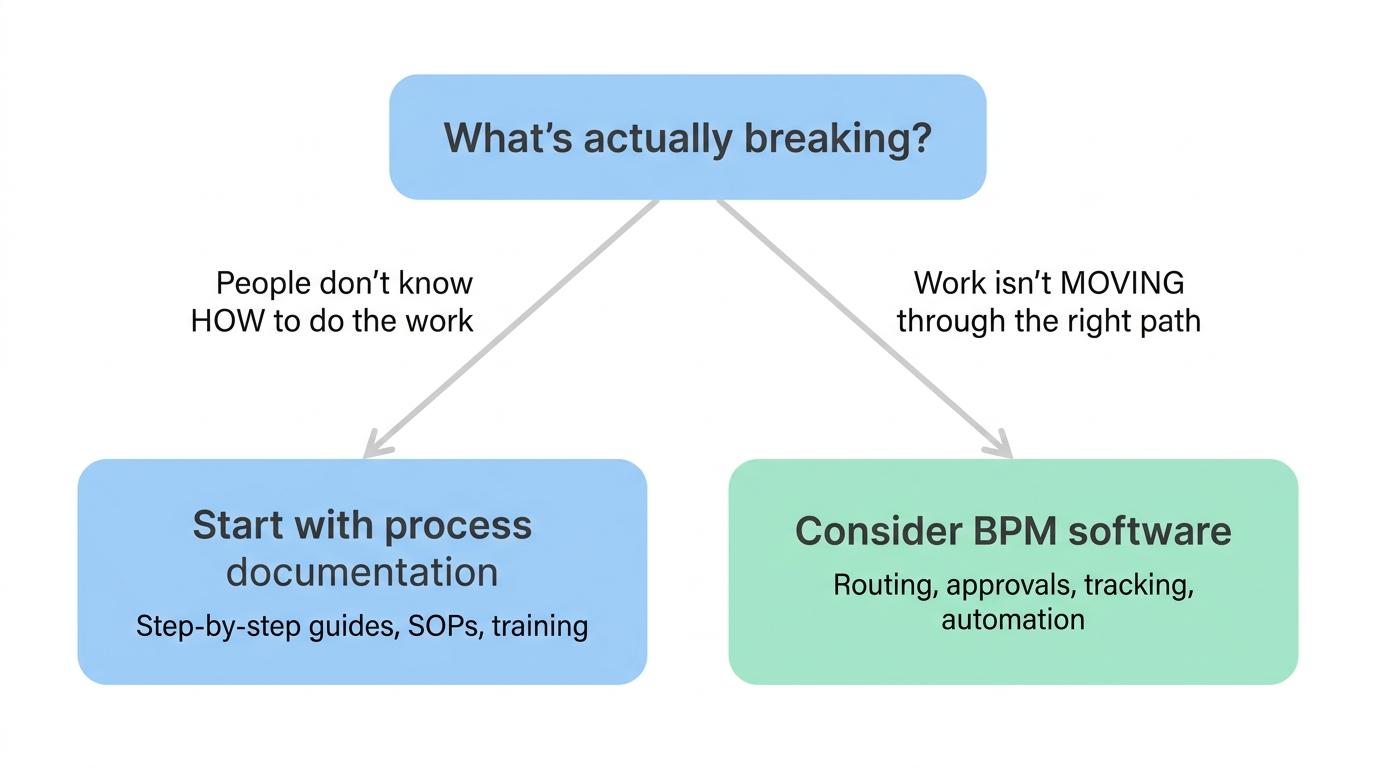
That distinction matters more than it sounds. Plenty of teams buy process tools before they have agreed on the process. Software can enforce a workflow, but it cannot tell you whether the workflow makes sense. If your process is unclear, outdated, or padded with approvals nobody can justify, BPM software will just make the mess official.3
How to choose business process management software
Start with one process, not a platform wish list. Pick a workflow that is painful enough to justify the change and specific enough to model clearly. A vague goal like improve operations will make every BPM product look plausible. A concrete one, like route customer refund requests from support to finance with manager approval, gives you something you can actually test.4
Questions worth asking during evaluation:
- Can the people who own the process understand and maintain it without an engineer on call?
- Does the tool handle the approvals, exceptions, and handoffs your process actually has?
- Can it connect to the systems where the work already happens?
- Does it surface bottlenecks, status, and cycle time clearly?
- Can the team document what the process means, not just configure its logic?
- Are the permissions and audit controls appropriate for the sensitivity of the work?
- Will it still feel usable when one process becomes ten?
The best BPM rollouts start boring. One workflow, clear owners, measured outcomes, and a plan for maintenance. Grand transformation programs look better in a slide deck, but small processes are where you find out whether the whole thing actually holds.
A useful example: employee onboarding
Employee onboarding is a good test case because it crosses teams almost immediately. HR collects information, IT provisions accounts, the hiring manager preps role-specific materials, finance may handle payroll setup, and the new hire needs a clear path through the first days.
In BPM software, the process might kick off from an approved hire record. The system creates tasks for HR, IT, and the manager; routes exceptions when equipment is delayed; tracks whether required steps are done; and shows the onboarding owner exactly where each new hire stands.
The process still needs documentation, though. Someone has to explain how to complete each task, what good looks like, and what to do when something goes sideways. BPM software moves the work. People still need usable guidance at the point of work.
How Trails helps
Trails is not a full business process management platform, and that is deliberate. BPM software manages live workflows. Trails creates the documentation that helps people perform those workflows correctly.
With Trails, a team member performs a workflow once and captures it as they go. Trails turns that capture into a polished step-by-step guide, and it can also produce an AI-narrated video version for training or sharing. For teams rolling out BPM software, that documentation layer covers the human steps around the configured workflow: how to review an approval, handle an exception, update a record, or finish a task in another system.
FAQ
Is business process management software the same as workflow automation?
No. Workflow automation focuses on triggering actions or moving data between tools. BPM software is broader. It helps teams model, route, monitor, govern, and improve an entire repeatable process.
Do small teams need BPM software?
Sometimes, but most small teams should start with clear documentation, simple task tracking, or lightweight automation. BPM software starts to make sense when a process crosses roles, needs approvals, or generates enough volume that manual coordination is breaking down.
What is the difference between BPM software and process documentation software?
BPM software manages how work moves through a process. Process documentation software explains how people complete the steps inside it. The two work well together, but they solve different problems.
What should a team document before implementing BPM software?
The current process, the desired process, owners, handoffs, exceptions, approval rules, the systems involved, and the outcome the process should produce. That groundwork gives the implementation a practical foundation instead of turning configuration into guesswork.
Comparing tools? See the process documentation software comparison.
Sources
- 1
International Organization for Standardization. The process approach in ISO 9001:2015. ISO. www.iso.org/iso/iso9001_2015_process_approach.pdf. Accessed June 16, 2026.
- 2
Object Management Group. Business Process Model and Notation. Object Management Group. www.omg.org/bpmn/. Accessed June 16, 2026.
- 3
Peter Trkman. The critical success factors of business process management. Information & Management, 2010. ideas.repec.org/a/eee/ininma/v30y2010i2p125-134.html. Accessed June 16, 2026.
- 4
Agency for Healthcare Research and Quality. Clinical Practice Improvement and Redesign. AHRQ. digital.ahrq.gov/key-topics/clinical-decision-support/clinical-practice-improvement-and-redesign-how-change-workflow-can-be-supported-clinical-decision. Accessed June 16, 2026.