
Glossary
Process Mining
 ChatGPT
 Perplexity
 Gemini
 Claude
What is process mining?
Process mining is a data-driven way to understand how a business process actually runs by analyzing event logs from the systems where work happens. Instead of relying only on interviews, workshops, or process diagrams, process mining reconstructs real process paths from timestamped activity data.1
It is most useful when a process leaves a digital trail in tools such as ERP, CRM, ticketing, procurement, billing, workflow, or case-management systems. The practical value is seeing where the lived process differs from the designed process, then deciding what should change.
How process mining works
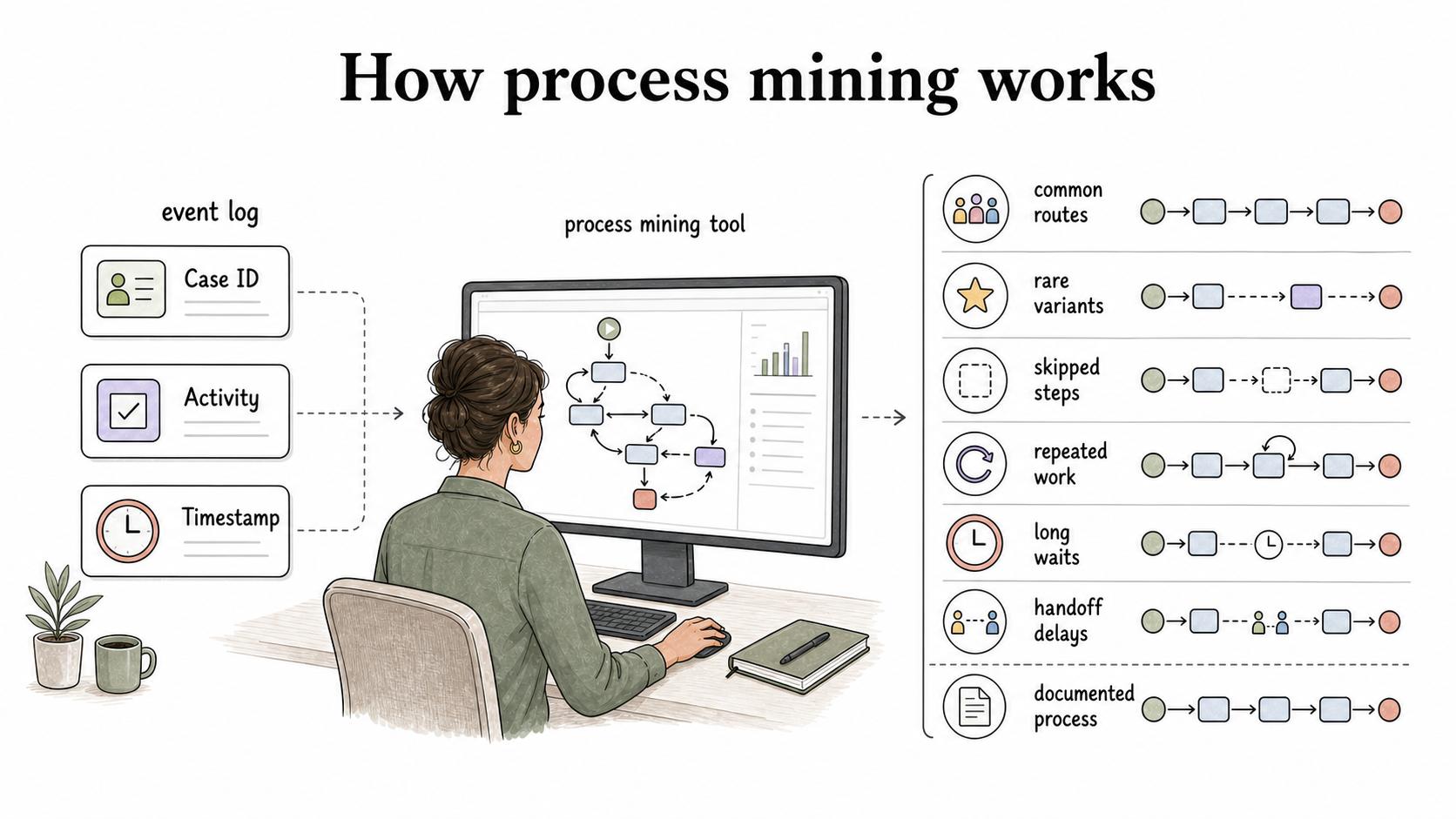
Process mining starts with event data. A usable event log usually needs three core fields:2
- Case ID: the item moving through the process, such as an invoice, support ticket, order, claim, or customer request.
- Activity: the step that happened, such as submitted, reviewed, approved, escalated, rejected, fulfilled, or closed.
- Timestamp: when the activity happened.
With those fields, a process mining tool can reconstruct paths through the process. It can show common routes, rare variants, skipped steps, repeated work, long waits, handoff delays, and places where the real process does not match the documented one.
The most valuable output is often the exception pattern. A team may believe invoices follow a simple submit-review-approve-pay sequence, but process mining might show that high-value invoices loop through extra approvals, sit idle after vendor corrections, or bypass a control when a field is missing.3
What process mining helps teams find
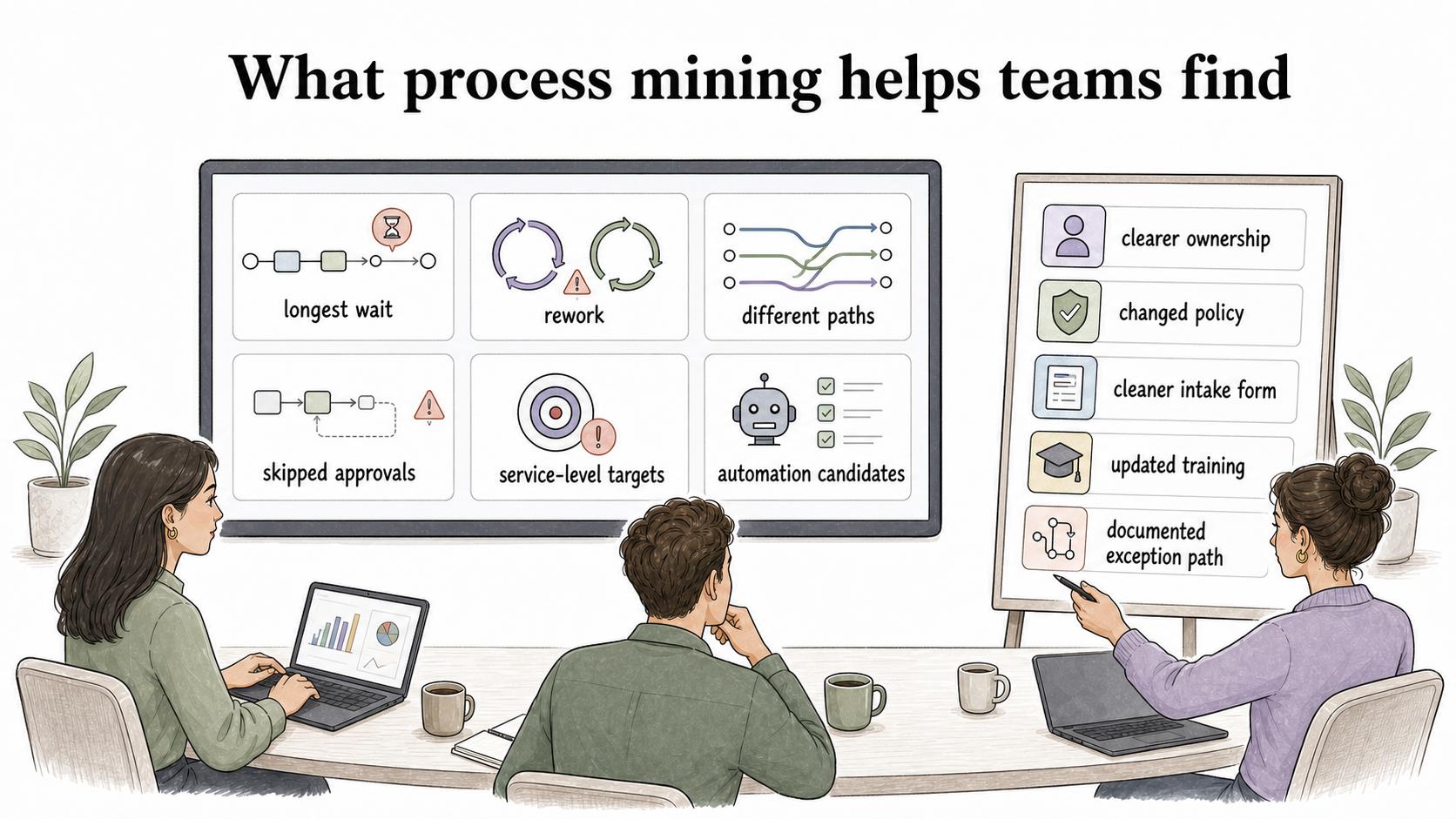
Process mining works best when the question is specific. It can help answer:
- Where does work wait the longest?
- Which process variants produce the most rework?
- Which teams, regions, queues, or customer segments follow different paths?
- Which approvals are skipped, repeated, or added late?
- Which cases miss service-level targets, and what happened before they missed them?
- Which automation candidates are frequent, rule-based, and stable enough to improve?
That last point matters. Process mining often gets marketed as an automation discovery method, but automation is only one possible outcome. Sometimes the better fix is clearer ownership, a changed policy, a cleaner intake form, updated training, or a documented exception path.
Process mining vs. process mapping
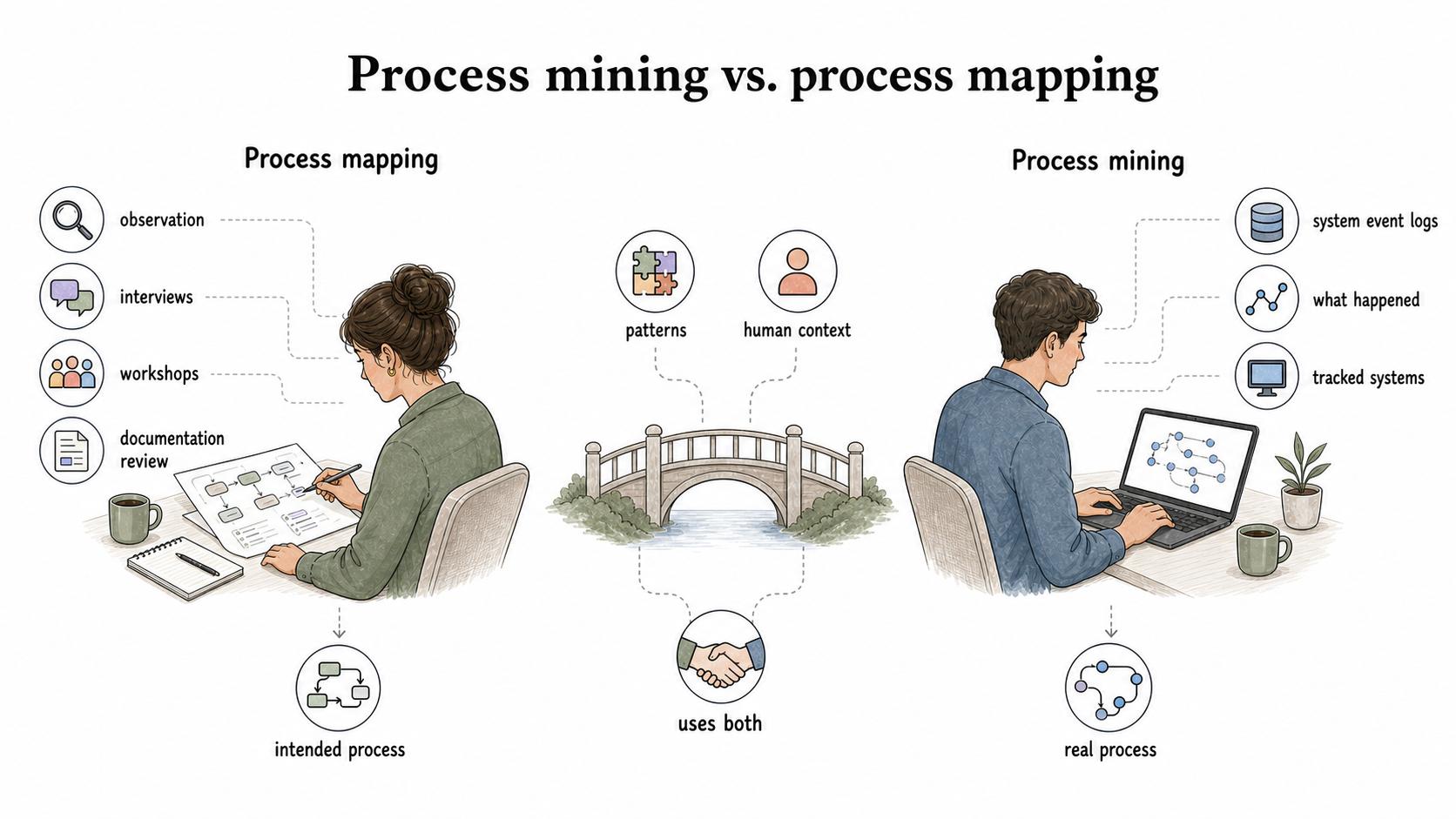
Process mining and process mapping both help teams understand workflows, but they use different evidence.
Process mapping is usually created through observation, interviews, workshops, and documentation review. It captures how people understand the process, how the process is intended to work, or how the team wants it to work after improvement.
Process mining is built from system event logs. It shows what happened inside the tracked systems.
The strongest process improvement work often uses both. Process mining can reveal patterns people do not see in day-to-day work. Process mapping can explain the human context: why people make certain decisions, what happens outside the system, and which exceptions are legitimate rather than broken.
A practical way to use process mining
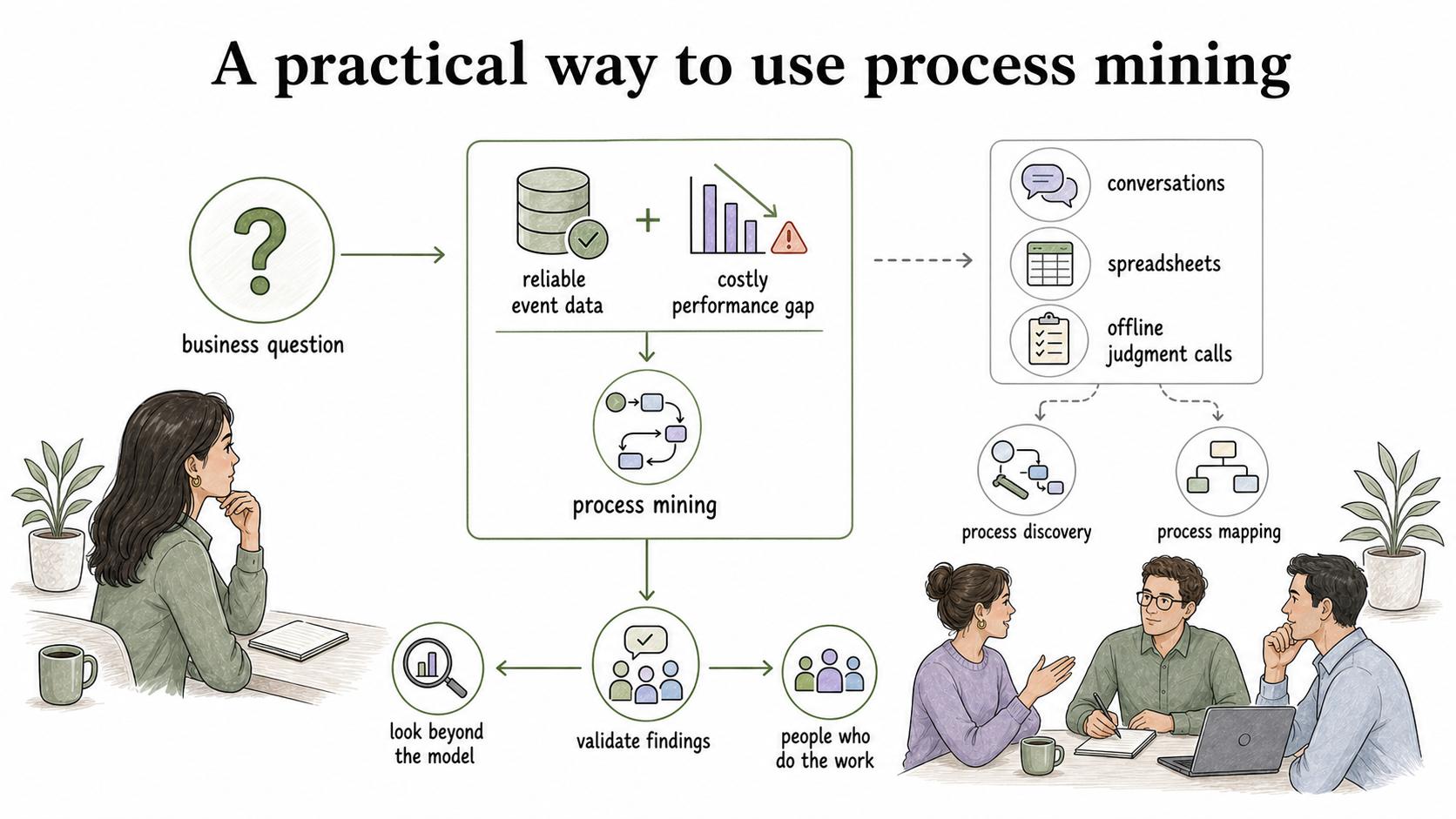
A good process mining project starts with a business question, not a tool demo. If the question is vague, the analysis usually becomes a tour of interesting diagrams that nobody acts on.
Use this decision rule before starting:
- Use process mining when the process has reliable event data and a costly performance gap. Examples include invoice delays, support escalations, order exceptions, claims rework, or missed onboarding steps.
- Start with process discovery or process mapping when the work happens mostly in conversations, spreadsheets, or offline judgment calls. The logs will only show a partial story.
- Look beyond the model when the team already knows the bottleneck but has not changed behavior. You may need clearer ownership, training, documentation, or incentives.
After the analysis, validate the findings with the people who do the work. Event logs show what happened in systems; operators explain why it happened and where the data is incomplete.
Common mistakes
The first mistake is treating the discovered model as the whole truth. A process mining output can look authoritative because it is data-driven, but it only reflects the events available in the source systems. If important work happens in email, chat, spreadsheets, phone calls, or judgment outside the system, the model may miss the most important part of the process.
The second mistake is confusing variation with failure. Some process variants are wasteful. Others are appropriate responses to customer type, risk, geography, contract terms, or regulatory requirements. The useful question is which variants are intentional, useful, documented, and controlled.
The third mistake is failing to update the operating system around the process. If process mining exposes a gap between the documented process and the real one, the team should decide whether to change the process, change the documentation, or formally document the exception.
Documentation takeaway
Process mining can reveal the current state, but teams still need documentation to make the desired state repeatable. The analysis may show that a process has five common paths, but employees need to know which path to follow, when an exception is allowed, who owns the handoff, and what "done" looks like.
A useful follow-up artifact is a short guide for each approved path: trigger, owner, steps, decision points, exception handling, and evidence of completion. That turns a mining insight into behavior people can repeat.
How Trails helps
Trails helps teams turn process-mining findings into process documentation. After analysis identifies the approved workflow or the exception path that needs clearer guidance, Trails can capture the workflow as someone performs it, turn it into a polished step-by-step guide, and create an AI-narrated video version for training or sharing.
That helps bridge the gap between discovering how work happens and helping people perform the improved process consistently.
Sources
- 1
IEEE Task Force on Process Mining. Process Mining Manifesto. IEEE Task Force on Process Mining. www.tf-pm.org/upload/1580737614108.pdf.
- 2
Wil van der Aalst. Process Mining Put Into Context. www.vdaalst.com/publications/p662.pdf.
- 3
IEEE Task Force on Process Mining. Process Mining Manifesto guidance on event-log quality and question-driven extraction. processmining.org/old-version/files/mao-process-mining.pdf.