
Glossary
Workflow
 ChatGPT
 Perplexity
 Gemini
 Claude
What is a workflow?
A workflow is the ordered path work follows from a starting trigger to a finished outcome. It shows the steps, owners, handoffs, decisions, tools, and outputs that move work from one state to the next.1
The useful part is not the word itself. A workflow gives a team a shared view of how work actually moves. When that view is missing, people fill the gaps with memory, Slack threads, side conversations, and local habits.
What a workflow includes
Most workflows have six practical parts:
- Trigger: what starts the work, such as a customer request, a signed contract, a failed quality check, a form submission, or a scheduled review.
- Outcome: what must be true when the workflow is complete.
- Steps: the actions that move the work forward.
- Owners: the role, person, team, or system responsible for each step.
- Handoffs: the points where work moves from one owner or tool to another.
- Decisions: the criteria that change the path, such as approval, priority, risk, missing information, or exception handling.
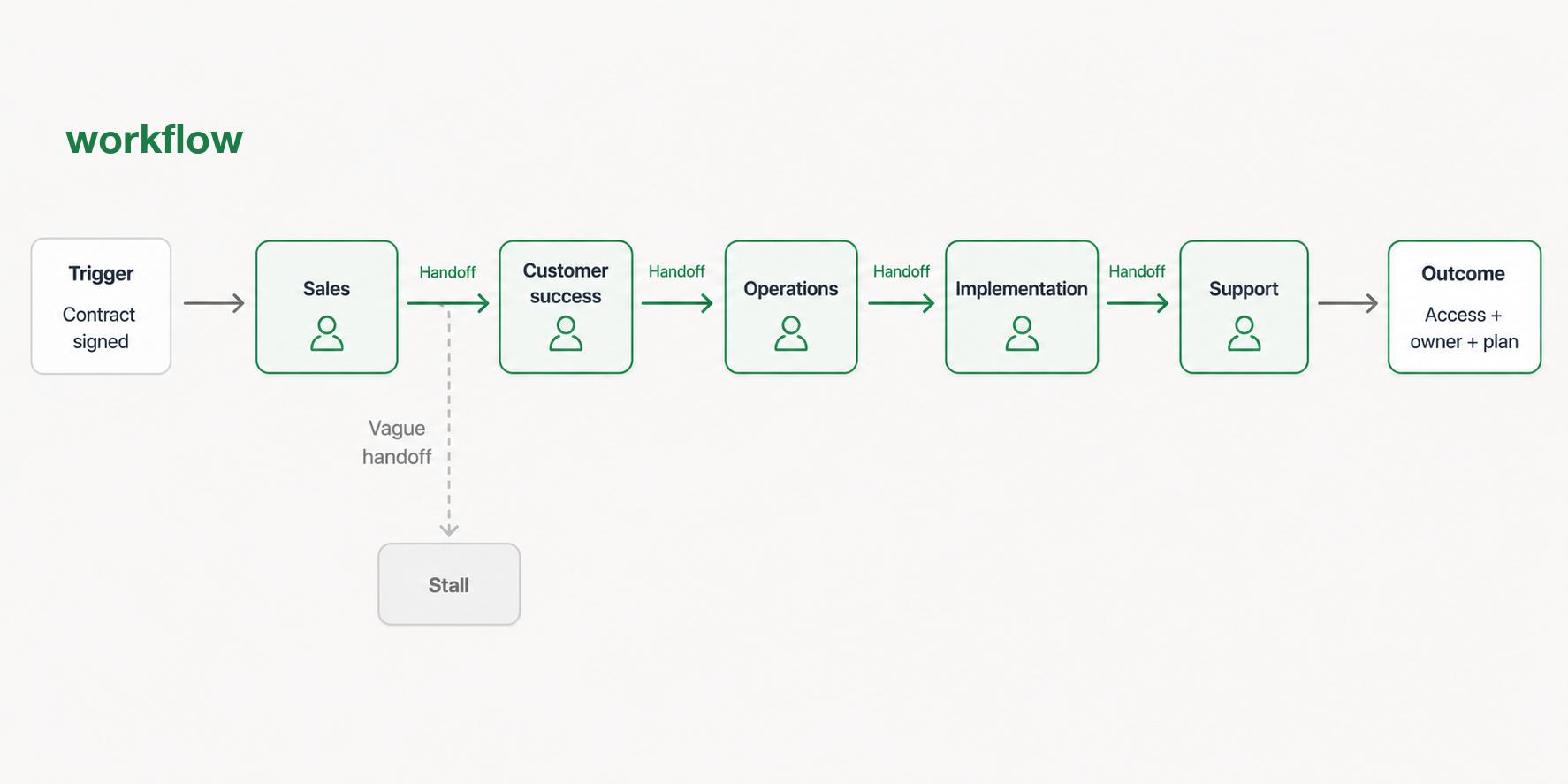
For example, a customer onboarding workflow may begin when a contract is signed. Sales hands the account to customer success, customer success sends a welcome email, operations provisions the account, the implementation owner schedules kickoff, and support confirms the customer knows where to get help. The workflow is complete when the customer has access, an owner, a plan, and the right next step.
That sequence sounds simple until one handoff is vague. If no one knows who sends the welcome email, the workflow becomes a guessing game.
Workflow vs process vs procedure
Teams often use workflow, process, and procedure as if they mean the same thing. They are related, but each one answers a different question.
| Term | Question it answers | Example |
|---|---|---|
| Workflow | How does work move from start to finish? | Customer onboarding from signed contract to kickoff. |
| Process | What repeatable activity produces an outcome? | The broader customer onboarding process. |
| Procedure | What exact steps should someone follow? | How to provision a new customer account. |
| Work instruction | How should one specific task be performed correctly? | How to configure the first user role in the admin panel. |
A workflow is usually the connective layer. It may point to several procedures or work instructions, but its main job is to make sequence, ownership, and handoffs visible.2
Why workflows matter
A workflow turns informal operating knowledge into something a team can inspect. That matters most when work crosses roles, systems, or departments.
The hidden failure mode is that teams usually notice workflow problems only after they show up as delays: a ticket sits untouched, a customer gets the wrong message, a new hire waits for access, or a manager has to ask three people where the work stands. Those are not just execution problems. They are workflow design problems.
Good workflow documentation helps answer:
- What starts this work?
- Who owns the next step?
- What information has to be present before work can move forward?
- Where do approvals or decisions happen?
- What happens when the normal path does not apply?
- How does someone know the work is done?
The goal is not to make every team rigid. The goal is to remove avoidable uncertainty so people can use judgment where judgment is actually needed.3
How to document a workflow
Start with a real example, not the ideal version. Ask someone to walk through the last time the work happened. Capture what triggered it, which tools were used, who touched it, where they waited, what decisions changed the path, and what proved it was complete.
Then turn that raw capture into a working document:
- Name the workflow around the outcome, not the tool. "Customer refund approval" is clearer than "Finance spreadsheet update."
- Define the trigger and the definition of done before listing steps. Without those boundaries, the workflow will keep expanding.
- Assign owners by role where possible. A named person changes too quickly; a role makes the workflow easier to maintain.
- Mark the handoffs. This is where work usually stalls, especially when ownership changes teams.
- Separate exceptions from the main path. Do not bury edge cases inside every normal step.
- Link task-level instructions instead of crowding the workflow. If a step needs screenshots or exact clicks, it probably deserves its own procedure.
A useful workflow document can be a short step-by-step guide, a flowchart, a swimlane diagram, or a checklist with owners. The format matters less than whether the team can use it during real work.
Common mistakes
The most common mistake is documenting the happy path and calling it done. The happy path is the cleanest story, but exceptions are where teams lose time. Missing approvals, incomplete intake, unclear priority, duplicate requests, unavailable owners, and unusual customer cases all need a place to go.
Another mistake is automating too early. Workflow automation works best when the human workflow is already clear. If the team cannot explain the manual path, automation will mostly make the confusion faster.
A third mistake is leaving the workflow owner unnamed. Every workflow needs someone responsible for keeping it accurate when tools, policies, roles, or volume change.
AI-ready workflow documentation prompt
Use this prompt to turn notes, a transcript, or a rough explanation into a usable workflow draft:
## Workflow Documentation Prompt

**Glossary term:** Workflow
**Source:** Trails Glossary — trails.so/glossary/workflow

---

### 01. Create a workflow document from rough source material

"Create a workflow document for [team] and [workflow name].

Use this raw description:
[Paste notes, transcript, screen recording transcript, or rough steps]

Return:
1. A one-sentence purpose.
2. The trigger and definition of done.
3. The workflow steps in order, with owner, tool, and output for each step.
4. Handoffs where work moves between owners or systems.
5. Decision points and alternate paths.
6. Common exceptions and how the team should recover.
7. Open questions the team must answer before this workflow is final.

Do not invent unsupported steps. If the raw description is unclear, flag the gap as a question."
How Trails helps
Trails helps teams document workflows by capturing work as someone performs it, then turning that capture into a polished step-by-step guide. That is useful when a workflow crosses tools, includes small but important clicks, or depends on tacit knowledge from an experienced teammate.
Teams can also create an AI-narrated video version for training or sharing, which makes the workflow easier to hand off without asking the same person to explain it repeatedly.
FAQ
Is a workflow the same as a checklist?
No. A checklist helps someone complete or verify tasks. A workflow explains how work moves from start to finish, including owners, handoffs, decisions, and outcomes. A checklist can sit inside a workflow.
How detailed should a workflow be?
Detailed enough that someone can see what happens next, who owns it, and what information is required. If one step needs detailed task instructions, link to a separate procedure or work instruction.
When should a workflow be updated?
Update a workflow when tools change, ownership changes, approval rules change, exceptions become common, or the team keeps asking the same clarification questions.
Comparing tools? See the process documentation software comparison.
Sources
- 1
American Society for Quality. Process Analysis Tools. ASQ. asq.org/quality-resources/process-analysis-tools. Accessed June 23, 2026.
- 2
Object Management Group. Business Process Model and Notation (BPMN), Version 2.0.2. OMG. www.omg.org/spec/BPMN/2.0.2/About-BPMN. Accessed June 23, 2026.
- 3
International Organization for Standardization. ISO 9001:2015 Process Approach. ISO. www.iso.org/iso/iso9001_2015_process_approach.pdf. Accessed June 23, 2026.