Trails, the best Scribe alternative
A modern alternative built for video-first documentation
Feature and Pricing Comparison

$10/ user / mo
Based on the Team plan: $49/mo for five users.
Engaging AI Videos
Save hours and deliver higher quality training materials with AI videos
Convert any video recording into a step-by-step guide
Take any video (Loom, Zoom, etc.) and turn it into a guide.
Knowledge bases
Organize guides and videos in searchable spaces for your team or customers.
Translations
Help everyone follow along, no matter what language they work in.
Web and desktop capture
Central user management
Voice transcription
SOC2 Type 2 compliance

$29/ user / mo
Pro Team, billed monthly. Five-seat minimum ($145/mo).
only screenshots and text
feature not available
feature not available


Create your first guide
Start documenting your process in minutes. Trails makes it easy to turn steps into a clear, shareable guide.

How is Trails different from Scribe?
1. Trails makes guides more engaging with AI videos
Most tools, including Scribe, stop at screenshots and text instructions. That can be helpful, but it often falls short when you're trying to make training content that makes an impact.
Different people learn in different ways. Some like to skim text and find what they need quickly. Others prefer to watch and listen. With Trails, you don’t have to pick one or the other.
Every guide you create automatically comes with a polished, AI-narrated video that’s ready to share.
The best part is that your videos stay in sync with your content. If you change a line of text or swap out a screenshot, the video narration and visuals update automatically. No editing tools or re-recording required.
Take a look at guides created by our platform and theirs side-by-side. Notice a difference?
only comes with text and screenshots

generates both video and guide
2. Trails lets you create guides from videos
Many teams are already used to creating short videos for documentation. With Scribe, you have to start from scratch to turn each video into a guide manually. Trails takes a different approach.
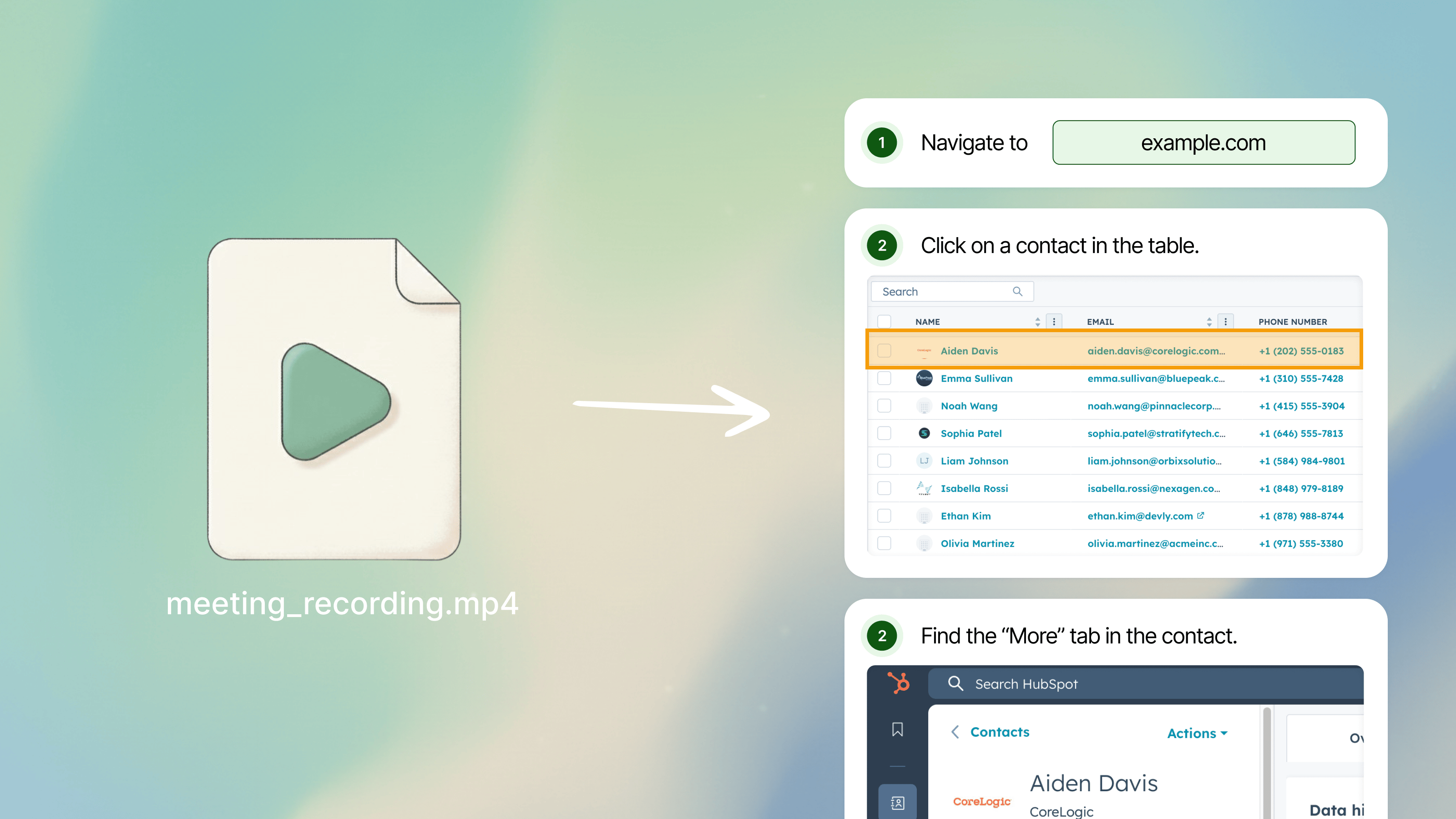
Upload any existing video, and Trails automatically turns it into a structured, step-by-step guide. It breaks down key actions, adds screenshots, and generates clear descriptions for each step. You end up with both a polished video and a written guide with no extra editing required.
This feature is especially useful for teams who are used to creating ad-hoc Loom videos or Zoom recordings.
Instead of letting that content collect dust (because who is really watching those 20+ minute recordings?), you can repurpose it into something searchable, easy to skim, and reusable.
3. Trails makes it easier to hide private information
When you’re creating training content, sensitive info almost always sneaks in: emails, names, or customer data you don’t want shared. Blurring that out is essential.
Most tools, including Scribe, let you blur after capture, but only once your screenshots have been uploaded to their servers. That’s not ideal if you’re documenting internal systems or private data.
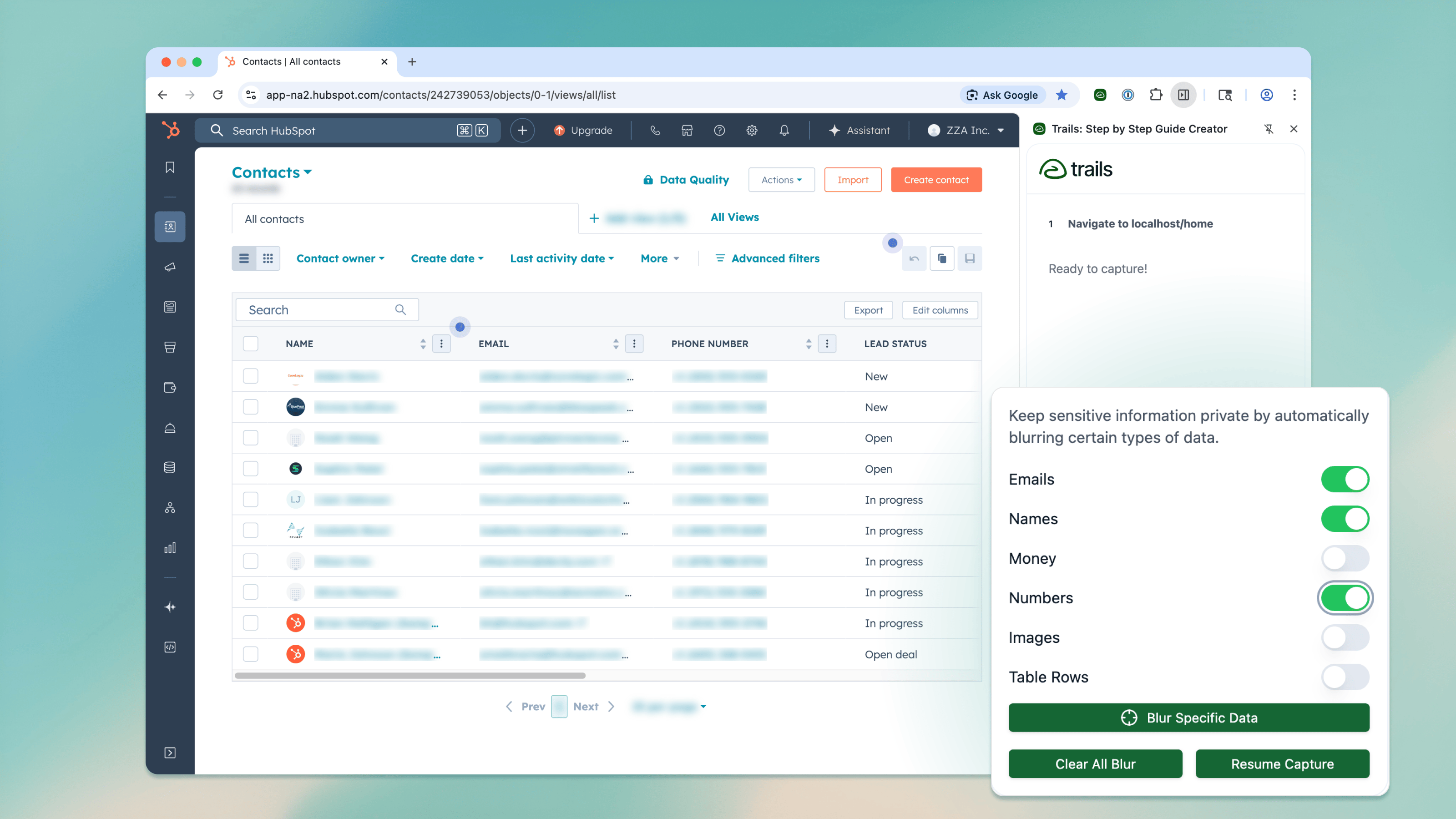
Trails handles blurring differently. Redacting data happens securely on your device before anything is uploaded. You can quickly hide sensitive details as you capture, keeping private information private.
Our smart blur can even detect and automatically hide things like emails, numbers, and names — all locally, without sending a single pixel to the cloud.
4. Trails costs less as you scale
Most documentation tools get more expensive the more people you share them with.
With Scribe, you pay for every user, even if they’re just reading. That makes broad internal or customer-facing documentation costly fast.
The Trails Business plan uses custom pricing for company-wide access, so sharing knowledge with the entire organization does not require a paid seat for every reader.
And you also don’t have to jump to an expensive enterprise plan to unlock core features. With Scribe, core features like user management and language translation are gated behind plans starting around $1,000 per month.

Security that stands up to scrutiny
Trails is SOC 2 Type II compliant, with independently audited controls designed to keep your guides and training videos secure.
Explore security at TrailsHere's what our customers have to say
I like your user interface more than Scribe’s. It feels less cluttered and I can easily find everything. Overall, the quality of life using Trails has been better, and aside from a couple of small issues, it’s been a real improvement for me.

Because the team already knew tools like Scribe, it was easy to explain Trails. But the added capabilities made it much more compelling. It just gives us more ways to create and manage documentation.

The main thing I’ve appreciated is the level of support and service. I’ve talked to the Trails team a lot, and I never really got to talk to our Scribe rep. With Trails, I don’t feel like I’m being left hanging.

It’s similar to Scribe, but with extra features. It's a better value.