


Publish your guides in one searchable knowledge base

Publish your step-by-step guides to one searchable knowledge base. Every new Trail and folder update appears automatically, so there’s nothing to export or embed.

Get started for free
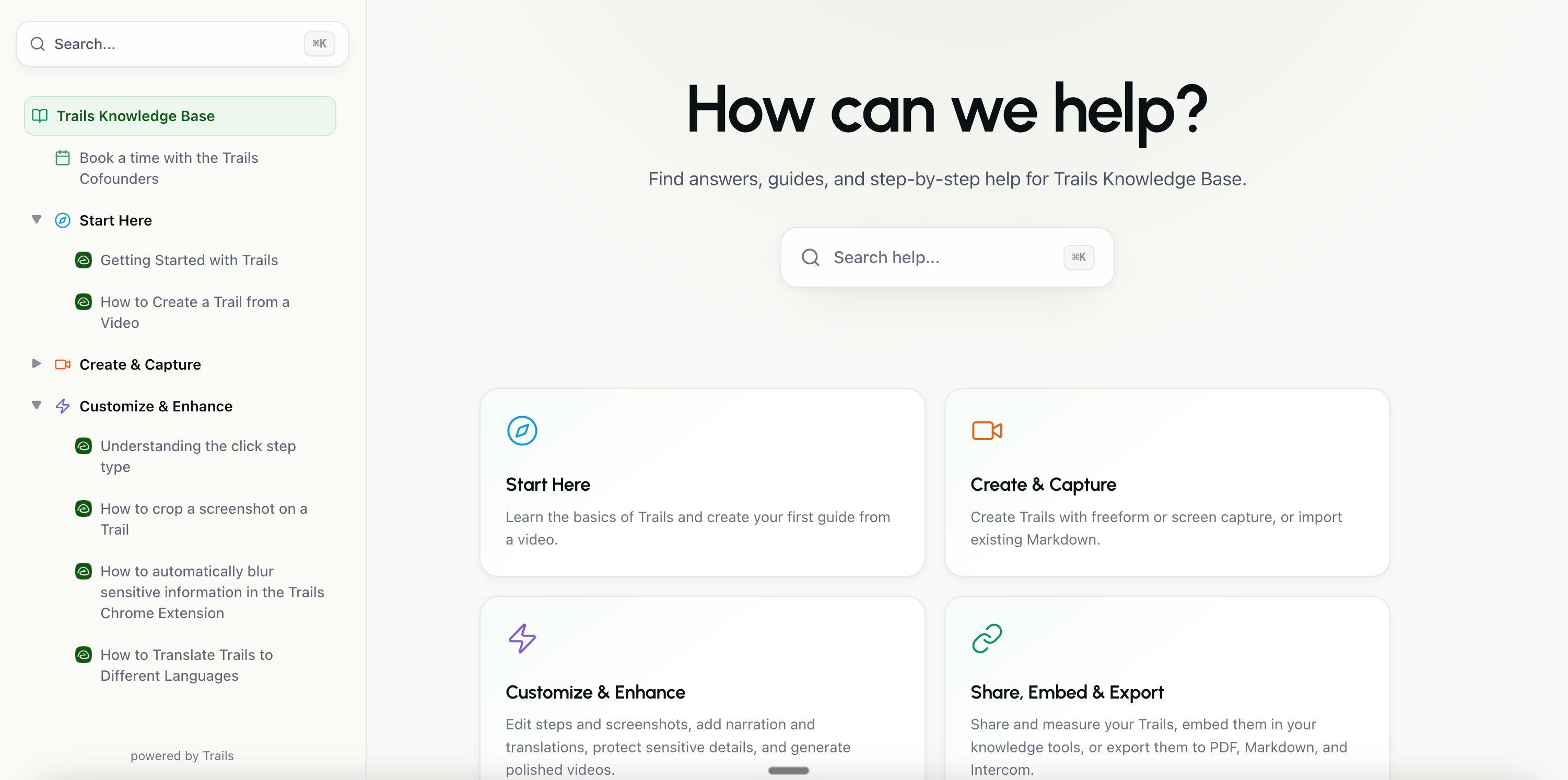
Trails knowledge base with searchable guides, sidebar navigation, and topic categories.

Publish in three simple steps

Trails knowledge bases make sharing content as easy as capturing it.

1

Pick what to publish

Choose any Trails folder. Its structure becomes the structure of your knowledge base, including nested folders and guides.

Pick what to publish
2

Share one link

Give customers, partners, or teammates one place to find the right guide. Prefer the knowledge base you already use? Embed your Trails knowledge base there instead.

Share one link
3

Keep creating

Add a guide, update a step, or reorganize a folder in Trails. The knowledge base updates with it, so readers always see the latest version.

Keep creating

One knowledge base.
Plenty of ways to use it.

Help customers help themselves

Give customers or clients a clear place to learn your product, complete a process, or get unstuck.

  • Reduce repeat support questions with clear, step-by-step answers.
  • Help new customers complete setup and reach value sooner.
  • Publish a public help center, protect sensitive guides with a password, or embed Trails into the support site you already use.


Keep your team on the same page

Turn your Trails into an internal home for SOPs, training, and everyday how-tos.

  • Help new hires learn without adding another meeting to someone’s calendar.
  • Capture important processes before they become tribal knowledge.
  • Keep every team working from the latest instructions, organized under one searchable link.

Already have a knowledge base? Keep it.

Embed a Trails knowledge base into your existing internal knowledge base so people can find guides where they already look for answers.

Your team keeps its current setup. Trails remains the source, and every update stays synced without another round of exports or embed maintenance.

Compatible with

  • SharePoint
  • Confluence
  • Notion

Your guides. Your brand.

Give readers a knowledge base that feels at home on your website. We’ll match it to your existing brand at no extra cost, so it looks familiar from the first click.

hearth & linenCare guide

Make yourself at home.

Find a little guidance
Caring for your pieces
Orders & deliveries
relay_DOCS / 01

Build something great.

Search the docs/
01Quickstart
02Workflows
GoodsideTEAM SPACE

Big ideas start here.

What are we making?
✳ Studio handbook↗ Our process

Illustrative examples of custom branding

All knowledge bases come with

Automatic syncing

New guides, edits, and folder changes flow through automatically.

Built-in search

Readers can search Trail titles, descriptions, and folder names from one place.

Flexible access controls

Publish publicly, require a Trails team login, or protect the knowledge base with a password.

Custom analytics tracking

Add your own tracking code to collect the analytics you need from your knowledge base.

Custom subdomains

Publish your knowledge base at a familiar address like help.yourcompany.com, so it feels like a natural part of your website. (Team plan and above)

Embedding in your current knowledge base

Embed your Trails knowledge base into SharePoint, Confluence, Notion, or any existing tool your team already uses.

Create it once. Keep it useful everywhere.

Give every Trail a searchable home that stays current on its own.