
Glossary
Process Documentation Software
 ChatGPT
 Perplexity
 Gemini
 Claude
What is process documentation software?
Process documentation software helps teams turn repeatable work into instructions people can actually follow. It captures how a process happens, organizes the steps, and gives the team one reliable place to find the current version. That matters because McKinsey Global Institute found that interaction workers spend nearly 20% of the workweek looking for internal information or tracking down colleagues who can help.1
Most process documentation fails before anyone opens the wiki. The person who knows the workflow is busy doing the work, not writing a perfect guide from memory later. Good process documentation software shortens the distance between doing the process and documenting it.
What process documentation software does
Process documentation software moves operational knowledge out of memory, chat threads, one-off screen shares, and scattered docs. Instead of asking one experienced person to explain the same workflow again, the team creates a reusable guide that shows what to do, in what order, and where judgment is required.
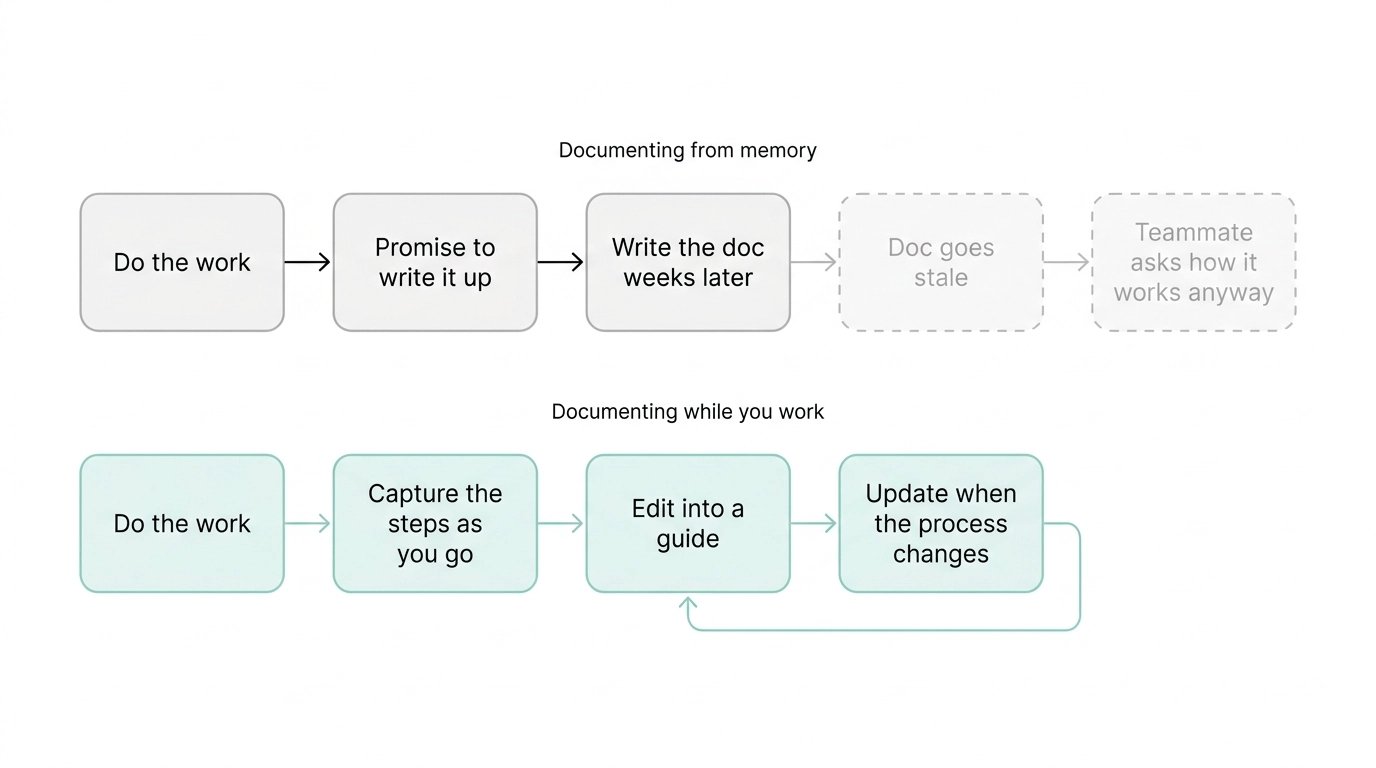
For example, a customer success team might document how to prepare a quarterly business review. The guide could cover checking product usage, reviewing open support issues, updating slides, confirming account goals, and sending the follow-up email. Without a shared process, each CSM may build the review differently. With process documentation software, the team can standardize the workflow, onboard new CSMs faster, and update the guide when the review process changes.2
Common capabilities include:
- Capturing steps from a workflow, often with screenshots or screen recording.
- Editing captured steps into a polished guide.
- Organizing guides by team, role, tool, or process area.
- Sharing documentation with employees, contractors, customers, or partners.
- Showing ownership, updates, and version history.
- Making process content searchable.
When teams need process documentation software
A team usually needs process documentation software when repeated work starts depending on memory. The symptoms are familiar: inconsistent execution, repeated questions, slow onboarding, avoidable errors, and too much dependence on a few people who know how things really work.
The key signal is not company size. It is repetition plus variation. If multiple people need to perform the same workflow in roughly the same way, and the workflow changes often enough that old PDFs or stale wiki pages become untrustworthy, the process is a candidate for documentation software.
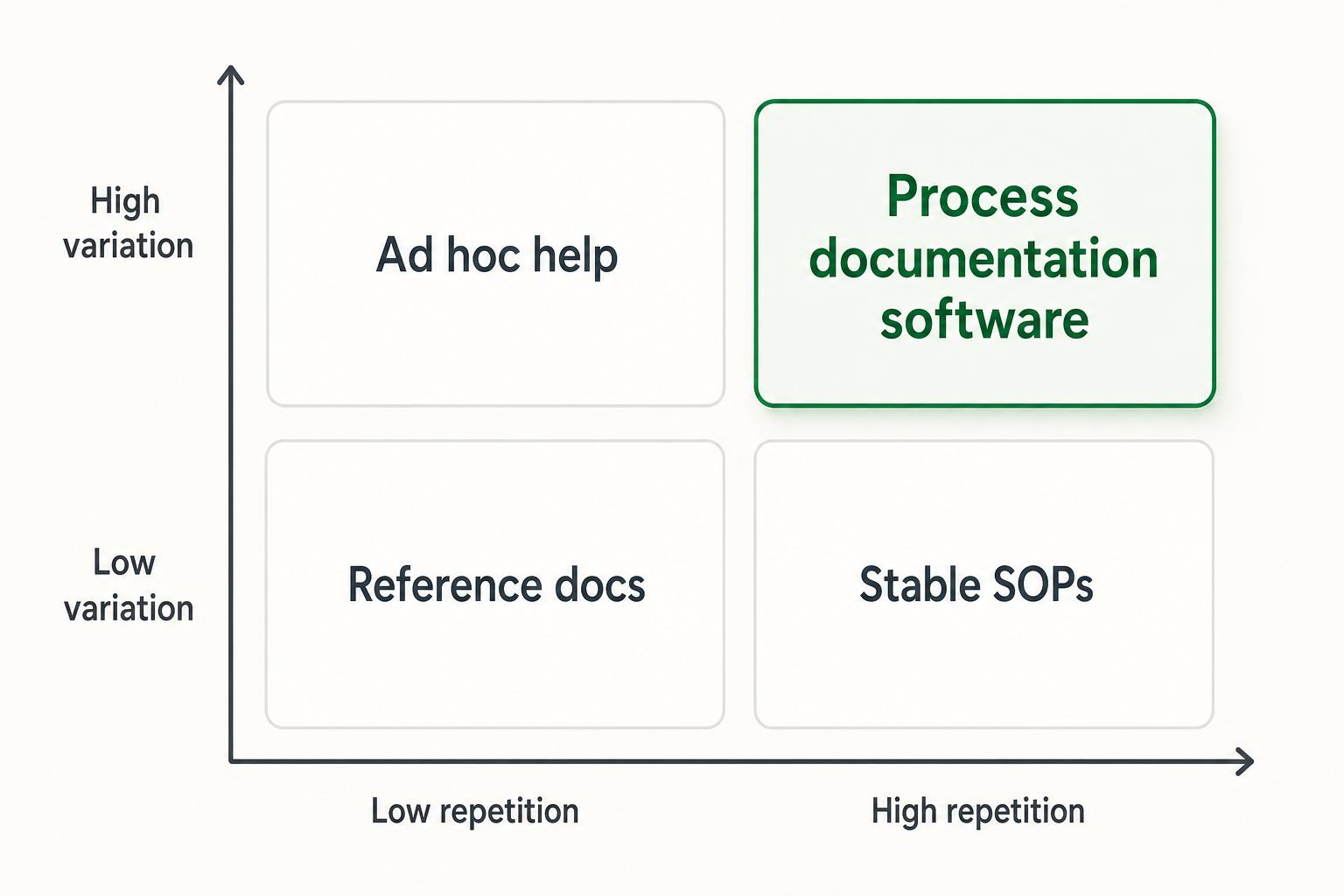
Support teams use it for escalation and troubleshooting workflows, operations for approvals and handoffs, HR for onboarding and offboarding, customer success for account workflows, and IT for setup, access, and internal support.
How to choose process documentation software
Start by naming the failure you are trying to prevent. If the bigger problem is undocumented work, prioritize fast capture, clean step-by-step output, and easy sharing. If the bigger problem is uncontrolled documentation, prioritize ownership, permissions, review cycles, and visibility into stale content.3
Use these questions to evaluate options:
- Can the person doing the work document it without turning the task into a separate writing project?
- Does the tool produce documentation that is easy to scan, not just watch?
- Can guides be updated when the product, policy, or workflow changes?
- Does the tool make ownership and stale content visible?
- Can employees browse and search the guide library in a way that matches how they work?
- Are permissions simple enough for internal and external sharing needs?
- Does the workflow fit the people closest to the process, or only a documentation owner?
That last question matters: AHRQ's workflow redesign guidance emphasizes designing tools around actual workflow context rather than treating workflow as a simple linear process.4
Example: documenting a customer refund process
Imagine a support team wants to standardize customer refund requests. The process includes checking eligibility, confirming account status, adding an internal note, issuing the refund in the billing system, and sending the customer a confirmation.
A useful process guide would include:
- The trigger: when a refund request should follow this process.
- The owner: who is allowed to approve or issue the refund.
- The steps: what to check, click, write, and confirm.
- The decision points: when to escalate or deny the request.
- The final output: what the customer and internal record should show.
- The update owner: who maintains the guide when the policy changes.
Process documentation software should make that guide easy to create from the live workflow and easy to revise when the billing system, refund policy, or approval path changes. If updating the guide takes longer than explaining the process again, the tool will not become part of the team's habits.
How Trails helps
Trails is useful when the hardest part of process documentation is getting the workflow captured in the first place. A team member performs the process, and Trails captures it as they do it, then turns the capture into a polished step-by-step guide that can be edited, shared, and reused.
Trails can also create an AI-narrated video version for training or sharing. For teams documenting repeatable software workflows, that keeps documentation close to the real work.
FAQ
Is process documentation software the same as SOP software?
Not exactly. SOP software usually focuses on formal procedures, approvals, and review controls. Process documentation software is broader and often focuses on making everyday workflows easier to capture, explain, and maintain.
Who should own process documentation software?
Ownership usually sits with operations, enablement, support, HR, or customer success leadership, but the best documentation comes from the people closest to the work. A central owner can set structure and quality standards while process owners maintain individual guides.
What makes process documentation software useful for onboarding?
New hires need to see how real work gets done, not just read policies. Process documentation software gives them step-by-step examples they can follow while learning the tools, decisions, and handoffs behind a role.
When is a wiki enough?
A wiki may be enough when the team mainly needs reference articles and policies. If the team needs to capture live workflows, keep step-by-step guides current, or train people on repeatable software tasks, dedicated process documentation software is usually a better fit.
Comparing tools? See the process documentation software comparison.
Sources
- 1
McKinsey Global Institute. The social economy. McKinsey & Company. www.mckinsey.com/industries/technology-media-and-telecommunications/our-insights/the-social-economy. Accessed June 10, 2026.
- 2
SHRM. Complete Employee Onboarding Guide. SHRM. www.shrm.org/topics-tools/topics/onboarding. Accessed June 10, 2026.
- 3
International Organization for Standardization. Annex SL Appendix 2. ISO. www.iso.org/cms/render/live/en/sites/isoorg/home.isoDocumentsDownload.do?t=2EVmNRpfMEK8NcTL_uoAJceDlxYmmqpQWNk3r1MeLNWCXk6i10vZ-R5FEjIK-UOe. Accessed June 10, 2026.
- 4
Agency for Healthcare Research and Quality. Clinical Practice Improvement and Redesign. AHRQ. digital.ahrq.gov/key-topics/clinical-decision-support/clinical-practice-improvement-and-redesign-how-change-workflow-can-be-supported-clinical-decision. Accessed June 10, 2026.