
Glossary
Digital Work Instruction
 ChatGPT
 Perplexity
 Gemini
 Claude
What is a digital work instruction?
A digital work instruction is a step-by-step guide to a single task, delivered on a screen instead of on paper. It shows one person how to do one job correctly, whether that's setting up a machine, processing a return, or provisioning a laptop, using text, screenshots, photos, or video the worker can pull up while actually doing the work.
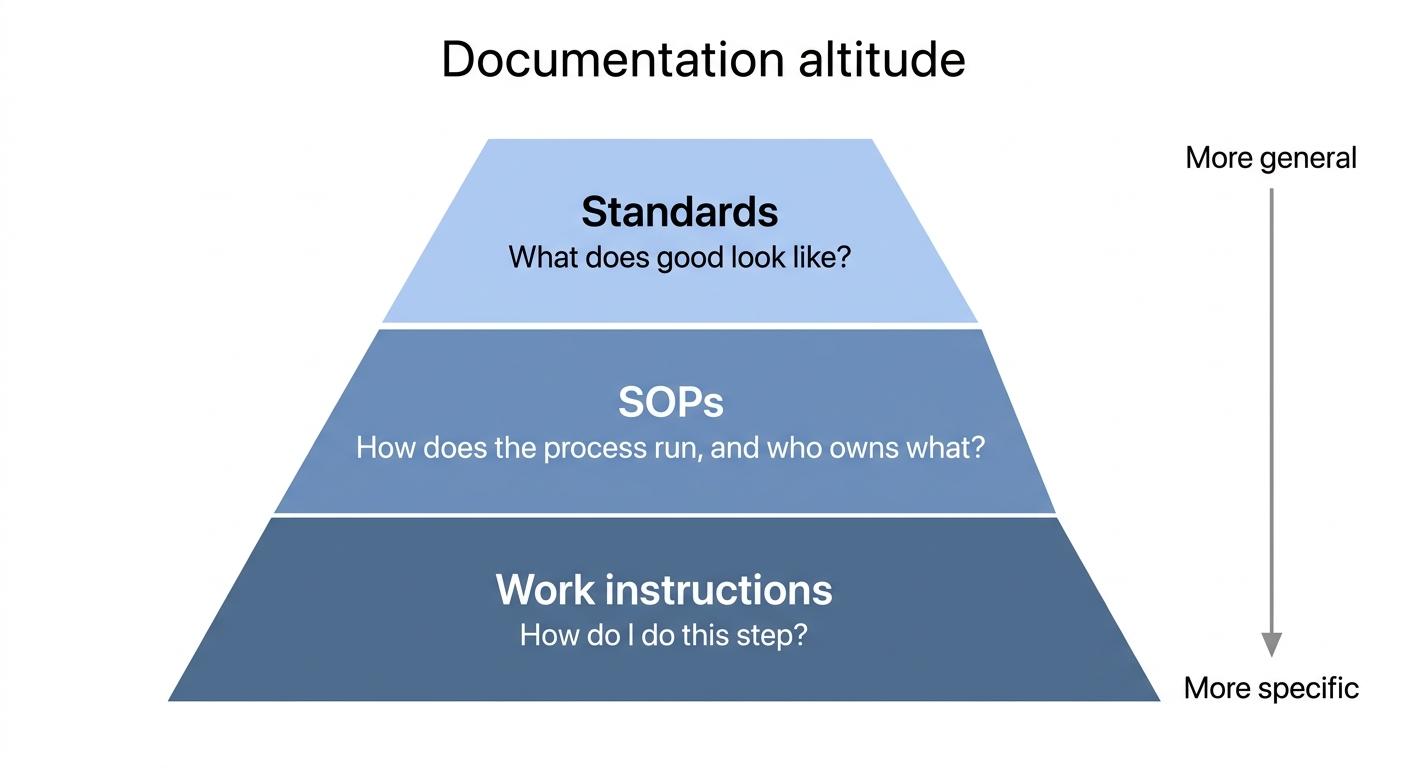
The term comes from manufacturing, where work instructions sit at the most granular layer of process documentation. Standards define what good looks like, SOPs define how a process runs, and work instructions define exactly what the operator does at the station. The digital part changes the delivery, not the purpose. Instead of a laminated sheet hanging near the line, the instruction lives on a tablet, terminal, or phone, where it can be updated in one place, enriched with visuals, and tracked.1
One thing worth getting straight before anything else: scanning a paper instruction into a PDF does not make it a digital work instruction. That's a digital photocopy. A real digital work instruction changes how the instruction gets created, maintained, found, and used.
Why digital work instructions matter
Paper instructions fail quietly. Someone updates the process, but the laminated sheet at station 4 still shows the old torque spec. A new hire follows it to the letter, produces a defect anyway, and the team spends the afternoon tracing the problem back to a stale instruction.
Digital work instructions fix the two things paper can't: staleness and invisibility. Update the instruction once, and the current version replaces every old copy. And because it lives on a screen, the team can see which instructions get viewed, skipped, signed off, or flagged. If you work in a regulated industry, that version and access history may be the strongest argument for making the switch.2
We'd be doing you a disservice if we glossed over the tradeoffs. Digital instructions need devices at the point of work, someone to write and update them, and a rollout plan that fits the environment. If your team works gloved, offline, or somewhere a tablet won't survive the month, the format alone won't fix the operation. Going digital is a workflow decision, not a file-format upgrade.
What makes a work instruction genuinely digital
Here's a quick test we like: could paper do the same job? If the answer is yes, the instruction may technically live online, but it isn't getting much out of being digital. The instructions that earn the label usually have five things going for them:
- One source of truth. You edit once and it updates everywhere, so nobody is chasing versions across binders, drives, and screenshots.
- Visual steps. Annotated screenshots or photos show the action itself, instead of paragraphs explaining where to click or what to turn.
- Embedded media. A short video of the tricky step beats three paragraphs about it. In one study, workers learning new manufacturing tasks performed better with digitally animated, interactive work instructions than with paper ones.3
- Access at the point of work. The instruction lives on a device the worker can actually use, and it turns up when they search for it.
- Feedback and tracking. Views, sign-offs, comments, and flags tell you whether the instruction is being used and where it falls short.
Digital work instruction vs digital SOP
These terms get blurred together, and that's how teams end up with sprawling SOPs that can't help anyone finish the next step. The real difference is altitude.
| Digital work instruction | Digital SOP | |
|---|---|---|
| Scope | One task, one role | A whole process, often multiple roles |
| Question it answers | How do I do this step? | How does this process run, and who owns what? |
| Example | How to run end-of-day register close | Cash handling and reconciliation procedure |
| Detail level | Click-by-click or action-by-action | Stages, responsibilities, handoffs |
| Typical length | 5-15 steps | Multiple sections, often linking to several work instructions |
A simple rule of thumb: if a new hire could complete the task using only the document, it's a work instruction. If they would still ask, "Which button do I press?", the SOP needs a work instruction underneath it.
How to create a digital work instruction
The most common mistake is writing from memory at a desk. That's where missing steps come from, because the author skips everything they do automatically. You'll get a better instruction by building it from the work itself.
- Capture while doing. Perform the task and record each step as it happens, with screenshots for software and photos or short video for physical work.
- Write one action per step. "Click Export, then choose CSV" is two steps. Splitting them keeps the instruction easy to follow under pressure.
- Add a visual wherever location or judgment matters. Show the field, valve, button, setting, or finished state.
- Test it on someone new to the task. Their first question is usually your missing step.4
- Assign an owner and a review trigger. "Review when the software updates" beats "review annually," because instructions go stale on the process's schedule, not the calendar's.
If you'd like a head start, this prompt turns rough notes into a structured draft:
## Digital Work Instruction Draft Prompt

**Glossary term:** Digital Work Instruction
**Source:** Trails Glossary — trails.so/glossary/digital-work-instruction

---

### 01. Turn rough notes into a structured draft

"Turn the following rough notes into a digital work instruction for [task name], performed by [role] using [tool/equipment].

Format: a numbered list where each step is one action, written as a direct instruction ("Click...", "Remove...", "Verify..."). After any step involving a judgment call, add a "Check:" line describing what correct looks like. Flag any step where my notes seem to skip something with [GAP - confirm this step].

My notes: [paste rough notes]"
How Trails helps
Trails is built around the capture-while-doing approach we just described. You perform the task once, Trails records it, and you get a polished step-by-step guide with screenshots. When the process changes, you re-capture and the guide updates in one place. For training, Trails can also generate an AI-narrated video version of the same instruction, so a new hire can watch the task before trying it.
The practical benefit is simple. The instruction starts from real work instead of a blank page.
FAQ
Do digital work instructions require special software?
No. Any shared doc tool will do. Dedicated tools earn their keep when capture speed, version control, and usage tracking start to matter.
Are digital work instructions only for manufacturing?
No. The term started there, but the format fits any repeatable task, from IT provisioning and support workflows to finance closes and retail operations. If the task has steps and more than one person does it, a work instruction can help.
How long should one be?
As long as the task, and no longer. If you're past 15 to 20 steps, you're probably documenting a process that should be split into several work instructions.
Sources
- 1
International Organization for Standardization. Guidance on the requirements for documented information of ISO 9001:2015. ISO. www.iso.org/iso/documented_information.pdf. Accessed June 10, 2026.
- 2
U.S. Food and Drug Administration. 21 CFR Part 11 - Electronic Records; Electronic Signatures. Electronic Code of Federal Regulations. www.ecfr.gov/current/title-21/chapter-I/subchapter-A/part-11. Accessed June 10, 2026.
- 3
Peter Letmathe and Markus Roessler. Should instructions be given in a paper-based or digital format?. Journal of Operations Management, 2021. doi.org/10.1002/joom.1159. Accessed June 10, 2026.
- 4
National Institute of Standards and Technology. Training Within Industry (TWI). NIST. www.nist.gov/mep/training-within-industry-twi. Accessed June 10, 2026.