
Glossary
Visual Work Instruction
 ChatGPT
 Perplexity
 Gemini
 Claude
What is a visual work instruction?
A visual work instruction is a task-level guide that uses screenshots, photos, diagrams, annotations, or short video clips to show someone how to complete work correctly. Text still matters, but the visual should carry information the reader cannot easily infer from words alone.1
Use visual work instructions when the task depends on what someone should see, click, inspect, assemble, select, or verify at a specific moment. They work well in manufacturing, warehouse operations, software workflows, support processes, field service, onboarding, and quality checks.
What makes a work instruction visual
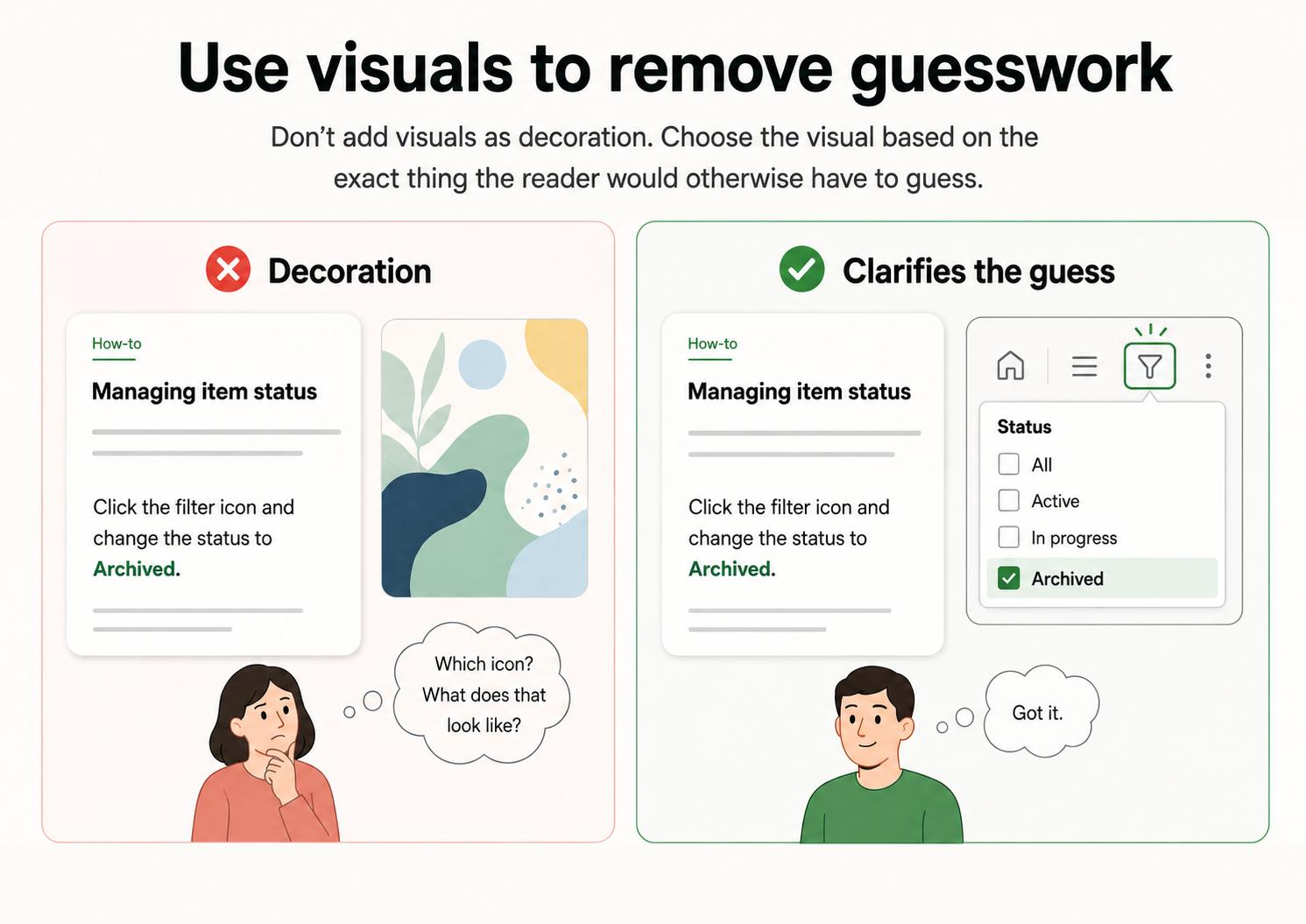
A visual work instruction is not a procedure with a random screenshot pasted into it. The visual has a job: remove a specific ambiguity that would otherwise make the reader guess, search, or ask for help.2
| Visual element | Best use | Example |
|---|---|---|
| Screenshot | Software and digital workflows | Show which setting to select in an admin panel |
| Photo | Physical tasks and inspections | Show correct label placement on a package |
| Annotated image | Steps with precise areas of attention | Circle the field that must match the invoice number |
| Diagram | Spatial relationships or flow | Show how parts, tools, or handoffs connect |
| Short video or GIF | Motion-based tasks | Show how to reset a device or complete a tricky UI action |
| Before-and-after image | Quality standards | Show acceptable vs. unacceptable setup |
The visual still needs a step, label, or expected result. A screenshot with no instruction can be just as confusing as a wall of text.
When to use visual work instructions
Use a visual work instruction when the task is repeatable, important enough to standardize, and easier to understand by seeing the work.
- Software setup tasks with several screens or settings.
- Warehouse picking, packing, labeling, and inspection steps.
- Equipment setup, cleaning, or maintenance routines.
- Customer support triage steps that depend on UI fields.
- Quality checks where correct and incorrect results must be compared.
- New-hire training tasks where people ask the same "where is that?" questions.
Text-only instructions are fine for simple policies, decision rules, or conceptual explanations. Visual instructions earn their keep when the reader needs to match the guide to what is in front of them.
Visual work instruction vs SOP
A standard operating procedure explains the broader process: purpose, scope, roles, policy, required inputs, major steps, and compliance requirements. A visual work instruction sits closer to the task. It shows someone how to perform one specific activity correctly.3
For example, a refund SOP may explain eligibility, approval levels, fraud checks, and recordkeeping. A visual work instruction might show the exact billing-system screens for issuing the refund, including which fields to verify before clicking submit.
The SOP tells the team what process to follow. The visual work instruction helps someone execute one part of that process without guessing.
How to create a useful visual work instruction
Start by watching or capturing the task as someone performs it. Build the guide around the actions, checks, and decisions that matter most.
- Task name and outcome: what the person will complete.
- When to use it: trigger, audience, or situation.
- Required tools or access: systems, materials, permissions, or equipment.
- Step-by-step instructions: short steps with visuals where they clarify the action.
- Quality checks: how the person knows the step was done correctly.
- Exceptions: what to do when the screen, item, or condition does not match the guide.
- Owner and update date: who maintains the instruction.
The best visual work instructions are selective. If every step has a full-size image, the guide becomes slow to scan. If no step has a visual, the reader may still need someone to show them the work. Use visuals where they reduce uncertainty.
Common mistakes
The most common mistake is treating visuals as decoration. A screenshot should answer a real task question: where to click, what good looks like, which field to verify, or how to recognize a problem.
Stale screenshots create a quieter failure. Interfaces change, labels move, and the guide can start training people into the wrong behavior.
Overloaded pages fail for a different reason. A visual work instruction should guide the person through the task, not become a scrapbook of every possible screen and exception.
The final mistake is skipping the expected result. Do not only say what to do. Show or describe what should be visible or true after the step is complete.
Visual work instruction template
Use this structure when turning a captured task into a visual guide:
## Visual Work Instruction Template

**Glossary term:** Visual Work Instruction
**Source:** Trails Glossary — trails.so/glossary/visual-work-instruction

---

### 01. Turn a captured task into a visual guide

"Task: [name]
Audience: [role or team]
Outcome: [what should be true when complete]
When to use this: [trigger or situation]
Tools or access needed: [systems, materials, permissions]

Steps:
1. [Action]
   Visual needed: [screenshot/photo/diagram/video/none]
   Expected result: [what should be visible or true]
   Common mistake: [what people often miss]

2. [Action]
   Visual needed: [screenshot/photo/diagram/video/none]
   Expected result: [what should be visible or true]
   Common mistake: [what people often miss]

Exceptions:
- If [condition], do [recovery step]

Owner: [person/team]
Review trigger: [tool change, policy change, quality issue, recurring question]"
This template keeps visuals tied to task performance instead of turning the guide into a gallery.
Documentation takeaway
Visual work instructions are strongest when they live with the team's real process documentation. Link them to the relevant SOP, training path, knowledge base article, or quality standard, and give them a clear owner.
If people keep asking for screen shares or shoulder taps to complete the same task, that is a signal. The process probably needs a better visual guide.
How Trails helps
Trails helps teams capture a workflow while someone performs it, then turn that capture into a polished step-by-step guide. That is a natural fit for visual work instructions because the source material comes from the real task, not from someone's memory.
Teams can also create an AI-narrated video version for training or sharing, so the same captured workflow can support written reference and visual learning.
FAQ
Is a visual work instruction the same as a job aid?
Not exactly. A job aid is any quick reference that helps someone perform a task. A visual work instruction is usually more step-by-step and uses visuals to guide task execution.
Do visual work instructions need video?
No. Many strong visual work instructions use annotated screenshots, photos, or diagrams. Video is helpful when motion, sequence, or timing is hard to explain in static images.
How often should visual work instructions be updated?
Update them whenever the task, tool, screen, equipment, policy, or quality standard changes. For software workflows, review screenshots regularly because small interface changes can make an instruction confusing.
- Work instruction
- Digital work instruction
- Work instruction software
- SOP vs work instruction
- Visual management
- Job aid
- Training manual
- Video SOP
Sources
- 1
Applied Sciences. Impact of Work Instruction Difficulty on Cognitive Load and Operational Performance. PMC. pmc.ncbi.nlm.nih.gov/articles/PMC11958653/. Accessed June 24, 2026.
- 2
Occupational Safety and Health Administration. Hazard Communication Pictograms. OSHA. www.osha.gov/hazcom/pictograms. Accessed June 24, 2026.
- 3
International Organization for Standardization. ISO 20607:2019, Safety of machinery - Instruction handbook. ISO, 2019. www.iso.org/obp/ui/en/. Accessed June 24, 2026.