
Glossary
Work Instruction
 ChatGPT
 Perplexity
 Gemini
 Claude
What is a work instruction?
A work instruction is a task-level guide that explains how to complete one specific task correctly. It usually covers the exact steps, tools, inputs, checks, and expected result for one narrow piece of work.
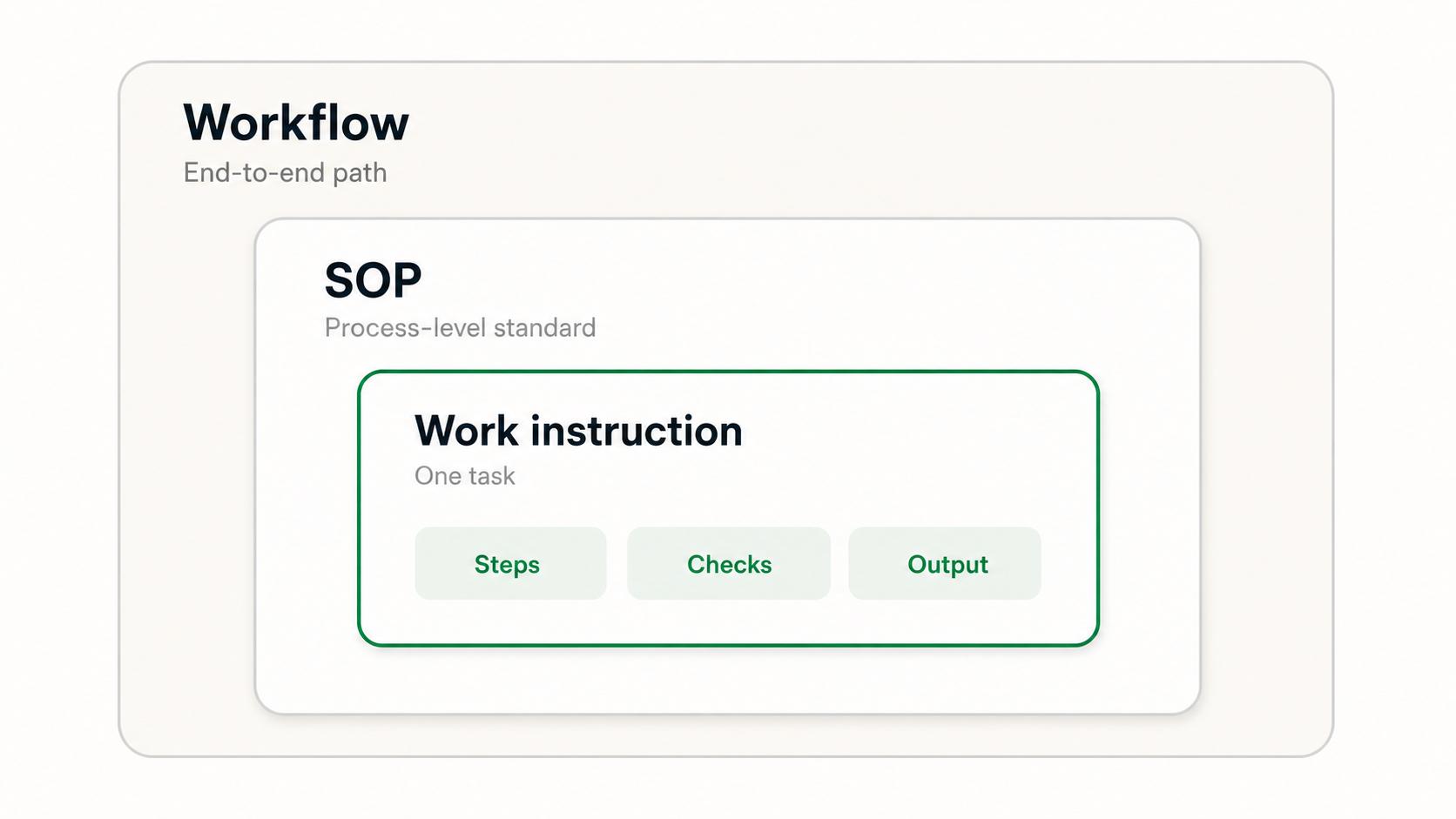
Think of a work instruction as the most practical layer of process documentation. A workflow shows how work moves, an SOP explains the standard way a process should run, and a work instruction tells someone exactly how to do one task inside that process.1
When to use a work instruction
Use a work instruction when a task needs consistency, safety, quality, or speed. It is especially useful when a small mistake can create rework, customer friction, compliance risk, or operational delays.2
Common examples include:
- How to refund a customer in a billing system.
- How to package a product before shipment.
- How to update a CRM field after a sales handoff.
- How to prepare a workstation for a new hire.
- How to capture screenshots and logs before escalating a technical issue.
- How to run a recurring quality check.
A work instruction should be narrow enough that someone can follow it without guessing. If the document starts covering several roles, multiple systems, policy background, and decision logic, it is probably drifting into an SOP or workflow guide.
Work instruction vs SOP vs workflow
These terms are related, but they operate at different levels of detail.
| Documentation type | Best used for | Typical scope |
|---|---|---|
| Workflow | Showing how work moves across steps, people, and systems. | End-to-end path from trigger to outcome. |
| SOP | Defining the standard way a process should be performed. | Process-level expectations, roles, rules, and controls. |
| Work instruction | Explaining how to complete one task correctly. | Task-level steps, tools, checks, and output. |
| Checklist | Verifying that required items are complete. | Short confirmation list, often used during or after work. |
A customer onboarding SOP might define the whole standard onboarding process. A workflow might show how the handoff moves from sales to customer success to implementation. A work instruction might explain exactly how to create the kickoff project in the project management tool.
What a good work instruction includes
A useful work instruction is practical, specific, and easy to follow while the person is doing the task. It usually includes:
- Purpose: why the task matters.
- Scope: when to use this instruction and when not to.
- Owner or audience: who performs the task.
- Inputs: what information, tools, access, or materials are required.
- Steps: the exact actions in order.
- Checks: how to confirm the work was done correctly.
- Exceptions: what to do if something is missing, blocked, or unusual.
- Output: the expected result or artifact.
Do not bury the steps under background. If people need context, include it briefly at the top or link to the SOP. The work instruction itself should stay close to the work.3
How to write a work instruction
Start by watching someone perform the task or capturing the task as it happens. Notes written from memory often miss small details: tool clicks, required fields, naming conventions, and checks that experienced people do automatically.
Then draft the instruction in plain language:
- Name the task clearly.
- State when the instruction should be used.
- List prerequisites, access, or required inputs.
- Write each step as one action.
- Add screenshots, warnings, or examples only where they prevent mistakes.
- Include the final quality check.
- Test the instruction with someone less familiar with the task.
The test is simple: can a qualified person follow the instruction and get the expected result without asking the author what they meant? If not, the instruction needs more clarity, not more jargon.
Common mistakes
The biggest mistake is making a work instruction too broad. A document called "How to onboard a customer" is probably an SOP or workflow. A document called "How to create the kickoff project after a closed-won deal" is closer to a work instruction.
Another mistake is writing vague steps, such as "update the account" or "send the standard email." A useful instruction names the system, field, template, recipient, and expected state when those details matter.
A third mistake is skipping maintenance. Work instructions become stale when tools change, forms change, or teams discover a better way to do the task. Put an owner on the instruction and review it when errors or repeated questions show up.
AI-ready work instruction template
Use this prompt to turn a rough task recording or notes into a clearer work instruction:
## Work Instruction Template

**Glossary term:** Work Instruction
**Source:** Trails Glossary — trails.so/glossary/work-instruction

---

### 01. Create a work instruction from source material

"Create a work instruction for [task] used by [team or role].

Source material:
[Paste notes, screen recording transcript, rough steps, or current instructions]

Return a practical work instruction with:
1. Task name.
2. Purpose in one sentence.
3. When to use this instruction.
4. Required tools, access, inputs, or materials.
5. Step-by-step instructions, with one action per step.
6. Quality checks or expected result.
7. Common mistakes or exceptions.
8. Questions that need human confirmation before publishing.

Keep the language direct and usable while someone performs the task. Do not invent system details that are not in the source material."
How Trails helps
Trails is a natural fit for work instructions because task-level documentation depends on the details people forget to write down. A team can capture a task as someone performs it, then turn that capture into a polished step-by-step guide.
That makes it easier to document tasks that happen inside software tools, especially when the important details are clicks, fields, menus, and checks. Trails can also create an AI-narrated video version, which helps when the instruction is used for onboarding, training, or handoffs.
FAQ
Is a work instruction the same as an SOP?
No. An SOP usually describes the standard way to run a process. A work instruction explains how to complete one task inside that process.
How long should a work instruction be?
Long enough to prevent guessing, but short enough to use during the task. If it needs many sections and decisions, split it into a workflow, SOP, and smaller task-level instructions.
Do work instructions need screenshots?
Not always. Screenshots help when visual context prevents mistakes, such as selecting the right menu, field, setting, or screen. Use them when they clarify the task, not as decoration.
Comparing tools? See the process documentation software comparison.
Sources
- 1
International Organization for Standardization. Guidance on the requirements for documented information of ISO 9001:2015. ISO. www.iso.org/iso/documented_information.pdf. Accessed June 23, 2026.
- 2
National Institute of Standards and Technology. Training Within Industry (TWI). NIST. www.nist.gov/mep/training-within-industry-twi. Accessed June 23, 2026.
- 3
Chalmers University of Technology. Effects of Information Content in Work Instructions for Operator Performance. Chalmers University of Technology. research.chalmers.se/publication/510359/file/510359_Fulltext.pdf. Accessed June 23, 2026.