
Glossary
Process Training
 ChatGPT
 Perplexity
 Gemini
 Claude
What is process training?
Process training teaches people to perform a specific workflow in the conditions where the work actually happens. It covers the steps, tools, decisions, handoffs, quality checks, exceptions, and evidence that turn a written process into consistent work.
Good process training connects instruction to job performance. A learner should see the workflow, practice realistic cases, and know how competence will be checked.1
What process training includes
Process training usually combines demonstration, guided practice, reference material, and verification.2 The right mix depends on the workflow's risk and complexity.
A useful process training plan should cover:
- The trigger, boundary, and purpose of the process
- The role responsible for each step, decision, and handoff
- The tools, forms, systems, permissions, inputs, and outputs involved
- The normal workflow plus the exceptions people are most likely to face
- Quality checks, review points, and escalation rules
- The records, screenshots, approvals, or notes that prove the work was done
- Practice scenarios and a competence check tied to the real workflow
Build the training from the live workflow whenever possible. If the team works in a CRM, ticketing system, billing tool, or operations platform, the training should show the actual tool path instead of describing the work in the abstract.
How to design process training
Start by clarifying the process itself. Training can't compensate for fuzzy ownership, missing triggers, unclear approvals, or a weak source of truth. It will pass that confusion to every learner.
Design the training around the moments where the work fails in practice.
Teach the trigger and the boundary. Learners need to know when the process starts, when it does not apply, and what should happen before they touch the workflow. Many errors start with missing inputs.
Show the real tool path. If a process depends on specific screens, fields, permissions, or status changes, train in that context. Someone may understand the policy and still fail because the system path is hidden.
Practice exceptions. The clean case is useful, but it is rarely enough. Include missing information, rejected approvals, duplicate records, customer disputes, unclear ownership, and late handoffs.
Define proof of competence. Attendance is weak evidence. Better evidence is a completed practice case, a supervised live task, a reviewed work sample, or a short assessment tied to the actual decisions in the process.3
Process training template
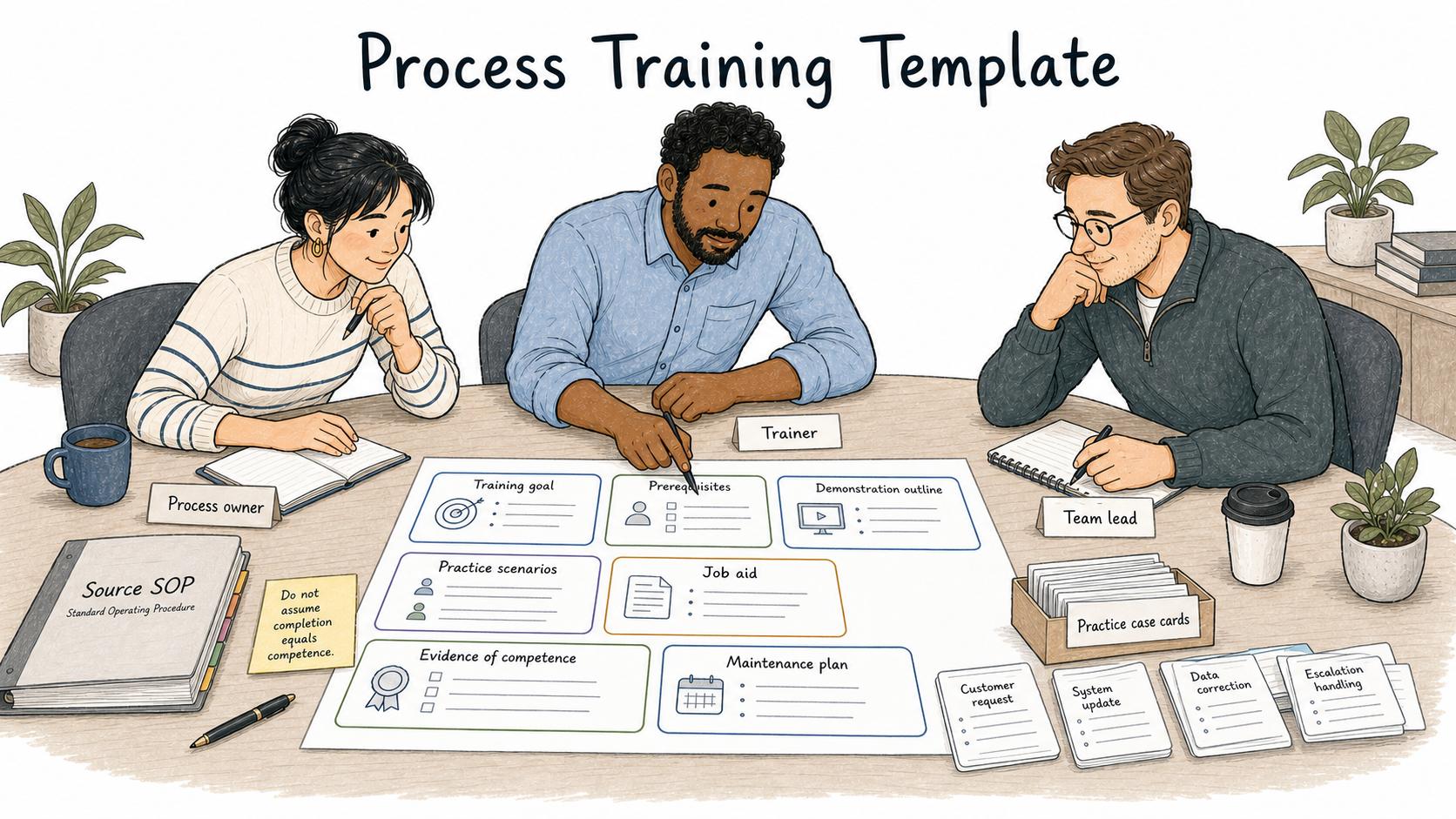
Use this prompt to draft a focused training plan from an existing workflow.
## Process Training Plan

**Glossary term:** Process Training
**Source:** Trails Glossary — trails.so/glossary/process-training

---

### 01. Create a process training plan

"Create a process training plan for [process] used by [team/role].

Context:
- Process owner: [owner]
- Learners: [roles]
- Tools used: [systems, forms, documents]
- Source documentation: [SOP, guide, checklist, workflow map]
- Common failure modes: [missing inputs, wrong approval, duplicate work, unclear handoff]
- Risk level: [low/medium/high]

Include:
1. Training goal stated as a work outcome
2. Prerequisites learners need before training
3. Short explanation of why the process exists
4. Demonstration outline using the real workflow
5. Practice scenarios, including at least two exceptions
6. Job aid or checklist learners can use during real work
7. Evidence required to confirm competence
8. Maintenance plan for updating the training when the process changes

Keep the plan practical. Do not assume completion equals competence."
Example: onboarding a support refund process
For a support refund process, training should move from policy to practice quickly:
- Explain when a refund request is eligible, ineligible, or uncertain.
- Show the source SOP and decision checklist.
- Demonstrate the workflow in the support tool and billing system.
- Practice approved, denied, partial, duplicate, and manager-review cases.
- Review the learner's decision, system updates, and customer response.
- Require a supervised live case before signoff and give the learner a job aid for future refund decisions.
The practical test is whether the learner can make the right decision, record the right evidence, and know when to escalate.
Common mistakes
The first mistake is turning process training into a content dump. People learn a workflow faster when they see the shape of the work, practice the decisions, and have support available at the point of work.4
The second mistake is separating training from the process owner. If no one owns updates, the training quietly drifts as tools, roles, forms, and approval rules change.
The third mistake is measuring only completion. A completion record is useful for administration, but it does not prove the employee can perform the process. For important workflows, add a competence check tied to real work.
How Trails helps
Trails helps teams turn real workflows into process training assets. A process owner can capture the workflow as they perform it, turn it into a polished step-by-step guide, and create an AI-narrated video version for training or sharing.
That keeps training close to the work. When the workflow changes, the team can update the guide instead of rebuilding a large training module from scratch.
Frequently asked questions
Is process training the same as SOP training?
No. SOP training teaches people to follow a specific documented procedure. Process training is broader: it can include tool walkthroughs, practice scenarios, role handoffs, decision points, and proof that someone can perform the workflow.
Who should own process training?
The process owner should own the accuracy of the training. Learning, enablement, operations, or team leads may help design and deliver it, but the process owner should keep it aligned with the real workflow.
How often should process training be updated?
Update it whenever the workflow, tool, approval rule, role ownership, policy, or common exception changes. For critical workflows, schedule a periodic review even if no one reports a change.
Sources
- 1
Taylor & Francis. How to Maximize the Impact of Workplace Training. www.tandfonline.com/doi/full/10.1080/1359432X.2024.2319082.
- 2
Quality Improvement Center for Workforce Development. Training Transfer. www.qic-wd.org/umbrella-summary/training-transfer.
- 3
Kirkpatrick Partners. The Kirkpatrick Model. www.kirkpatrickpartners.com/the-kirkpatrick-model/.
- 4
70:20:10 Institute. The 70:20:10 Model. www.702010institute.com/702010-model/.