
Glossary
Process Bottleneck
 ChatGPT
 Perplexity
 Gemini
 Claude
What is a process bottleneck?
A process bottleneck is the step, role, queue, rule, or tool that limits how much work can move through a workflow. It slows the whole system even when every other step looks efficient.
A bottleneck isn’t always the loudest complaint or the step people dislike most. It is the point where work waits, piles up, gets reworked, or can’t move forward at the same pace as the rest of the process.
Why process bottlenecks matter
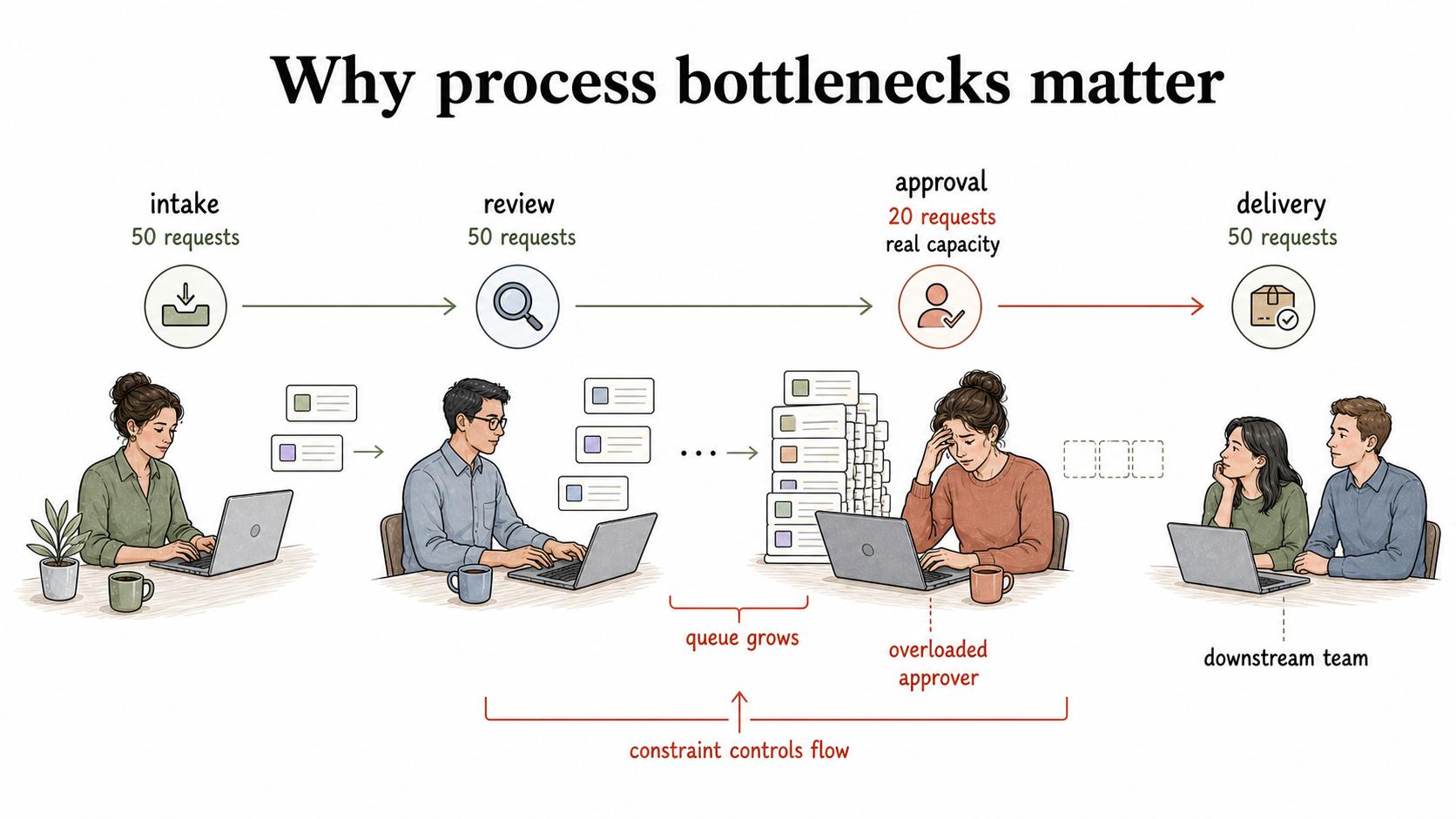
Process bottlenecks matter because they set the real capacity of the workflow. If intake, review, and delivery can each handle 50 requests a week, but one approval step can only handle 20, the process still behaves like a 20-request process.
That is why broad cleanup can disappoint teams. They polish every visible step, but the queue still grows in front of one overloaded approver, unclear handoff, or required system update. Everyone gets busier while the customer, employee, or downstream team keeps waiting.
The practical job is to find the constraint that controls flow, then decide whether to remove it, reduce it, protect it from low-value work, or redesign the process around it.
What a process bottleneck looks like
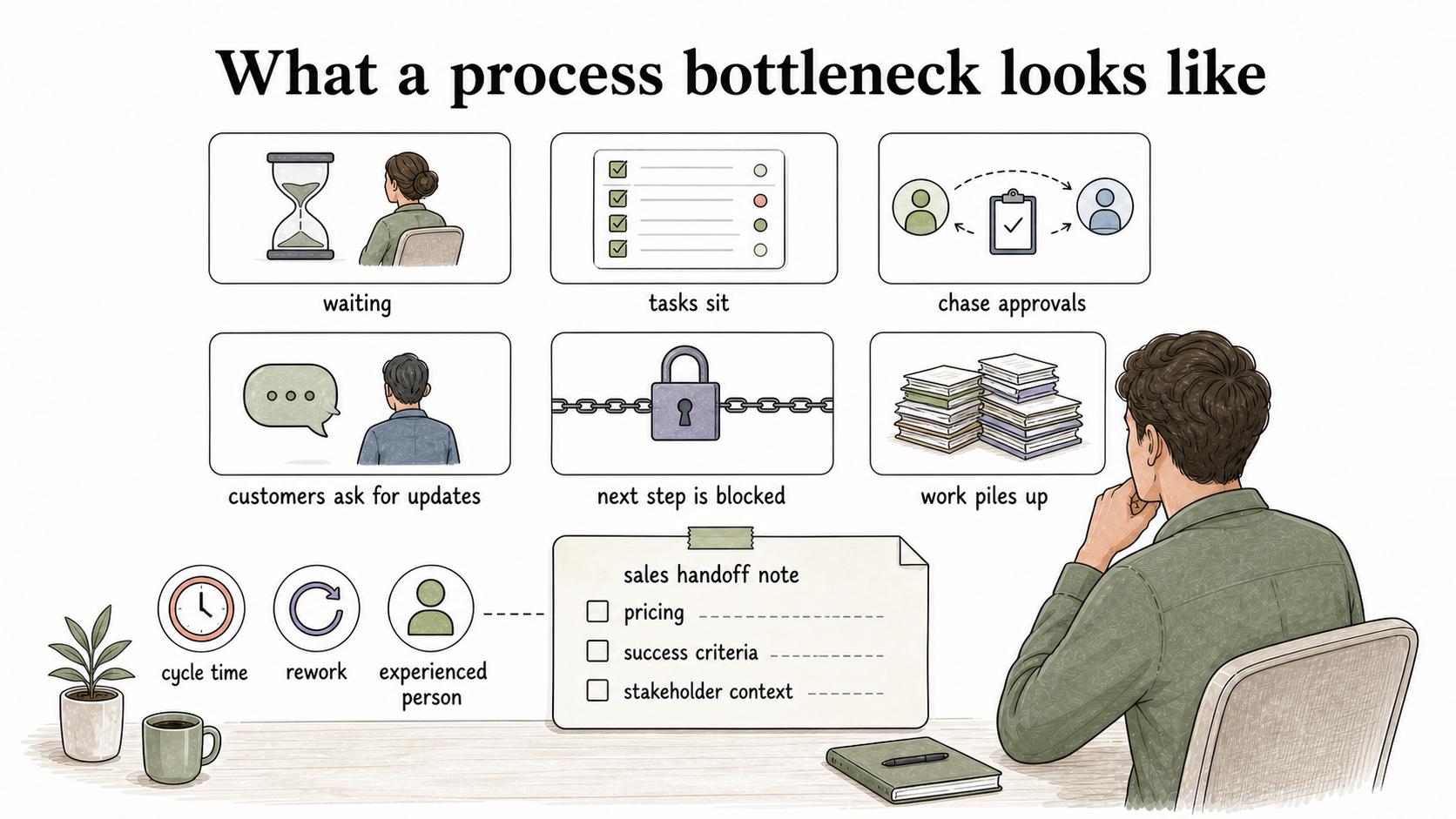
A bottleneck usually shows up as waiting before it shows up as failure. Tasks sit in a status for too long. People chase approvals. Customers ask for updates. A team finishes its part quickly, then loses momentum because the next step is blocked.
Common signals include:
- Work piles up before one step or owner.
- Cycle time is long even when task time is short.
- The same person is tagged for routine decisions.
- Downstream teams wait while upstream work looks “done.”
- Rework keeps returning to the same part of the workflow.
- The process only works when one experienced person is available.
For example, a customer onboarding process may look slow because customers take time to schedule training. Discovery might reveal a different bottleneck: implementation cannot start until sales completes a handoff note, and those notes often arrive missing pricing, success criteria, or stakeholder context.
How to diagnose the real bottleneck
Start with evidence, not frustration. The most annoying step may still be a problem, but it may not be the step that limits throughput.
A useful diagnostic compares where work waits, where work gets touched, and where work returns for correction. If the task takes 15 minutes but waits three days for review, the bottleneck is probably review capacity, review rules, or unclear readiness criteria.
Ask one hard question: if this step improved tomorrow, would the whole process move faster? If not, it may be a pain point rather than the bottleneck.
| Bottleneck cause | What it feels like | Better first fix |
|---|---|---|
| Capacity limit | One team or person is always behind | Rebalance work, cross-train, automate routine steps, or reduce low-value demand |
| Poor inputs | Work keeps coming back incomplete | Tighten intake, define “ready,” add examples, or make required fields explicit |
| Decision delay | Work waits for approval or judgment | Create thresholds, delegate routine decisions, or document decision rules |
| Tool friction | People copy data, switch systems, or wait on slow updates | Remove duplicate entry, improve templates, or automate the handoff |
| Hidden rework | Items look complete, then reopen later | Document acceptance criteria and expose quality checks earlier |
The tradeoff is that removing one bottleneck often reveals the next one. That does not mean the fix failed. It means the workflow’s constraint moved, which is normal when a process gets healthier.
How to fix a process bottleneck
The fix should match the cause. If the issue is capacity, a checklist won’t solve it. If the issue is unclear input, adding another person may only spread the confusion.
Strong bottleneck fixes usually change one of four things:
- The rule: Who can approve, when a review is required, or what qualifies as complete.
- The handoff: What information moves to the next owner and where it is captured.
- The workload: Which work is prioritized, batched, automated, or removed.
- The documentation: How people know the expected path, exceptions, and decision criteria.
Avoid asking people to simply work faster. That may clear the queue for a week, but it does not change the system. A durable fix changes the process design so the same delay is less likely to return.
Bottleneck diagnostic prompt
Use this AI-ready prompt to turn workflow notes into a bottleneck hypothesis:
## Bottleneck Diagnostic

**Glossary term:** Process Bottleneck
**Source:** Trails Glossary — trails.so/glossary/process-bottleneck

---

### 01. Identify the likely process bottleneck

"Analyze the [process] used by [team].
Goal: identify the most likely process bottleneck and one low-risk fix.
Notes: [paste process map, ticket examples, wait times, interview notes, or observed workflow]

Return:
- The process trigger and end point
- Each major step, owner, input, and output
- Where work waits the longest
- Where rework returns most often
- Whether the likely cause is capacity, poor input, decision delay, tool friction, or hidden rework
- The strongest evidence for the bottleneck
- One change to test first
- What metric should improve if the diagnosis is right
- What new bottleneck might appear after the fix"
Treat the result as a hypothesis. Validate it with people doing the work and with any queue, cycle-time, or ticket data you have.
Documentation takeaway
A bottleneck is easier to fix when the workflow is visible. A process map can show where work waits. An SOP can clarify ownership and decisions. A checklist can keep bad inputs from creating rework. A handoff guide can make the next step easier to start.
After a bottleneck fix, update the documentation immediately. If the new approval threshold, intake rule, or handoff expectation lives only in a meeting note, the old process will come back under pressure.
How Trails helps
Trails helps teams capture a workflow as someone performs it, then turn that workflow into a polished step-by-step guide. When a bottleneck fix changes a handoff, checklist, or approval path, Trails can document the new process and share it as a guide or AI-narrated training video.
That matters because bottleneck fixes only stick when the new way of working is easy to find, learn, and repeat.