
Glossary
People Process Technology Framework
 ChatGPT
 Perplexity
 Gemini
 Claude
What is the people process technology framework?
The people process technology framework is a way to diagnose work by looking at three connected parts: the people doing the work, the process they follow, and the technology that supports it. It helps teams avoid treating every operational problem as a tool problem, training problem, or process problem by default.
It is often shortened to the PPT framework. Its value is not the three labels; it is the discipline of checking whether the operating system is aligned. A strong process can still fail when ownership is unclear. Good software can still frustrate people when the workflow is poorly designed. Training can still disappoint when the tool makes the right behavior hard.
What each part means
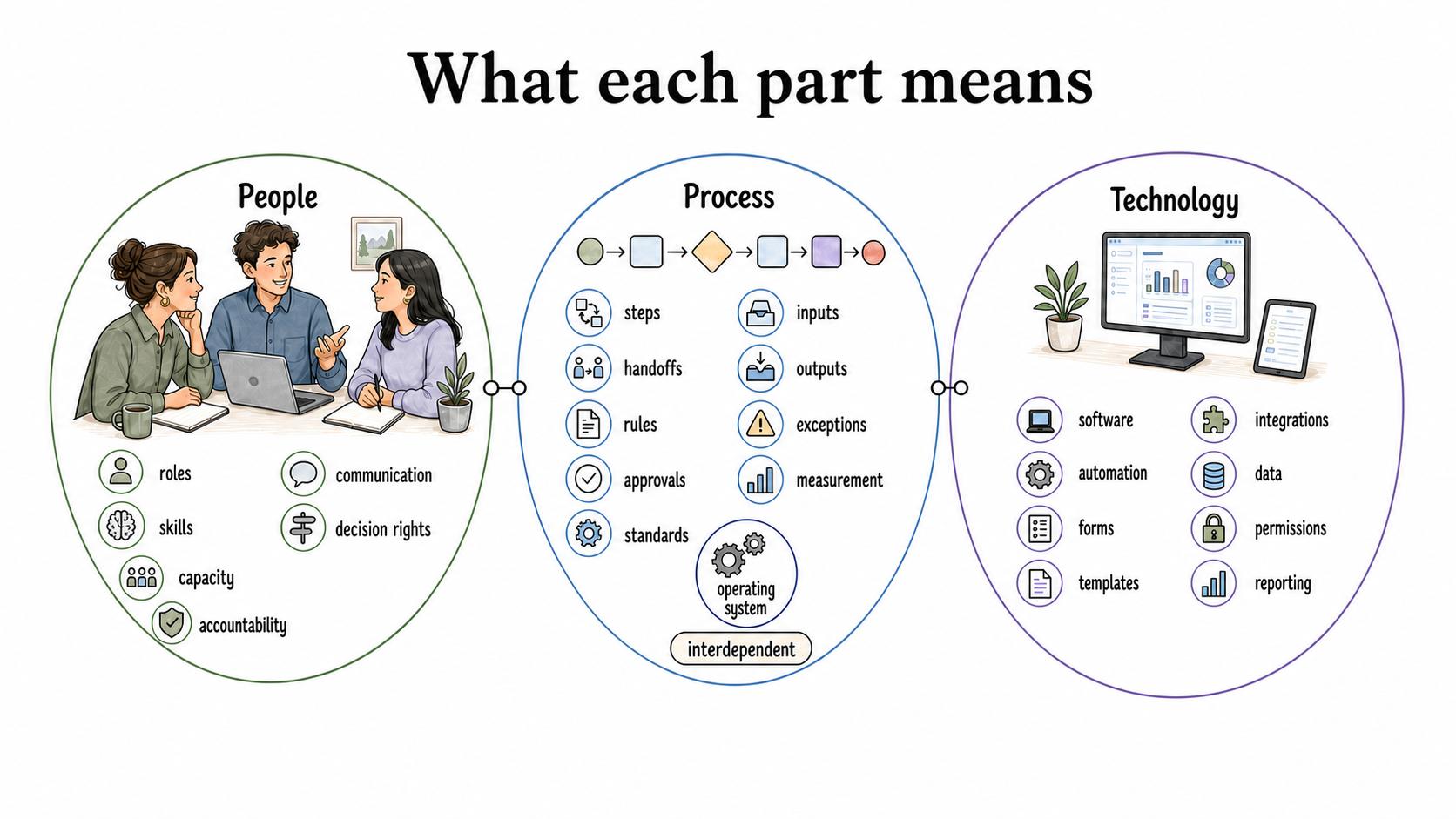
People refers to the humans involved in the work: roles, skills, capacity, incentives, accountability, communication, and decision rights. A people problem might be unclear ownership, lack of training, overloaded teams, or inconsistent expectations.
Process refers to the workflow: steps, handoffs, rules, approvals, standards, inputs, outputs, exceptions, and measurement. A process problem might be duplicated work, missing handoffs, unclear decision points, or a workflow that only works when one expert remembers the next step.
Technology refers to the systems and tools that support the work: software, automation, forms, templates, integrations, data, permissions, and reporting. A technology problem might be missing data, tool friction, broken integrations, poor visibility, or a system that does not match the actual workflow.
The framework works because these parts are interdependent. Changing one usually changes the others. Prosci describes the PPT framework as a way to assess whether people, process, and technology strategies are balanced during organizational process and technology change. 1
Why teams use the framework
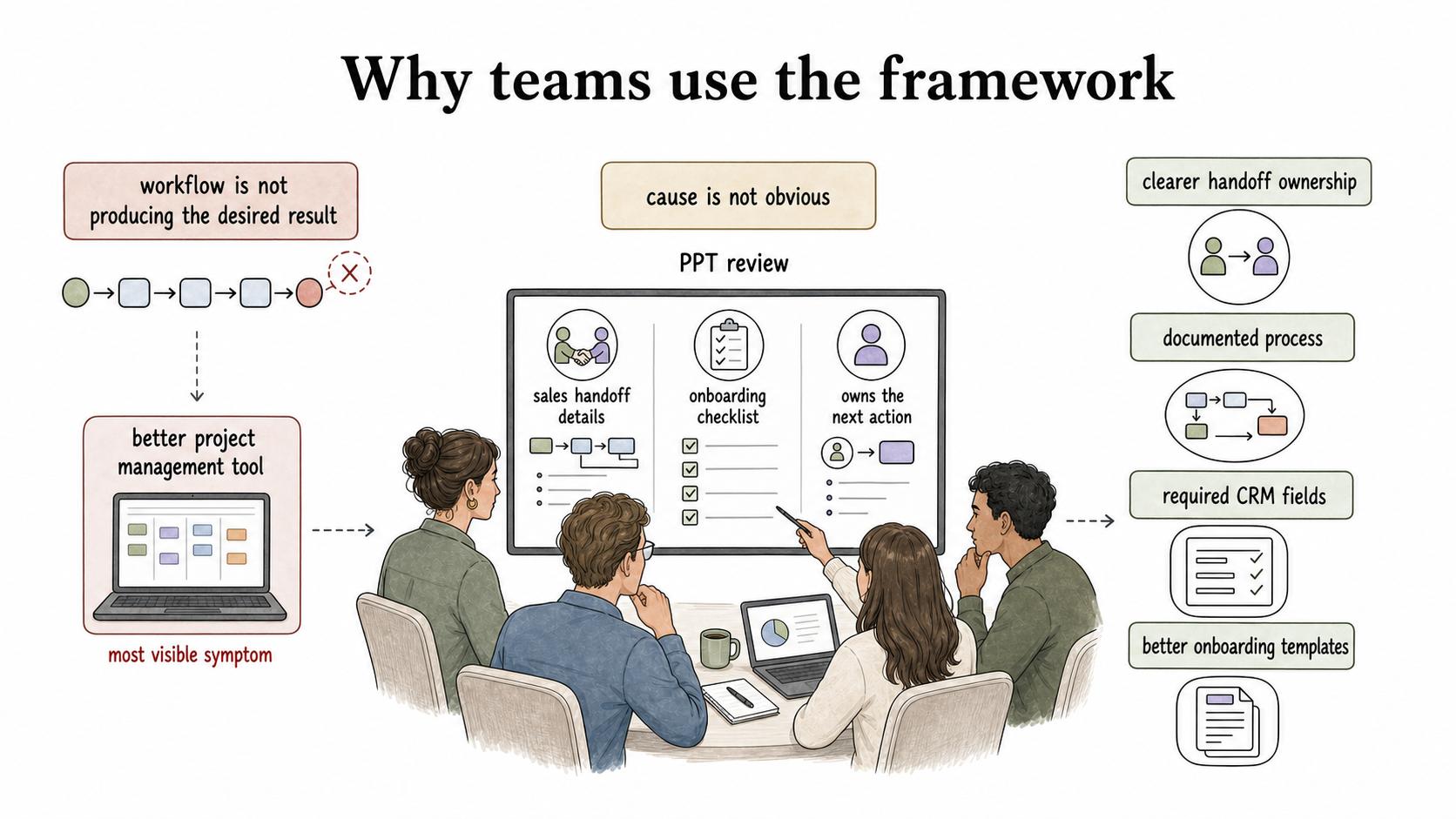
Teams use the people process technology framework when a workflow is not producing the desired result and the cause is not obvious. It creates a more disciplined diagnosis before the team buys software, rewrites an SOP, reorganizes roles, launches training, or automates a broken workflow.
For example, a customer onboarding team may miss kickoff deadlines. The easy diagnosis is "we need a better project management tool." A PPT review might show something more specific: sales does not capture required handoff details, the onboarding checklist is inconsistent, and the current workspace does not show who owns the next action. The improvement may require clearer handoff ownership, a documented process, required CRM fields, and better onboarding templates.
The framework slows the team down just enough to stop solving the most visible symptom.
Diagnostic questions for each area
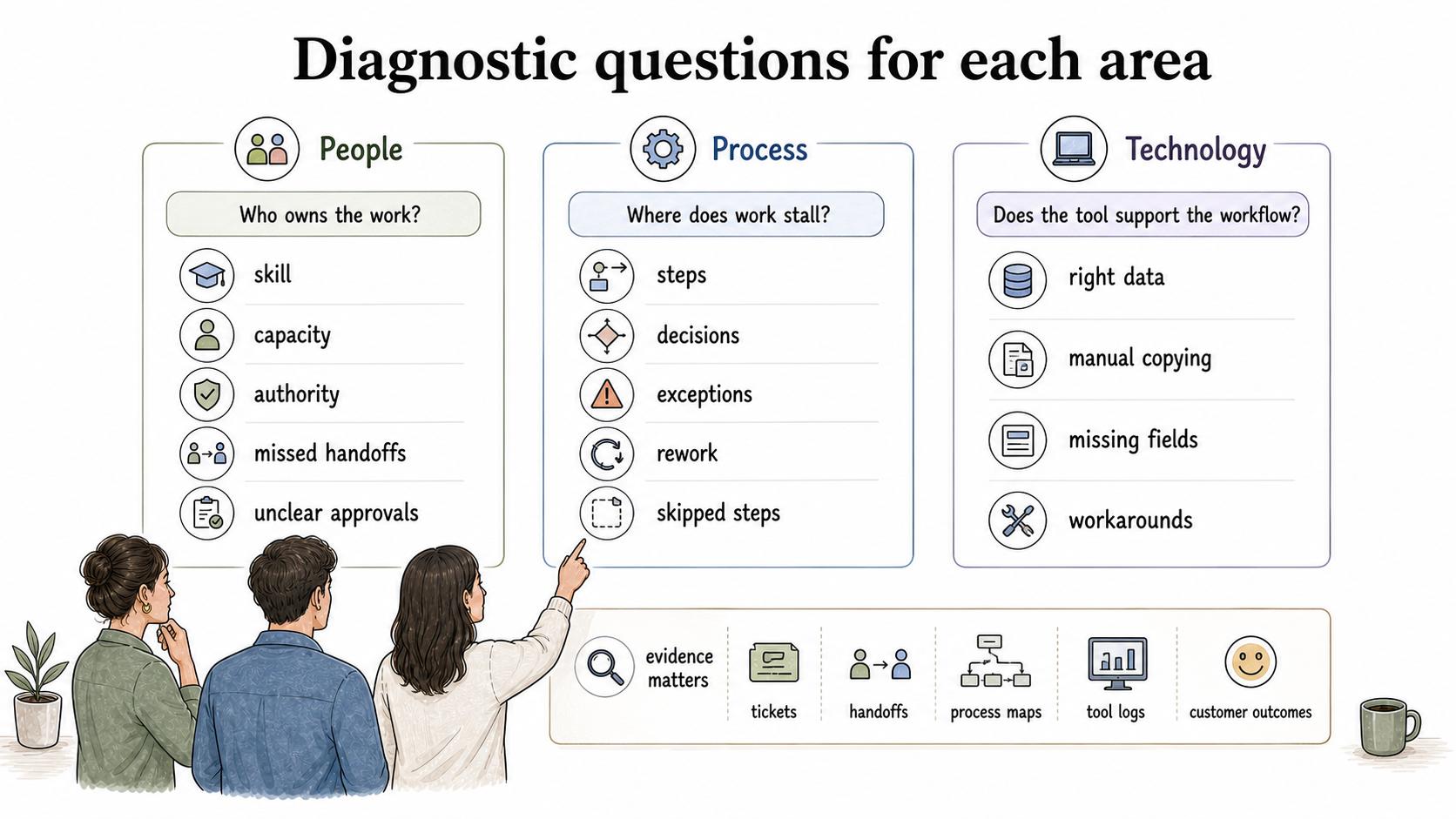
Use the framework as a set of questions, not as a slide label.
| Area | Diagnostic questions | Common evidence |
|---|---|---|
| People | Who owns the work? Do they have the skill, capacity, context, and authority to do it? | Repeated questions, missed handoffs, unclear approvals, overloaded roles |
| Process | What are the steps, decisions, exceptions, and success criteria? Where does work stall? | Rework, skipped steps, inconsistent outputs, undocumented exceptions |
| Technology | Does the tool support the workflow? Is the right data available at the right moment? | Manual copying, duplicate systems, missing fields, poor reporting, workarounds |
The evidence matters. Without it, the framework becomes a brainstorming exercise. Look at tickets, handoffs, recordings, process maps, tool logs, customer outcomes, or examples of completed work before deciding which category is failing. ITIL 4 uses a similar holistic lens for service management, explicitly considering organizations and people, information and technology, partners and suppliers, and value streams and processes together. 2
How to apply the framework
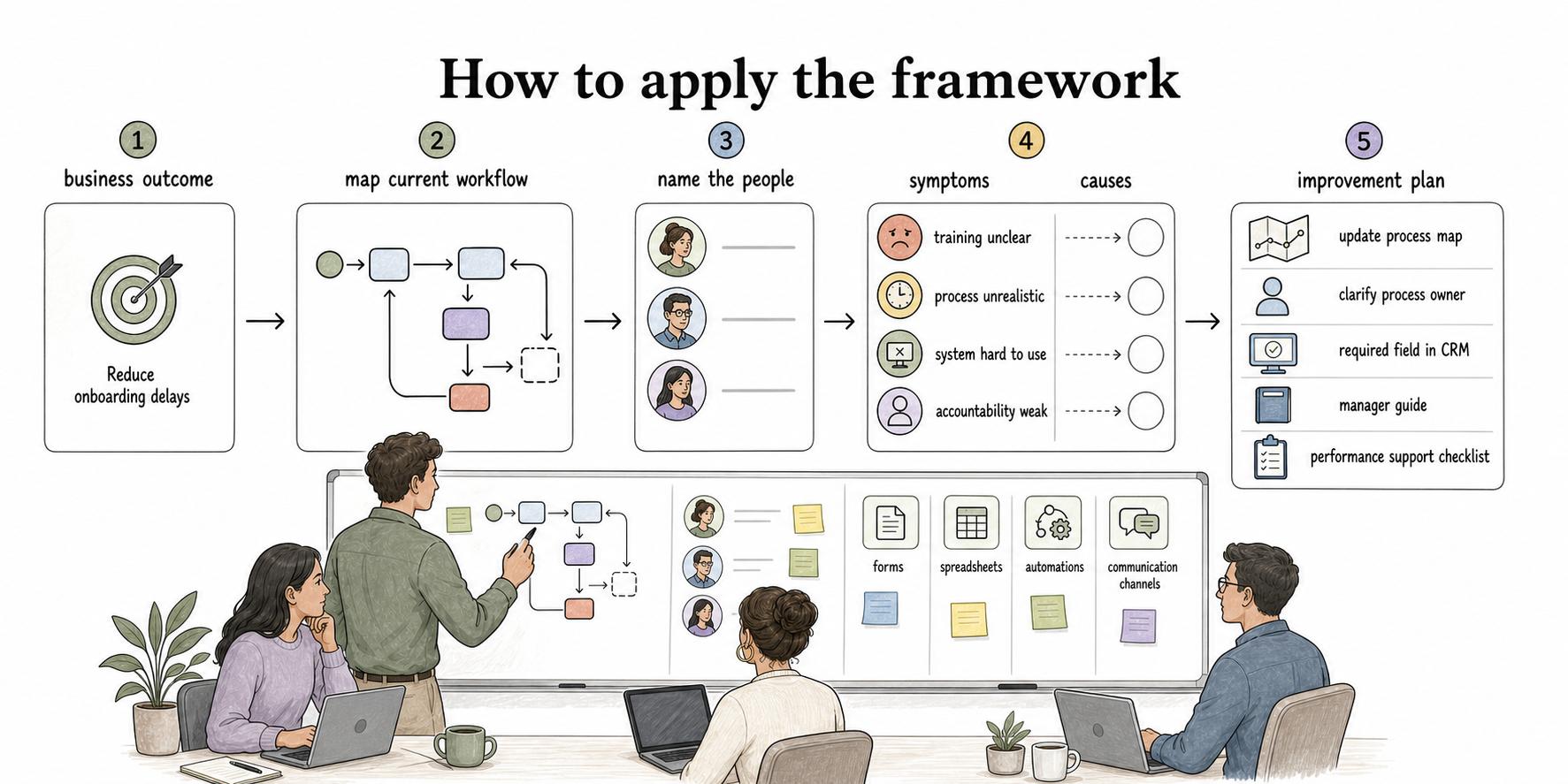
Start with the business outcome, not the tool or team complaint. "Reduce onboarding delays" is a better starting point than "replace our onboarding software." Then map the current workflow and name the people who touch it. Identify the technology used at each step, including forms, spreadsheets, automations, and communication channels.
From there, separate symptoms from causes. If managers are not following a new process, is the training unclear, the process unrealistic, the system hard to use, or the accountability weak? The answer may involve more than one category.
A practical improvement plan should name the changes in all three areas. For example: update the process map, clarify the process owner, add a required field in the CRM, create a manager guide, and publish a short performance support checklist. That is more useful than declaring "we need better adoption."
AI-ready diagnostic prompt
Use this prompt to analyze a workflow or change initiative:
## People Process Technology Diagnostic Prompt

**Glossary term:** People Process Technology Framework
**Source:** Trails Glossary — trails.so/glossary/people-process-technology-framework

---

### 01. Analyze the workflow or change

"Analyze [workflow or change] using the people process technology framework. For people, process, and technology, identify what is working, what is failing, what evidence supports that diagnosis, and which change should happen first. Keep the recommendations practical, and call out dependencies where a tool change requires process documentation, training, or role clarity."
The final answer should include an order of operations. Many teams can identify all three issues; the harder work is deciding what must change first.
Common mistakes
One mistake is treating technology as the strategy. Tools can make a well-designed workflow easier, but they rarely fix unclear ownership or weak decision rules by themselves. Deloitte's human-centric change guidance makes the same point from the people side: transformation work needs employee voice, feedback, and upskilling as well as new systems. 3
Another mistake is using the framework too evenly. Not every situation needs equal work in all three areas. Sometimes the process is sound and the tool is the bottleneck. Sometimes the tool is fine and the team has no shared definition of done. The framework should guide diagnosis, not force symmetry.
A third mistake is documenting the process after the technology is already configured. Documentation should shape implementation. If the workflow is only written down after rollout, teams often end up documenting workarounds instead of designing the work.
Documentation takeaway
The people process technology framework becomes useful when it turns into concrete operating artifacts: role definitions, process maps, SOPs, tool guides, templates, training materials, and support checklists. Documentation is the bridge between process design and the people expected to follow it.
How Trails helps
Trails helps teams capture the process side of a change as work actually happens. Teams can turn workflows into polished step-by-step guides, create AI-narrated video versions for training or sharing, and use those guides to support people adopting new tools or updated processes.
For the rollout stage, explore how Trails Assistant brings training into the flow of work, so people can reference the new process while using the technology.
Sources
- 1
Prosci. People, Process, Technology: A Framework for Transformation. www.prosci.com/blog/people-process-technology.
- 2
PeopleCert. ITIL 4 Foundation. www.peoplecert.org/browse-certifications/it-governance-and-service-management/ITIL-1/itil-4-foundation-2565.
- 3
Deloitte. Next-level human-centric change management. www.deloitte.com/ch/en/services/consulting/research/next-level-human-centric-change-management.html.