
Glossary
Knowledge Management Software
 ChatGPT
 Perplexity
 Gemini
 Claude
What is knowledge management software?
Knowledge management software helps teams capture, organize, share, find, and maintain important knowledge. It gives people a system for preserving what they know about customers, processes, policies, products, systems, decisions, and repeated work.
The category includes internal wikis, knowledge bases, document management systems, help centers, AI knowledge tools, intranets, and process documentation software. The right tool depends on whether the team's main problem is storing knowledge, finding knowledge, trusting knowledge, or creating knowledge in the first place.
Why knowledge management software matters
Every team has knowledge. The real question is whether that knowledge is usable. If the answer to a common question lives in one person's head, an old chat thread, a forgotten folder, or a ticket from six months ago, the organization has knowledge but not knowledge management. McKinsey Global Institute has estimated that interaction workers spend nearly 20 percent of the workweek looking for internal information or tracking down colleagues who can help.1
Knowledge management software reduces dependency on memory and informal sharing. APQC describes structured knowledge transfer as pinpointing, capturing, and passing on valuable tacit knowledge stored in experts' and other knowledgeable people's heads.2
It can support:
- Faster onboarding for new employees
- More consistent answers from support and customer-facing teams
- Easier handoffs when roles change
- Better reuse of process, policy, and product knowledge
- Fewer repeated questions in chat
- Less operational risk when experienced employees are unavailable
The goal is not to centralize every possible note. The goal is to make important knowledge easier to capture, trust, and use.
What knowledge management software should do
A useful KM system usually has four jobs: capture, organize, retrieve, and maintain.
| Job | What it means | Common failure mode |
|---|---|---|
| Capture | Turn tacit knowledge into usable content | People are too busy to document what they know |
| Organize | Give knowledge structure, ownership, and context | Pages pile up without a clear system |
| Retrieve | Help people find the right answer quickly | Search returns too much or the wrong result |
| Maintain | Keep knowledge accurate over time | Old pages look authoritative but are no longer true |
Most tools are strong at one or two of these jobs and weak at another. A wiki may store knowledge well but depend on strong habits for capture and maintenance. An AI search layer may improve retrieval, but it still needs trustworthy source material. Microsoft's Work Trend Index reported that 62 percent of surveyed workers struggled with too much time spent searching for information in their workday.3
Types of knowledge management software
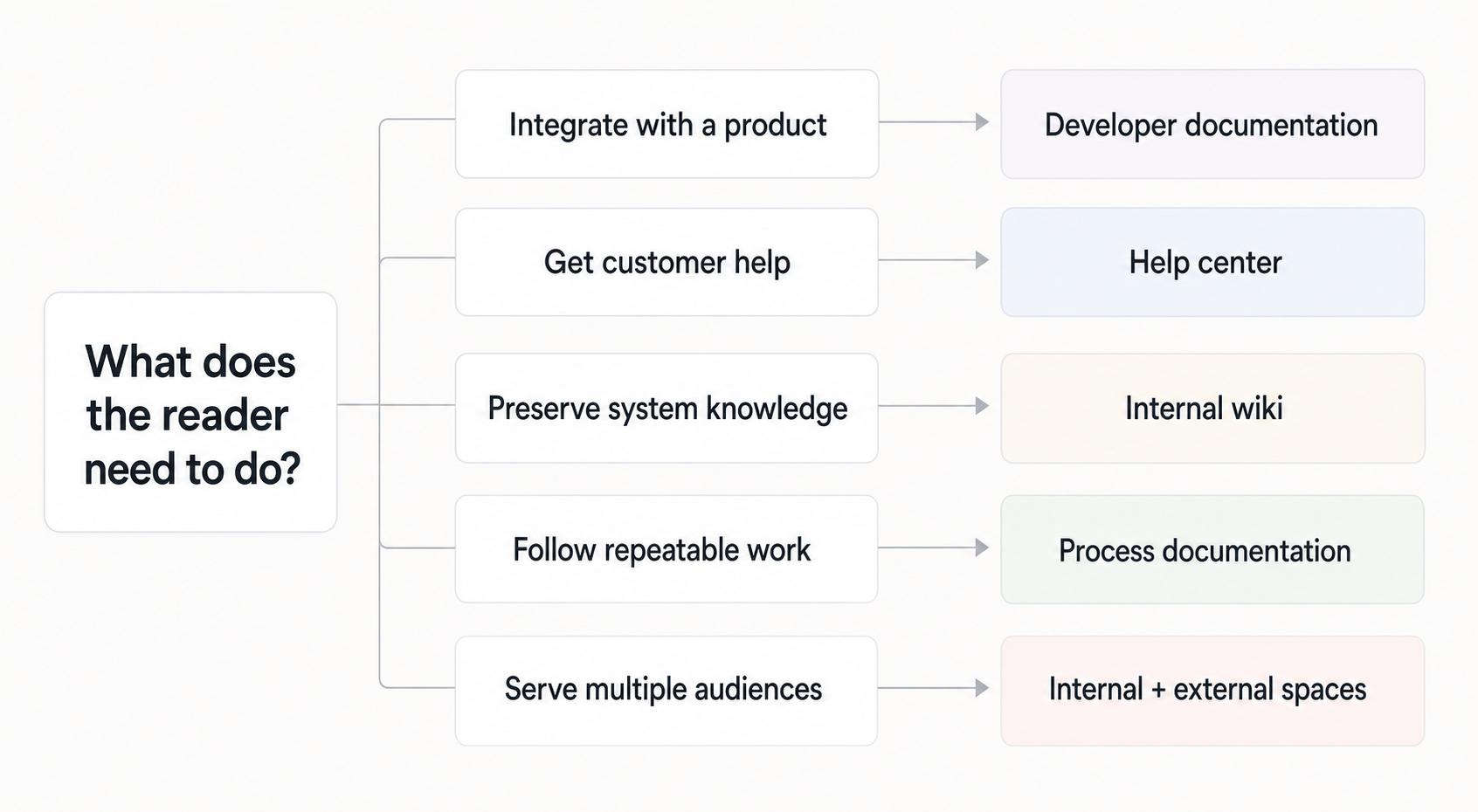
Knowledge management software is not one product category. Common types include:
- Internal wikis for company knowledge, decisions, and team references
- Knowledge bases for support articles and repeatable answers
- Document management systems for controlled files and formal documents
- Intranets for company-wide communication and resources
- Help centers for customer-facing self-service
- Process documentation tools for step-by-step workflows and SOPs
- AI knowledge tools for search, summarization, and answer retrieval
A team documenting product policies may need a knowledge base. A team documenting how work gets done may need process documentation. A company managing formal contracts or compliance files may need document management. The overlap is real, but the primary use case should drive the choice.
How to choose knowledge management software
Start by naming the pain clearly. We need knowledge management is too broad to guide a buying decision.
Use this decision rule:
- If people cannot find existing answers, prioritize search, structure, and permissions.
- If people do not trust existing answers, prioritize ownership, review dates, and version history.
- If people do not create documentation, prioritize capture speed and templates.
- If knowledge lives inside repeatable work, prioritize workflow capture and step-by-step guides.
- If customers need self-service answers, prioritize publishing, analytics, and support workflows.
The common mistake is buying a better library when the team needs a better capture habit. A beautiful knowledge base still fails if the most important knowledge never makes it into the system.
Knowledge management prompt
Use this prompt to turn scattered knowledge into a structured draft:
## Knowledge Management Drafting Prompt

**Glossary term:** Knowledge Management Software
**Source:** Trails Glossary — trails.so/glossary/knowledge-management-software

---

### 01. Organize scattered knowledge

"Organize knowledge about [topic, process, policy, customer issue, or system] for [audience]. Include: what the reader needs to know, when they should use it, key definitions, step-by-step actions if relevant, examples, exceptions, owner, related resources, and review cadence. Separate reference information from procedural steps so the page is easy to scan."
This works best when paired with a clear owner. A page without ownership becomes stale quietly. ISO 9001 guidance treats documented information as something organizations should control, update, protect, and make available where it is needed.4
Documentation takeaway
Knowledge management succeeds when documentation stays close to the work. If people have to leave the workflow, reconstruct what happened, and write a polished article from scratch, capture becomes a chore. That is why many KM systems are full of old reference pages but missing the practical details people need to do the job.
For operations, support, onboarding, and IT teams, some of the highest-value knowledge is procedural: how to complete a task, handle an exception, or make a decision consistently. That knowledge belongs in guides, checklists, examples, and troubleshooting paths, not only in broad reference articles.
How Trails helps
Trails is useful for the workflow side of knowledge management. It captures a process as someone performs it, turns that workflow into a polished step-by-step guide, and can create an AI-narrated video version for training or sharing.
It should not be treated as a replacement for every KM use case. A company may still need a wiki, help center, intranet, or document management system. But when the missing knowledge is how this work actually gets done, Trails helps teams capture and maintain that knowledge with less manual writing.
FAQ
What is the difference between knowledge management software and a knowledge base?
A knowledge base is one type of knowledge management software. Knowledge management software is the broader category and can include wikis, intranets, document systems, help centers, AI search tools, and process documentation tools.
Who uses knowledge management software?
Customer support, operations, HR, IT, enablement, sales, product, and leadership teams can all use it. The audience may be internal employees, customers, partners, or a specific functional team.
Why do knowledge management systems fail?
They usually fail because knowledge is hard to capture, ownership is unclear, or stale content looks trustworthy. Tooling helps, but the system also needs habits for creation, review, and cleanup.
Comparing tools? See the process documentation software comparison.
Sources
- 1
McKinsey Global Institute. The social economy. McKinsey & Company. www.mckinsey.com/industries/technology-media-and-telecommunications/our-insights/the-social-economy. Accessed June 16, 2026.
- 2
APQC. Structured Knowledge Transfer. APQC. www.apqc.org/resource-library/resource-listing/structured-knowledge-transfer. Accessed June 16, 2026.
- 3
Microsoft. Work Trend Index: Will AI Fix Work?. Microsoft, 2023. www.microsoft.com/en-us/worklab/work-trend-index/will-ai-fix-work. Accessed June 16, 2026.
- 4
International Organization for Standardization. Guidance on the requirements for documented information of ISO 9001:2015. ISO. www.iso.org/iso/documented_information.pdf. Accessed June 16, 2026.