
Glossary
IT Documentation Software
 ChatGPT
 Perplexity
 Gemini
 Claude
What is IT documentation software?
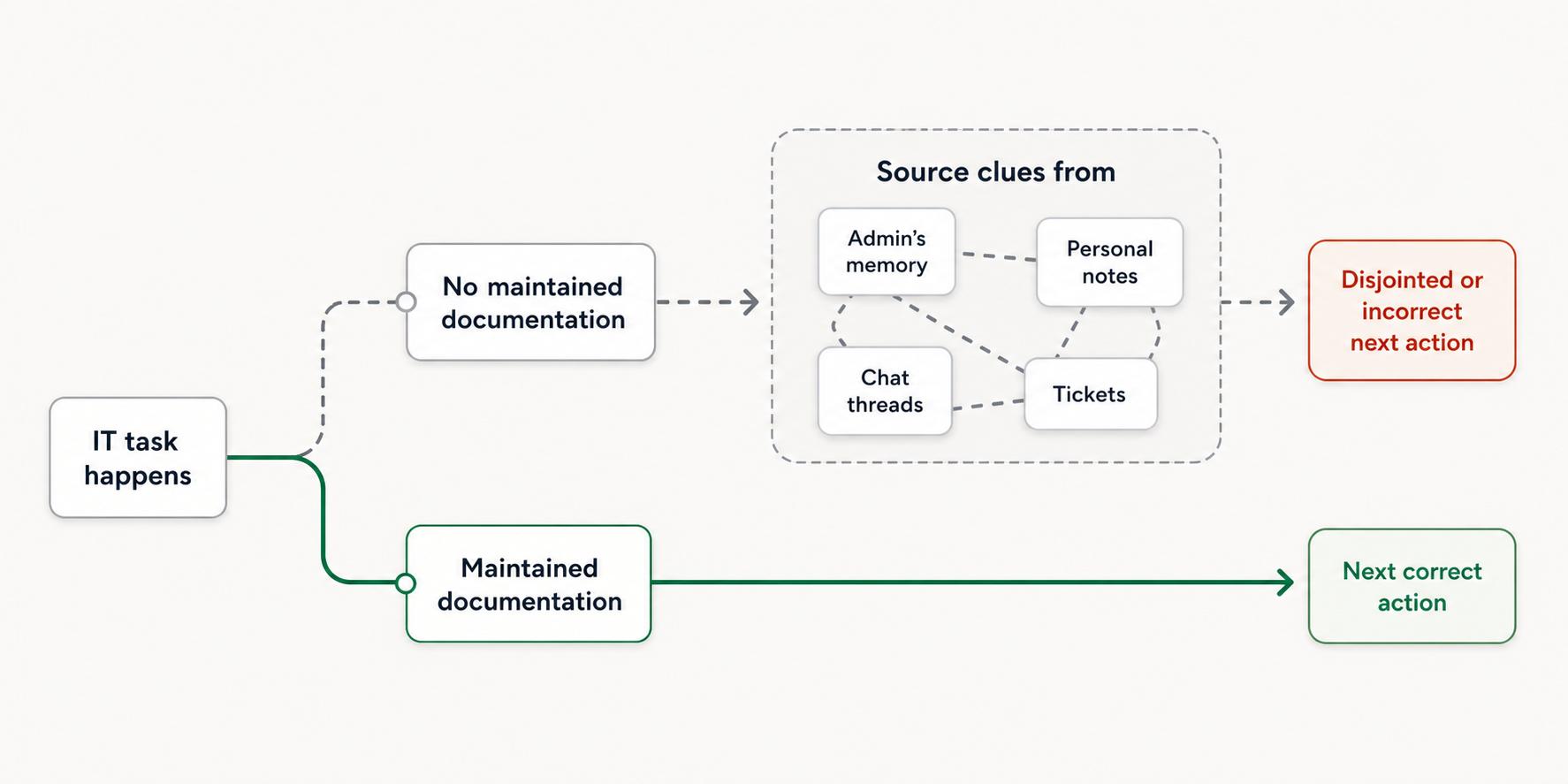
IT documentation software helps teams document the systems, infrastructure, applications, procedures, and support workflows they rely on. It gives technical knowledge a maintained home instead of leaving it scattered across tickets, chat threads, personal notes, and one administrator's memory.
The category can include internal wikis, knowledge bases, runbook tools, SOP tools, network documentation platforms, password and asset documentation systems, and process documentation software. The useful question is not which label sounds most complete. It is what kind of IT knowledge the team needs to preserve and how that knowledge will be used.
What IT documentation software is used for
IT work creates knowledge that decays quickly when it stays informal. A server migration, access request, incident response, VPN setup, or recurring troubleshooting flow may be clear to the person who handled it last week and opaque to the teammate repeating it next month. McKinsey Global Institute has estimated that interaction workers spend nearly 20 percent of the workweek looking for internal information or tracking down colleagues who can help.1
IT documentation software gives that knowledge a maintained place to live. Common uses include:
- System architecture notes and dependency maps
- Device, network, and application documentation
- Internal IT procedures and runbooks
- Troubleshooting guides for recurring issues
- Access management and escalation steps
- Onboarding documentation for new IT staff
- End-user help articles for common requests
Security frameworks make some of this scope concrete: NIST CSF 2.0 includes maintained inventories of hardware, software, services, systems, and network data flows as asset-management outcomes.2
The best IT documentation is more than a library of facts. It helps someone take the next correct action under pressure, whether they are resolving a ticket, rotating credentials, restoring a service, or handing work to another team. NIST's incident response guidance says documented procedures should explain how technical and operating processes are performed, and can be tested or used to train new personnel.3
How IT documentation software differs from a basic wiki
A wiki can be a good starting point. IT teams usually outgrow plain pages when documentation has to support operational work, not just store reference notes. The difference shows up in structure, freshness, and fit with the way work happens.
| Need | Basic wiki | IT documentation software |
|---|---|---|
| Storing reference notes | Usually strong | Usually strong |
| Capturing procedures as work happens | Often manual | Stronger when workflow capture is supported |
| Keeping ownership clear | Depends on discipline | Often includes owners, tags, or review workflows |
| Finding troubleshooting steps quickly | Can become messy | Better when search, templates, and categories are intentional |
| Supporting audits or handoffs | Possible, but inconsistent | Stronger when repeatable procedures are documented consistently |
The risk with a wiki is not that it lacks pages. The risk is that it collects pages nobody trusts. IT documentation software should make the most important knowledge easier to create, find, and keep current. DORA's 2023 State of DevOps research found that high-quality documentation increases the effectiveness of technical capabilities on organizational performance.4
What to document first
Teams often stall because they try to document everything. Start with the work that creates the most interruption or risk.
Prioritize processes where at least one of these is true:
- Only one person knows how to do it
- Mistakes cause downtime, security risk, or customer disruption
- The process happens often enough to waste time when rediscovered
- A new hire would need help doing it correctly
- The steps are scattered across tickets, screenshots, and chat messages
A useful first set might include laptop provisioning, employee offboarding, password reset escalation, software access requests, common network troubleshooting, backup verification, and incident handoff. These pages are rarely glamorous, but they reduce daily friction quickly.
How to choose IT documentation software
The best tool depends on whether the team needs to preserve reference knowledge, procedural knowledge, asset knowledge, or support knowledge.
Use this decision rule:
- Choose a knowledge base when your main need is searchable internal articles.
- Choose a runbook or SOP tool when your main need is repeatable operational procedures.
- Choose an IT asset documentation platform when your main need is structured system, client, device, or network records.
- Choose process documentation software when your main need is capturing how work is actually done and turning it into guides others can follow.
The common mistake is buying for storage when the real problem is capture. If busy IT staff have to stop, reconstruct a workflow from memory, and format it by hand, documentation will keep trailing behind reality.
IT documentation template
Use this compact prompt to turn a recurring IT workflow into a usable draft:
## IT Documentation Template Prompt

**Glossary term:** IT Documentation Software
**Source:** Trails Glossary — trails.so/glossary/it-documentation-software

---

### 01. Draft IT documentation

"Create IT documentation for [process or system]. The audience is [IT staff, support team, end users, or admins]. Include: purpose, when to use it, prerequisites, access or permissions needed, step-by-step procedure, expected result, troubleshooting notes, escalation path, owner, and review cadence. Write it clearly enough that a trained teammate could follow it without asking the original owner."
The template works best when paired with screenshots, real system names, and the exception cases people usually forget to mention.
How Trails helps
Trails is useful when the missing documentation is a repeatable workflow, not just a reference article. An IT teammate performs the task once, and Trails captures the workflow as it happens. From there, Trails turns the activity into a polished step-by-step guide and can create an AI-narrated video version for training or sharing.
That matters because IT documentation is often most accurate while the work is happening. Asking someone to recreate the process from memory later is slower and easier to get wrong.
FAQ
Is IT documentation software only for IT departments?
Usually it is owned by IT, but the audience can include operations, support, security, HR, finance, or any team that depends on IT systems and procedures.
What is the difference between IT documentation and technical documentation?
IT documentation usually focuses on internal systems, operations, support procedures, infrastructure, and service delivery. Technical documentation is broader and can include product docs, API docs, developer guides, and engineering reference material.
What makes IT documentation successful?
Successful IT documentation is easy to find, trusted by the team, specific enough to follow, and maintained close to the work. A large documentation library that nobody uses is not a success.
Sources
- 1
McKinsey Global Institute. The social economy. McKinsey & Company. www.mckinsey.com/industries/technology-media-and-telecommunications/our-insights/the-social-economy. Accessed June 16, 2026.
- 2
National Institute of Standards and Technology. Cybersecurity Framework 2.0. NIST, 2024. nvlpubs.nist.gov/nistpubs/CSWP/NIST.CSWP.29.pdf. Accessed June 16, 2026.
- 3
National Institute of Standards and Technology. SP 800-61r3: Incident Response Recommendations and Considerations. NIST, 2025. nvlpubs.nist.gov/nistpubs/specialpublications/nist.sp.800-61r3.pdf. Accessed June 16, 2026.
- 4
DORA. Accelerate State of DevOps Report 2023. DORA, 2023. dora.dev/research/2023/dora-report/. Accessed June 16, 2026.