
Glossary
Data Encryption
 ChatGPT
 Perplexity
 Gemini
 Claude
What is data encryption?
Data encryption converts readable information into ciphertext so only someone with the right key can restore it. Teams rely on it when sensitive data is stored, sent between systems, or shared with an approved recipient. 1
For a process owner, encryption is not just an IT setting. It works only when the algorithm, keys, access rules, and day-to-day handling process point in the same direction.
Why data encryption matters
Data encryption matters because teams routinely handle information that should not sit in plain text: customer records, employee files, payment-related data, contracts, credentials, screenshots, exports, and internal operating details. If the wrong person gets access to a laptop, backup, file share, or network connection, encryption can limit what they can actually read.
For operations and support teams, encryption usually appears as a workflow boundary. A manager may not choose the cryptographic method, but they still need to know whether customer data can be exported, where files may live, which tools are approved, and how sensitive information should appear in documentation.
The common mistake is treating encryption as automatic safety. If the wrong people can log in, keys sit beside the encrypted data, screenshots show secrets, or customer data is copied into an unapproved tool, the workflow can still expose the information encryption was supposed to protect.
How data encryption works in practice
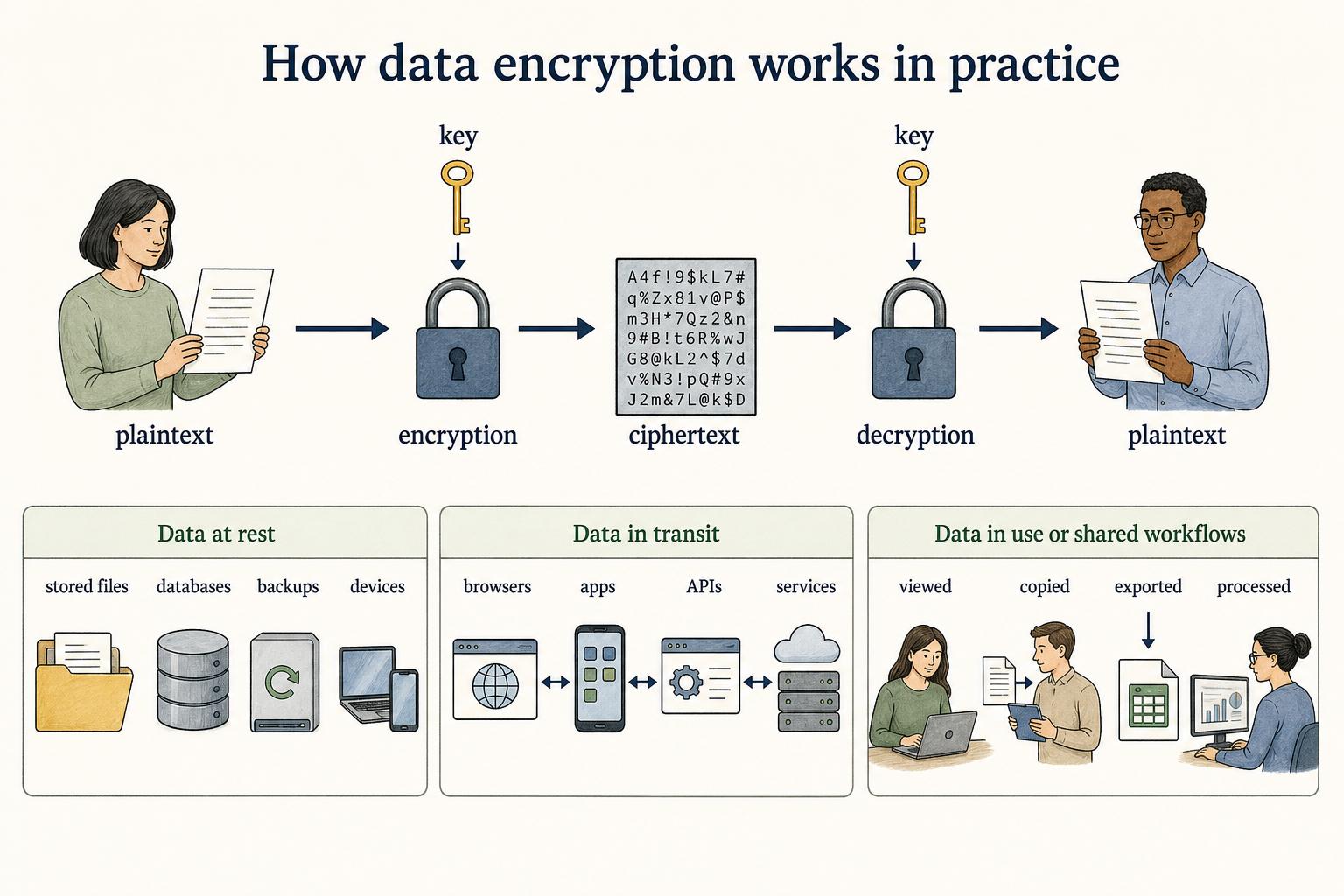
Encryption has three practical parts: plaintext, ciphertext, and keys. Plaintext is the readable data. Ciphertext is the protected version. The key is the secret value used to encrypt or decrypt it. Modern systems usually handle the mechanics, but process owners still need to know where encryption applies and where human handling can bypass it.
| Encryption context | What it protects | Common documentation question |
|---|---|---|
| Data at rest | Stored files, databases, backups, and devices | Which systems store sensitive data, and are approved storage locations required? |
| Data in transit | Data moving between browsers, apps, APIs, and services | Are secure connections required for every transfer? |
| Data in use or shared workflows | Data being viewed, copied, exported, or processed | Who can access the data, and what may be pasted into other tools? |
A security team might standardize on approved cryptographic methods such as AES for certain use cases. 2 That choice matters, but day-to-day failures often happen one layer above the algorithm: unclear ownership, unsafe exports, stale permissions, missing retention rules, or undocumented exceptions.
The key management problem
Encryption is only as strong as the way keys are created, stored, rotated, and retired. 3 If a key is handled like a shared password, the encryption control is mostly theater. If a key is lost, legitimate users may lose access. If a key is exposed, unauthorized users may read what encryption was meant to protect.
That is why encryption procedures need more than "encrypt sensitive data." Name the approved system, the key-management owner, the recovery path, the review cadence, and the exception process. Small teams do not need a cryptography manual, but they do need a plain operational answer to: who is allowed to decrypt this, and how would we know if that access changed?
How to document data encryption requirements
A useful encryption SOP connects the security requirement to the work people actually perform. Start with the data class, not the tool. "Customer support exports containing personal data must be stored only in approved encrypted storage" is easier to follow than "use encryption where appropriate."
Include the boundary conditions that usually cause leaks:
- Allowed systems: Name where sensitive data may be stored, shared, exported, or uploaded.
- Human-readable exceptions: Explain what to do when data must go to a vendor, auditor, customer, or internal teammate.
- Screen and document hygiene: Encryption will not help if sensitive fields are pasted into an unprotected guide, ticket, chat, or screenshot.
- Owner and review rhythm: Assign the team that approves encryption settings, access changes, and exceptions.
A practical test: if a new support lead can read the procedure and know what to do with a customer export, the documentation is probably useful. If they need to interpret a security policy from scratch, the process is not operational yet.
AI-ready template for an encryption procedure review
## Encryption Procedure Review Template

**Glossary term:** Data Encryption
**Source:** Trails Glossary — trails.so/glossary/data-encryption

---

### 01. Review an encryption procedure

"Review this procedure for data encryption gaps.

Context:
- Team: [team]
- Workflow: [workflow]
- Sensitive data involved: [data types]
- Systems used: [tools, storage locations, integrations]
- Current encryption controls: [known controls]

Find:
1. Where data is stored, transmitted, exported, copied, or documented.
2. Any point where sensitive data may become readable outside approved systems.
3. Missing ownership for encryption settings, keys, access, or exceptions.
4. Specific SOP updates that would make the workflow safer and easier to follow.

Return a concise risk summary, then a revised procedure section in plain language."
Documentation takeaway
Data encryption belongs inside the workflow documentation, not in a vague security checkbox. Strong process documentation explains what data needs protection, where it may live, which systems are approved, who owns the control, and what people should do when the normal workflow does not fit.
For training and SOPs, show the exact storage location, export setting, redaction step, or approval path. Do not make employees infer the security architecture while they are trying to handle a real customer file.
FAQ
Is data encryption the same as data security?
No. Encryption is one security control. Data security also includes access control, monitoring, retention, training, vendor review, incident response, and safe handling procedures.
What is the difference between data at rest and data in transit?
Data at rest is stored data, such as files, databases, backups, and devices. Data in transit is data moving between systems, such as a browser sending information to an application or an API sending data to another service.
Does encryption stop employees from seeing sensitive data?
Not by itself. If an employee has valid access to decrypt or view the information, encryption does not decide whether that access is appropriate. That is an access-control and governance question.
What should a non-technical SOP say about encryption?
It should say which data is sensitive, where it may be stored or transmitted, what tools are approved, who owns exceptions, and what employees should do before exporting or sharing the data.
Sources
- 1
National Institute of Standards and Technology. NIST SP 800-53 Rev. 5: Security and Privacy Controls. NIST. csrc.nist.gov/pubs/sp/800/53/r5/upd1/final.
- 2
National Institute of Standards and Technology. NIST FIPS 197: Advanced Encryption Standard (AES). NIST. csrc.nist.gov/pubs/fips/197/final.
- 3
National Institute of Standards and Technology. NIST SP 800-57 Part 1 Rev. 5: Recommendation for Key Management. NIST. csrc.nist.gov/pubs/sp/800/57/pt1/r5/final.