
6 Best SOP Software in 2026: We Tested Each One





Choosing SOP software gets confusing when a screenshot tool and a training platform both promise to solve the same problem. They're built for different jobs, and the wrong fit can leave you doing the work you hoped to avoid.
This comparison weighs creation speed, output quality, useful differentiators, and cost as your team grows, using published product information and pricing. Below, I'll explain when I'd choose each alternative.
If your team also needs a wiki or a broader knowledge library, our process documentation software guide compares those options alongside capture tools.
How we evaluated
We put each tool through the same practical job: capturing a browser-based workflow, cleaning up the first draft, sharing the finished SOP, and updating a step after the process changed. For tools built around video, training, or in-app guidance, we also tested the experience that makes each product different rather than judging everything as a screenshot recorder.
We looked at four things throughout the process: how quickly someone could create a usable SOP, the quality of the finished guide or video, the features that genuinely changed how people learn or follow the process, and what the product costs as a team grows. We checked public pricing and product information, then calculated representative costs for teams of different sizes where the pricing model allowed it.
One disclosure up front: we make Trails, so this article has a point of view. We’ve tried to earn your trust by using the same criteria for every product, naming Trails' limitations, and explaining when another tool is the better choice.
Which SOP tool should you choose?
- Choose Trails if you want an editable written SOP and narrated video from the same capture.
- Choose Scribe if you need polished written guides and enterprise workflow analysis.
- Choose Tango if people need guidance while working inside business software.
- Choose Guidde if a polished, presentation-ready video is the main deliverable.
- Choose Whale if you need to assign training and track completion.
- Choose Loom if you need to explain something quickly and don't expect to maintain it as a formal SOP.
1. Trails
Best overall for written SOPs and video
Speed of creating an SOP
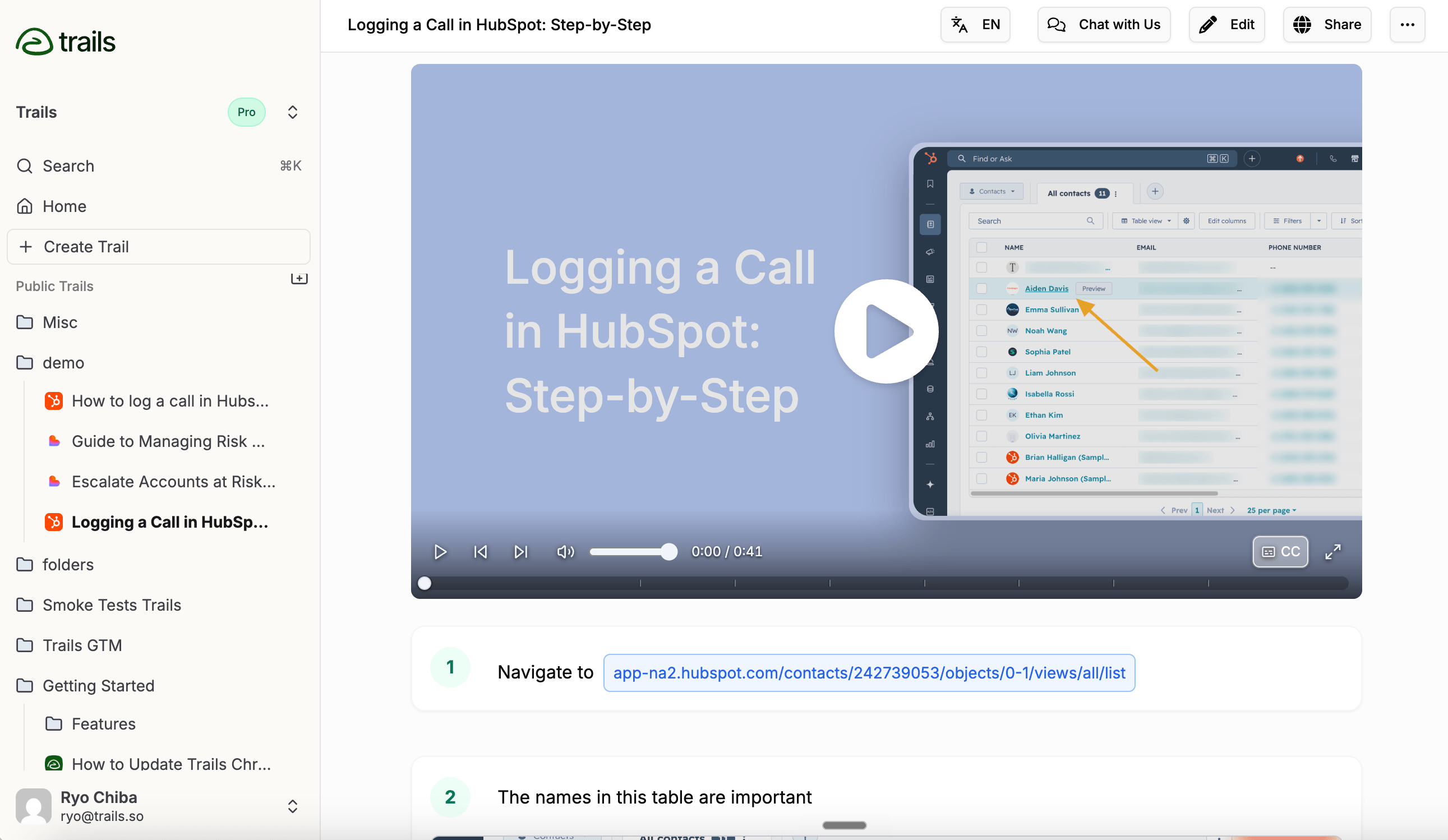
Trails offers several ways to create an SOP quickly: desktop apps for Mac and PC, a Chrome or Edge browser extension, and video upload.
The Trails AI SOP generator shows how a captured workflow becomes an editable procedure with screenshots and a training video.
The most common way to create an SOP with Trails is through the browser extension. It offers two capture methods. The first takes a screenshot with every click, similar to Scribe and Tango. This can leave you with extra steps to remove from the first draft.
The second capture method is Freeform Video Capture where you talk through the process and explain what is happening as if you are on a call with a colleague. It can be messy and you can make mistakes, but the AI edits it all out and gives you a polished SOP, saving time.
The choice between click-based capture, narrated recording, and video upload gives teams more ways to turn an existing process into an SOP.
Quality of the finished output
Trails produces a written guide with annotated screenshots and an AI-narrated video. A new teammate can watch the walkthrough; someone who knows the process can jump to the step they forgot.
When a screen changes, you can replace the affected screenshot and edit the instructions, then regenerate the video. That gives the recommendation substance: both formats come from the same editable guide. See how Trails training videos work.
Differentiating features
One important difference is the two-way sync between the SOP and training video. When you edit the SOP, the training video updates automatically, so you don't need to make the same changes in a timeline-based video editor.
I'd choose Whale when assigning training and checking understanding are central to the job. I'd look at Tango if you’re interested in automating those processes.
Pricing as the team grows
Creator costs $29/month for one user and 20 guides per month. Team costs $49/month for five users, with unlimited guides and video-to-guide conversion. Additional users cost $10/month, bringing 10 users to $99/month and 25 to $249/month.
For teams that need both written guides and video, this can cost less than buying separate documentation and video tools. Enterprise requires a quote. Current Trails pricing.
2. Scribe
Best for enterprise workflow documentation and analysis
Speed of creating an SOP
Like the other tools, Scribe captures your clicks and assembles screenshots with written steps. Scribe Sidekick opens on the side as you click through a process and their optional voice transcription allows you to explain the process out loud as you capture. One downside to their capture product is that, since they are capturing a screenshot every time you click, there can be many steps that you need to delete after creating the first draft.
Quality of the finished output
Scribe produces consistent layouts with readable screenshots and clear annotations. Its AI-written text is easy to understand, and the editor makes it easy to redact sensitive information or add annotations.
I'd be comfortable shortlisting Scribe when written instructions are the finished product. However, if your SOPs would benefit from a narrated walkthrough, I'd give Trails or Guidde more weight.
Differentiating features
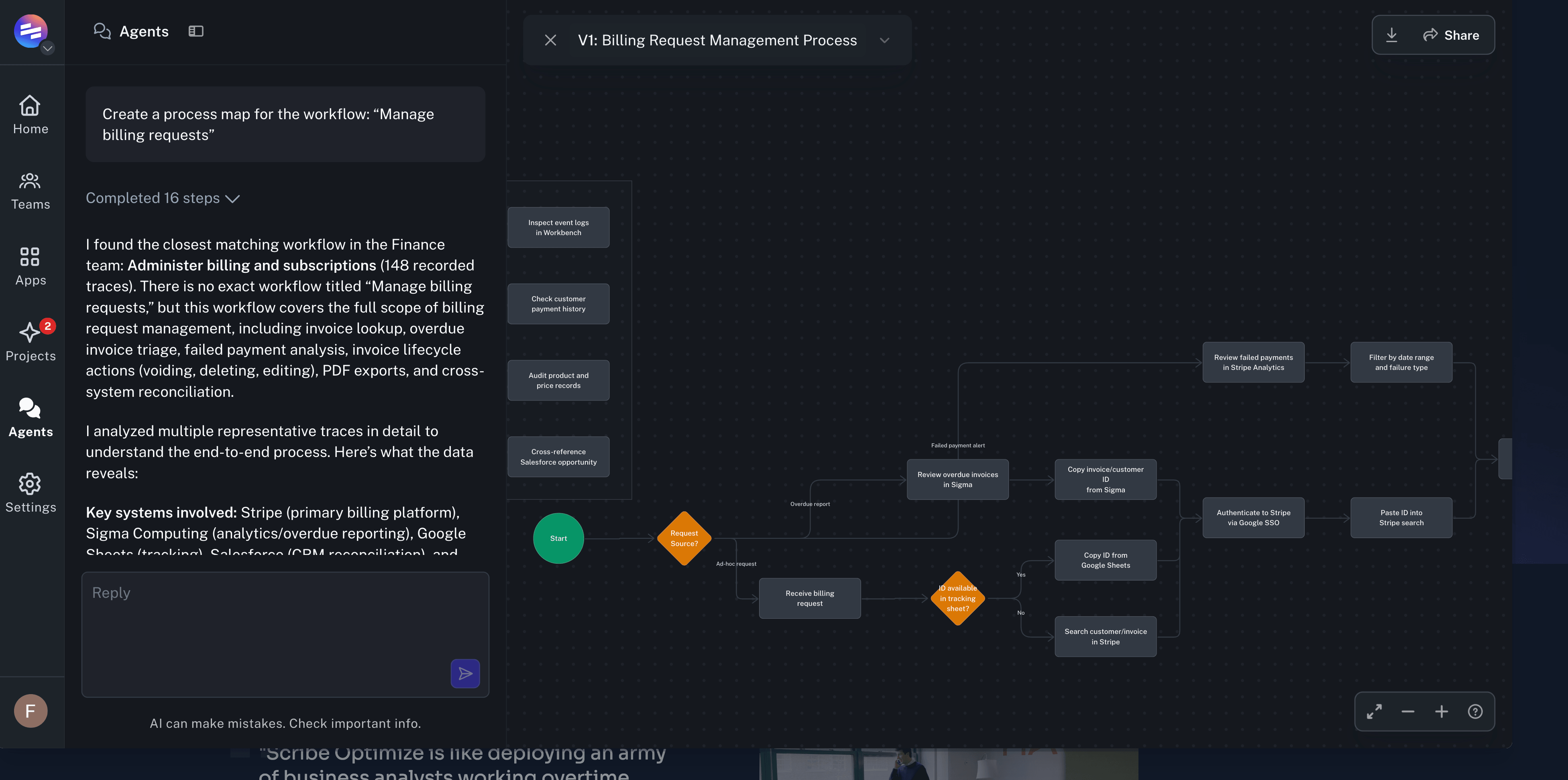
Scribe Optimize analyzes how work happens and identifies opportunities to improve or automate it. This can help operations leaders find repeated steps and bottlenecks across departments.
The tradeoff is that their Terms of Service and Privacy Policy are heavy-handed in giving Scribe the right to use any activity captured in their system to be used for training their own AI models, which is not typical compared to competitors.
Pricing as the team grows
Pro Team costs $29 per seat per month on monthly billing, with a five-seat minimum. That's $145/month for five seats, $290 for 10, or $725 for 25. Annual billing costs $23 per seat per month.
The minimum matters if only one or two people will write your SOPs. Confirm viewer access before pricing a company-wide rollout, and get a separate Enterprise quote where needed. Current Scribe pricing.
Read our Trails vs. Scribe comparison.
3. Tango
Best for software onboarding and in-app guidance
Speed of creating an SOP
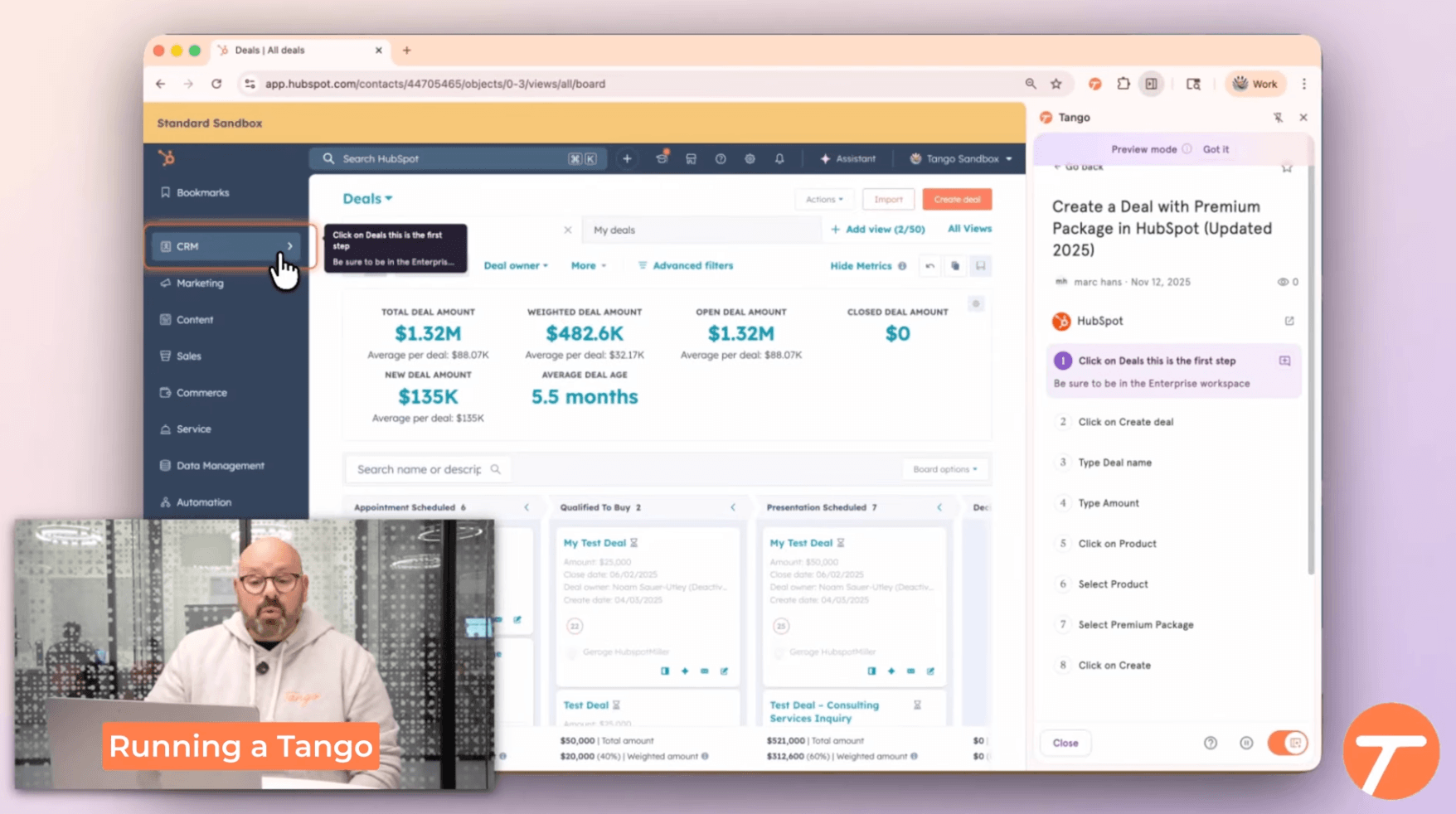
Tango captures a workflow and turns it into steps with highlighted screenshots. Voice transcription can add explanations behind the clicks.
I'd try it on a process in the actual application your team uses before choosing a plan. For a CRM workflow, that means including the awkward parts, such as a field that appears only for certain account types.
Quality of the finished output
The written guide gives readers a reference, while Guide Me helps them follow the process inside the application. That makes Tango particularly interesting when employees understand the task but keep getting lost in the interface.
Tango also generates video embeds with optional AI narration on Pro and Enterprise. Those videos regenerate when the workflow changes. I'd include that in the comparison if you're considering Tango for both written and video instructions.
Differentiating features
Guide Me and contextual Pins put help close to the task. Enterprise also includes branching workflows and browser automation.
I'd pay for that depth when software adoption is the problem. For example, a sales team might need help completing the right fields in a CRM, even when the instructions already exist.
Automation also raises the bar for a trial. I'd test what happens when the page layout or available options change, and establish who will maintain the workflow. A feature that performs actions deserves a closer check than one that displays instructions.
Pricing as the team grows
Pro Team costs $15 per user per month billed annually for three or more users, or $20 on monthly billing. Ten users cost $150/month equivalent annually; 25 cost $375.
Each member of an upgraded Pro workspace needs a paid seat. Guide Me, Pins, and automation require custom Enterprise pricing, including a platform fee based on supported users. I'd get that quote early if in-app guidance is the reason for buying. Current Tango pricing.
4. Guidde
Best for polished video walkthroughs
Speed of creating an SOP
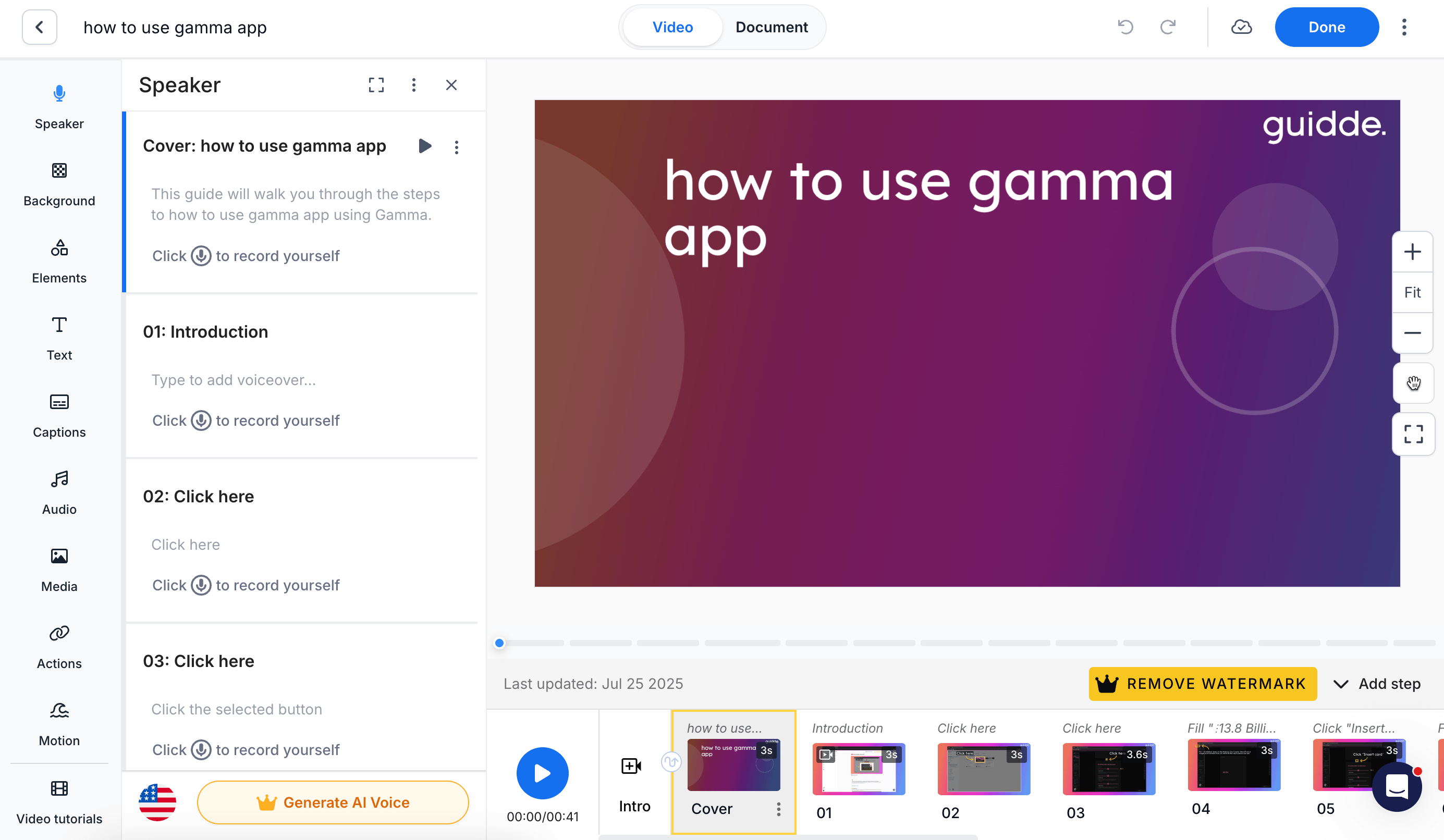
Guidde captures a workflow and builds an editable walkthrough. Magic Mic turns your spoken explanation into cleaned-up AI narration, saving the effort of getting every voiceover take right.
The initial capture process is comparable to the other tools. However, Guidde's advanced video controls can add editing time if you only need a simple internal SOP.
Quality of the finished output
Guidde puts more emphasis on the finished video than on the written SOP.
That being said, Guidde offers strong branded styling and control over subtitles. I like that professional-level presentation control, especially for external use cases where an SOP and video will be shown to customers.
Differentiating features
Guidde's video tools let you edit individual steps and shape the narration. I'd choose it when the video itself is the main deliverable and someone on the team wants control over how it looks.
The tradeoff is the time you choose to spend on those details. During a trial, I'd focus on getting a sense of whether the entire team will be comfortable using the tool or if the learning curve will be too steep.
Guidde’s Broadcast feature extends guidance into business applications and is available as an Enterprise add-on. It inserts a Video Tutorials button on the page if Guidde detects that there is content that is relevant, allowing the team to watch the video while they are doing their work.
Pricing as the team grows
Pro costs $29 per creator per month on monthly billing. Business costs $59 and adds unlimited text-to-voice generation and desktop capture. Five Business creators total $295/month.
The pricing page lists Business for up to five creators, so ask about Enterprise for a larger authoring team. Current Guidde pricing.
5. Whale
Best for SOP training and accountability
Speed of creating an SOP
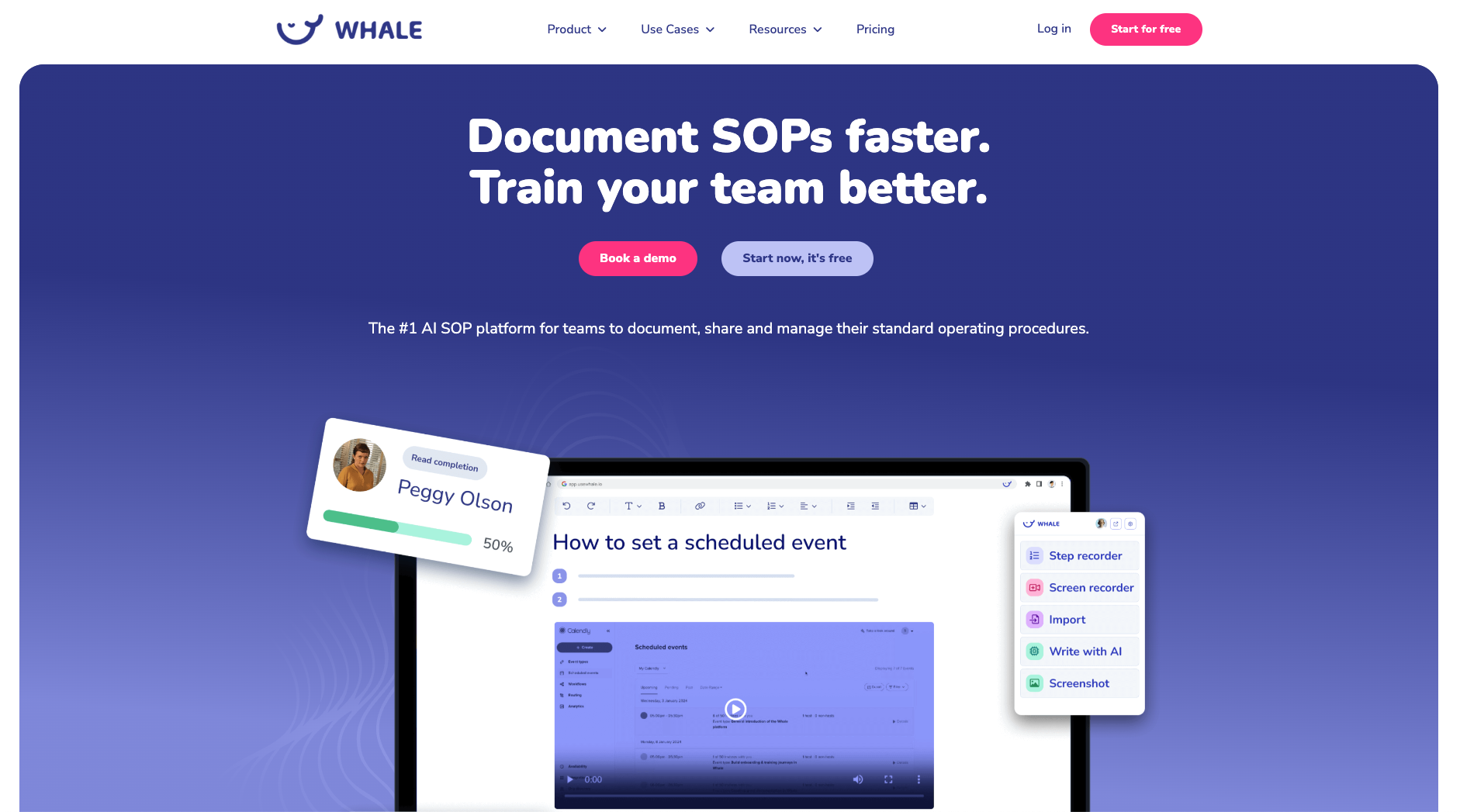
Whale's step recorder and video-to-SOP conversion help create the first draft, but their bigger focus is building training around the instructions.
As such, their capture tool is a little rough around the edges compared to the others, occasionally missing steps or taking the wrong screenshot. It’s a secondary or tertiary feature for their product.
Quality of the finished output
Whale's first drafts are workable but may need more editing to produce the consistent layouts, clear annotations, and concise instructions available from Scribe, Tango, and Trails.
Whale stands out by putting procedures into a searchable library and letting you include them in defined learning paths. Review cycles also assign responsibility for keeping content current.
Differentiating features
Assignments and quizzes let you track completion and check understanding. Alice, Whale's AI assistant, answers questions from workspace content.
This is where I'd choose Whale over a tool focused on capture. If a manager needs to know whether a new hire completed the required training, publishing a guide alone won't answer that question. Whale gives you a way to manage the follow-through.
For a broader comparison of authoring tools and platforms that assign learning, see our training documentation software guide.
Pricing as the team grows
Scale costs $249/month billed annually or $399 on monthly billing, including three creators and unlimited members. Additional creators cost $29/month each. Five creators on annual billing total $307/month equivalent, whether 25 or 100 members use the training.
That model deserves a close look when a small authoring team supports a large audience. Scale includes five training flows and 15 quizzes. Advance starts at $499/month billed annually with unlimited flows and quizzes. Check AI credit allowances too. Whale's current plan and seat details.
6. Loom
Best for quick video explanations
Speed of creating an SOP
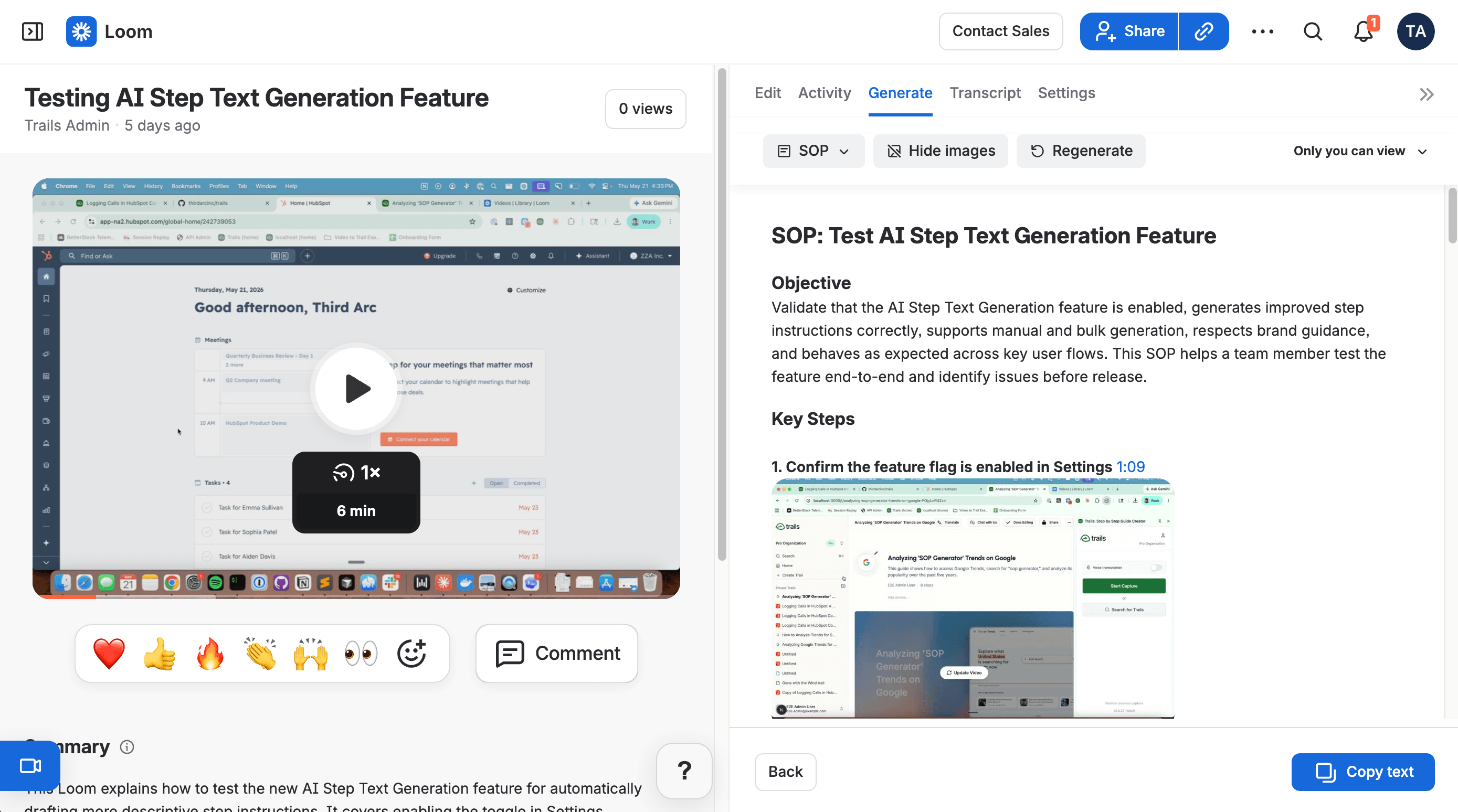
Open Loom, record your screen, and explain the task in your own voice. I'd choose it when answering a colleague quickly is the immediate priority.
Loom AI can also turn recordings into documentation drafts, but this is a secondary feature in a product focused on quick, shareable screen recordings.
Mistakes in a Loom recording can lead to extra editing or another take. Other tools in this comparison use AI to remove mistakes and rebuild the output as a polished guide.
Quality of the finished output
Screen recordings are useful for explaining a process, but they have serious tradeoffs as SOPs. They're harder to search, harder to skim, and difficult to update when the process changes.
My rule of thumb is simple. If the explanation is temporary and isn't meant to be maintained, Loom is a good choice. Otherwise, consider one of the other tools.
Differentiating features
Loom also works well beyond SOPs. Teams can use it to create bug reports, respond to support questions, or pitch potential customers.
For more details, see our Trails vs. Loom comparison.
The tradeoff is that Loom's SOP features are weaker because documentation isn't its primary focus.
Pricing as the team grows
On monthly billing, Business costs $18 per user per month and Business + AI costs $24. Ten paid users total $180 or $240/month; 25 total $450 or $600.
Choose the AI tier if video-to-document workflows are part of your plan. Confirm billable users in your workspace. Annual subscriptions use user tiers, so calculate those separately. Current Loom pricing.
FAQ
What is the best SOP software?
Trails is my overall pick for software procedures that need both written instructions and narrated video. I'd choose Whale for assigned training or Tango for guidance inside applications. The best fit depends on what happens after you create the SOP.
What features should SOP software include?
Start with clear instructions and an easy way to update individual steps. Check that the right people can find and access the current version. Add assignments or approvals when your process requires them. Our SOP software glossary explains the category in more detail.
Can AI create an SOP from a screen recording?
Yes. Trails can turn an existing recording into an editable guide, and Whale also offers video-to-SOP conversion. Treat the result as a draft. Someone who knows the process should check accuracy and add any decisions the recording leaves unexplained.
Is Loom good for SOPs?
Loom is useful for capturing an explanation quickly, especially when hearing someone's reasoning helps. I'd be more cautious about using video alone for instructions people consult repeatedly. Its AI documentation features help, but you'll still need to maintain the result.
How much does SOP software cost?
The examples above range from individual plans to platforms costing hundreds of dollars per month. Compare the plan that includes your required features, then count everyone who needs paid access. A low price per creator can be misleading if your rollout needs an Enterprise feature.