TL;DR: Clueso or Trupeer?
Both Clueso and Trupeer turn screen recordings into polished videos and written guides. While Clueso offers more extensive video editing and customization options, beginners may find Trupeer's interface simpler.
- Choose Clueso for branded product walkthroughs and customer-facing videos when you want more options to customize their appearance.
- Choose Trupeer for product demos and training videos when you want straightforward editing and written tutorials alongside the videos.
If your team frequently updates a large library of process guides and training videos, Trails may be a more practical and cost-effective choice.
If you’re comparing Clueso vs Trupeer, you’re probably looking for a way to make video creation easier for your marketing, product, customer support, or operations teams.
To help you decide which one will suit your budget and needs, we tested Clueso and Trupeer hands-on and researched their features, pricing, and customer reviews. We also included our own software, Trails, as an alternative worth considering, especially if your focus is on creating and maintaining a growing process documentation and training video library.
How we researched and tested
We used three sources to prepare this comparison:
- Product research: We verified features, plans, and usage limits from official product documentation, pricing pages, and release announcements.
- Hands-on testing: Our reviewer tested recording, uploading, editing, and generating written guides. We’ve included screenshots and recordings from our tests where relevant.
- Customer reviews: We examined feedback on G2 and Product Hunt, including positive and negative experiences, and checked review dates against product updates.
We last checked pricing and G2 ratings on November 2, 2026.
Disclosure: We make Trails, and we’ve included it because we believe it’s a better fit for businesses that want a simple, affordable way for more people to create guides and training videos and keep them up to date.
What is the core difference between Clueso and Trupeer?
Clueso and Trupeer use AI to turn raw screen recordings into product walkthroughs and tutorials. Both tools help you edit recordings, write scripts, and add voiceovers.
The two platforms differ in how you edit a video, how much you can customize, and what you pay for.
- Clueso is better when you want detailed creative control and more customization. Those who are new to video editing may find the timeline and range of options harder to learn.
- Trupeer is better when you want branded demos but don't need to customize every visual element. Creating and editing videos is simpler, but if you make frequent creative iterations and style updates, it can increase costs.
Here is how the two platforms compare, at a glance:
Clueso vs Trupeer: Comparison table
| Clueso | Trupeer | |
|---|---|---|
| Best for | Branded product marketing demos and detailed feature videos. | Fast AI explainers, support ticket replies, and knowledge base docs. |
| G2 rating | 4.8/5, 141 reviews | 4.7/5, 70 reviews |
| Learning effort | Low-to-medium (easy for those with some video editing experience) | Near zero (easy for those with no video editing experience) |
| Screen recording options | Browser recording. Record your screen using a browser extension (or upload existing videos). | Browser recording. Record your screen using a browser extension (or upload existing videos). |
| Editing interface | Storyboard-style editor. Adjust layout, timing, and visual elements on a timeline like in traditional video-editing software. Editors get more creative control. | Transcript-based editing. You edit videos by changing or removing text, or blocks of text. Editing may be easier for beginners. |
| Branding and customization | More creative control. Adjust fonts, colors, layouts, animations, and visual effects individually. | Faster output. Set up your brand kit once (on Scale plan & above). Trupeer automatically applies it to your videos, reducing manual work. |
| AI narration features | 100+ AI voices. | 100+ AI voices. |
| Written guides | Auto-generates step-by-step guides. You can export these in a separate step. | Auto-generates step-by-step guides. Available alongside the video. |
| Output | Download videos as MP4/GIF and export articles. | Download videos as MP4 and guides as PDF, Word, or Markdown. |
| Starting price | $40/month billed annually, includes one user (Plan name: Solo) | $40/month billed annually, includes one creator (Plan name: Pro) |
| Free plan availability | Ongoing free plan for one user. Exported videos have a watermark. | Limited 10-day free trial with access to all features. 10 AI minutes and 3 video exports. |
Sources: Clueso pricing, Trupeer pricing, Clueso G2, Trupeer G2. Last updated: November, 2026
While Clueso and Trupeer have similar starting prices, their billing models are fairly different, and the value-for-money depends entirely on your team’s workflows.
Clueso vs Trupeer pricing: Which offers better value?
Clueso and Trupeer each offer three paid plans.
| Pricing tier | Clueso | Trupeer |
|---|---|---|
| Individual | $40/month (billed annually) | $40/month (billed annually) |
| Team | $120/month (billed annually) | $199/month (billed annually) |
| Enterprise | Custom | Custom |
On the face of it, the plans look similar, but two teams paying the same price could produce different numbers of videos based on how they use the platforms. Let’s explore the billing and usage models in detail.
Clueso billing model
Each Clueso plan includes a set number of video export minutes and written guide exports. If you know how many videos you’ll produce, it's fairly easy to estimate your costs and plan.
You pay for:
- Exporting the final guide or video
- Additional creator seats
- Re-exporting a video after you make it longer uses additional export minutes
- Creating or editing videos through chat, using AI avatars or motion graphics, and generating AI images. These features use AI credits.
You don't pay for:
- The number of times you record a screen
- Re-exporting the same video without changing its length
- Generating AI voices, scripts, or written guides. You can also rewrite and edit scripts without spending AI credits.
Reset cycle: Clueso refreshes your AI credits monthly and tracks export minutes separately. If you use all your export minutes, Clueso pauses exports. You cannot download or export files until you purchase an add-on export bundle or upgrade your tier.
Trupeer billing model
Trupeer charges credits for the content you generate. It charges 100 credits per minute of AI video, 50 credits per written document, and 100 credits per minute for each language you translate a video into. Exporting content you’ve already generated doesn’t use additional credits.
To estimate your monthly costs, count how many videos and documents you need and how long each video will run.
You pay for:
- Generating videos or translations
- Additional creator seats
You don’t pay for:
- The number of times you record a screen
- Generating written guides on paid plans
- Re-exporting videos you’ve already generated
Reset cycle: If you reach your credit limits mid-month, you can purchase additional credits, upgrade your plan, or wait for your credits to reset before generating more content.
What would each platform cost your business?
Because of these differences in billing, you can get different outputs from Trupeer or Clueso for the same $40/month budget. Let’s consider two examples:
For product marketing: Product demos often need several rounds of editing before they’re ready to publish. Let’s assume your team creates five-minute videos and generates each one twice to get it right.
For customer support: Help tutorials are usually simpler. Let’s assume your team creates three-minute walkthroughs and generates each video just once.
Here’s how much each team could produce on the $40/month plans:
| Clueso Solo ($40/month) | Trupeer Pro ($40/month) | |
|---|---|---|
| Product marketing: 5-minute demos, two AI generations per video | 180 ÷ 5 = 36 videos/year, averaging 3/month. | 2,000 ÷ (5 × 100 × 2) = 2 videos/month, or 24/year. |
| Customer support: 3-minute tutorials, one AI generation per video | 180 ÷ 3 = 60 videos/year, averaging 5/month | 2,000 ÷ (3 × 100) covers 6 complete videos/month, or 72/year. |
Calculations assume Clueso’s 180 annual export minutes and Trupeer’s 2,000 monthly credits at 100 credits per generated video minute. They exclude features like written guides, avatars, and translations.
Clueso offers better value when your team edits and regenerates each video several times. Trupeer offers better value when you can finish a video in fewer rounds.
Now that we have looked at costs, let's compare features to understand how easily your teams can create these videos on both platforms.
Clueso vs Trupeer features: How do they compare in practice?
With either tool, you can record your screen, add a voiceover, and export the finished video in one place. We compared how each tool handles those steps.
Recording and creating videos
Both Clueso and Trupeer let you record your screen live using browser extensions for Chrome or Chromium supported browsers. You can also upload an existing screen recording or turn other static content into videos on both platforms:
- Clueso can turn slides and documents into videos.
- In September 2026, Trupeer announced document-to-video creation for Enterprise customers.
We found both recorders easy to use. Some G2 reviewers pointed out one limitation. Loom lets you record your webcam and screen at the same time, but neither Clueso nor Trupeer offers that option. A G2 reviewer who liked Clueso’s browser recording also mentioned that when capturing the whole screen, you may require extra edits and manual sync points.
Editing videos and scripts
Clueso and Trupeer take different approaches to video editing.
- Clueso uses an interactive storyboard and timeline. You adjust visual elements, layouts, and timing on the timeline, just as you would in a traditional video editor.
- In Trupeer, each transcript section corresponds to a block on the timeline. You can edit or delete individual blocks.
- In both tools, you can edit the script and select “regenerate” to update the voiceover.
- Clueso also offers an AI editing assistant that lets you request changes through natural-language prompts in a familiar chat window.
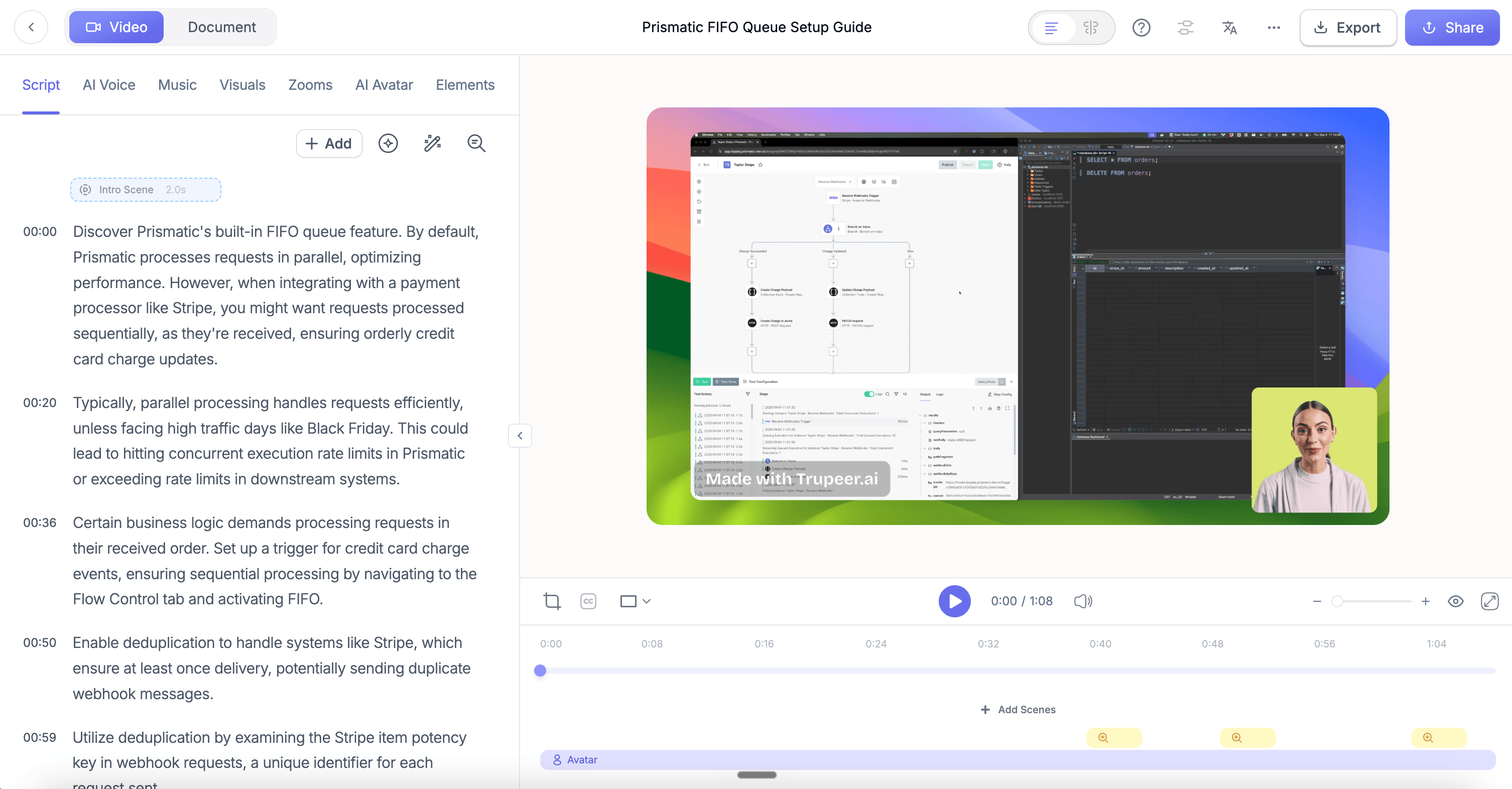
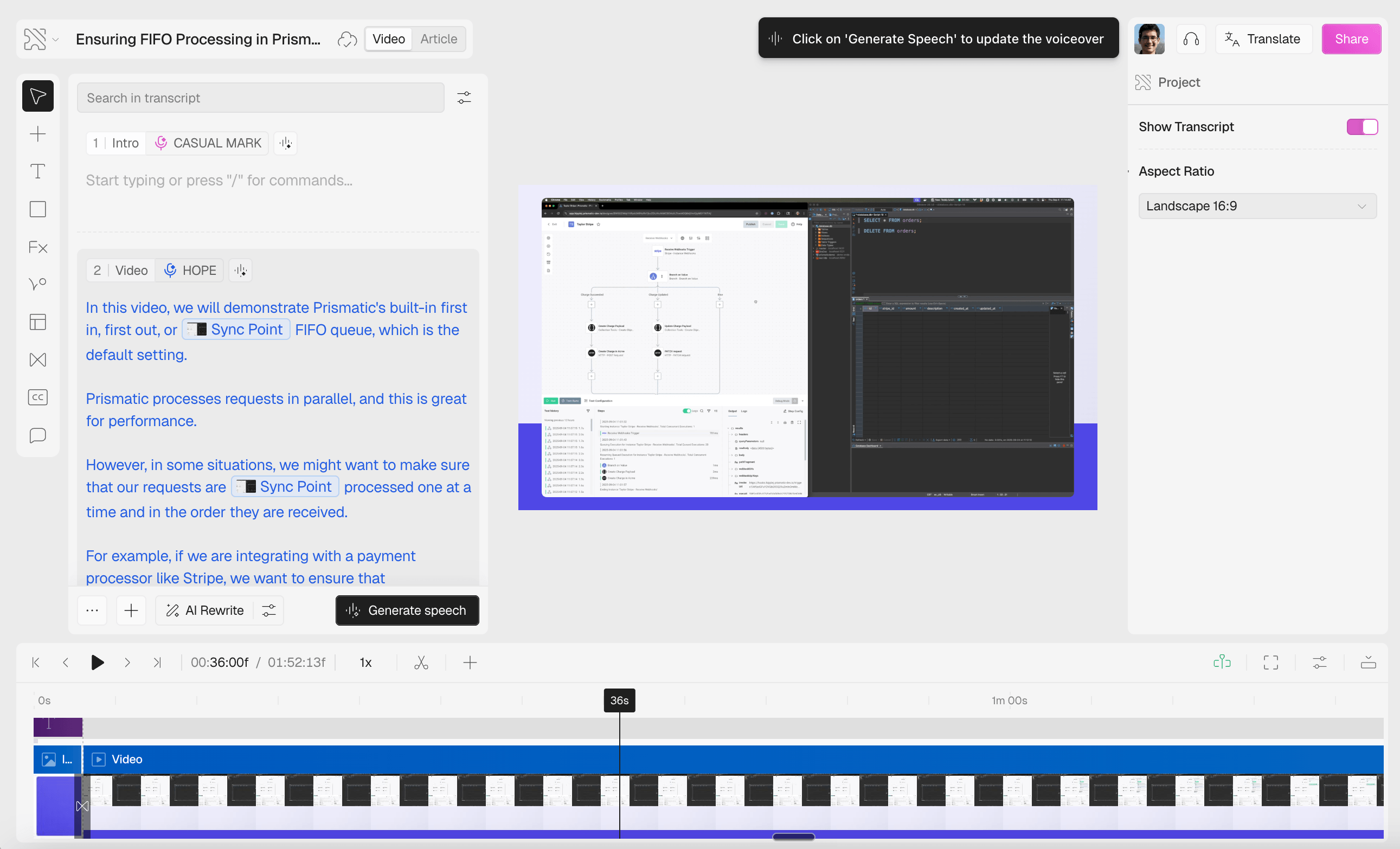
While testing, our reviewer took slightly longer to understand Clueso’s editor and found trimming unwanted sections less obvious than expected. Other users had a different experience. Becka S., a customer success manager, found minor edits intuitive, although changing control locations occasionally confused her.
Our reviewer found it easier to edit and trim sections with Trupeer. Gediz M., who creates tutorials, likewise praised Trupeer for its clear dashboard and editable transcript.
The difference in experience will depend on what tools your team already uses. Users familiar with Figma or Adobe Premiere may find Clueso’s interface simple to use, and in many reviews, they asked for even more editing features.
Branding and creative control
Clueso offers more granular customization than Trupeer.
- Clueso lets you upload logos, choose fonts and colors, and customize visual elements such as callouts, arrows, spotlight effects, layouts, and animations.
- For teams that don't want to experiment, Trupeer may simplify branding consistency. Your marketing team configures a brand kit (on Scale plan and above). Trupeer will apply it automatically, and consistently to all your videos. It ensures every video your team makes looks exactly the same, but may offer less fine-tuned creative tweaks to individual elements.
A marketer refining a branded product video may appreciate that flexibility. For a sales rep who needs to turn a recorded demonstration into something ready to share, Trupeer’s upload and editing workflow may be simpler.
AI narration and scripts
You can generate scripts and AI voiceovers from screen recordings in both Clueso and Trupeer. Both platforms let you edit the scripts, choose stock AI voices, and correct the pronunciation of specific words.
- Clueso lets you add expressive tags to manually alter pauses, emphasis, and tone.
- Both Trupeer and Clueso offer voice cloning on higher plans: Team members can record a sample of their own voice and use it to generate narration that sounds like them.
In our hands-on test, both Clueso’s and Trupeer’s AI narration sounded fairly natural. Our reviewer found Clueso’s script more salesy than Trupeer’s, but both platforms allow users to record their unscripted narration.
Complementing videos with written guides
Both Clueso and Trupeer automatically generate screenshot-based written documents for every video you create.
- In our test, we found that Clueso’s editor emphasized the video.
- In our free trial, Trupeer gave us more ways to format a guide than Clueso did. We could add a summary, apply heading styles, and insert tables.
If you maintain a best practice library in Clueso or Trupeer, you need to update the guide and video separately. In Trails, you can edit the guide and regenerate the video from it.
But before we introduce the advantages of Trails for standard operating procedures (SOPs) documentation libraries, we’ll explore what customers think of both Clueso and Trupeer.
Clueso vs Trupeer reviews: What do users say?
Both Clueso and Trupeer have positive overall ratings, though Clueso has about twice as many reviews.
The accounts below describe individual users' experiences and may reflect different plans and product versions.
Clueso reviews: What users like and dislike
Overall, Clueso users praised its video editing tools and the ability to create professional videos without outside help. Some reported issues with navigation, audio synchronization, and low export limits.
- Jeff C., a software services director, liked that Clueso let him create company videos without hiring a video producer, although he felt some parts of the interface were unfinished.
- David a., a startup managing director, liked Clueso’s video clipping and styling features and said it reduced his need for an outside content agency, although transferring video files took longer than he would have liked.
Trupeer reviews: What users like and dislike
Trupeer users liked how easily they could create branded demos and training videos, but some found the recording limits frustrating.
- Jacob B., a customer success manager, liked Trupeer’s translations but sometimes had to manually adjust the automatic zooms.
- A small-business reviewer liked the finished demo but wanted to re-record individual sections, an option their plan didn’t offer.
- Chris on Product Hunt liked Trupeer overall but found its output limits restrictive.
Re-recording sections and output limits become concerns when teams regularly create and update tutorials or SOPs. These teams may prefer a different kind of workflow.
Trails: A simpler alternative for maintaining a video library
When we started designing Trails, some customers told us that AI videos often felt “overproduced” for internal documentation. They wanted something that felt more like a natural screen recording, but without the effort of creating documentation manually.
That's what we kept in mind while building Trails.
1. Trails keeps the workflow simple
- Record naturally. Hit record and freely talk through your process.
- Skip the retakes. No need for retakes if you pause or stumble. Trails turns your recording into a step-by-step guide with screenshots and an AI-narrated video.
- Edit easily. When you edit the written guide, you can also auto-update the video.
We kept the interface simple so your team can learn to record a process, edit the guide, and update the video.
2. More videos for the same price
Suppose your support team makes three-minute tutorials, generates each video once, and makes only minor edits. If you pay annually, a $40/month plan covers this many tutorials on each platform:
- Clueso (Solo): 60 videos per year
- Trupeer (Pro): 72 videos per year
- Trails (Team): 240 videos per year
We assume you generate and export each video once. For Trails, we used the plan’s allowance of 60 video download minutes per month.
At the same price, Trails lets you produce four times as many three-minute tutorials as Clueso and over three times as many as Trupeer.
And, if you don’t require so many videos, Trails offers a lower barrier to entry, starting at $24 for 30 minutes of video export.
3. More teams can contribute to your documentation library
If you’re creating a documentation library, or standardizing processes across your organization, you want to involve more people.
If you pay annually, Clueso Solo and Trupeer Pro each give you one creator seat for $40/month. For the same price, Trails Team lets five people create and maintain guides.
If your team uses all five seats, you pay $8 per creator each month.
As your documentation library grows, it's easy to update screenshots and regenerate videos without maintaining multiple versions of documents and videos.
- Your operations owner can review and revise SOPs.
- Your support team can update training guides after product updates
- Your L&D manager could correct a training video without asking someone to narrate it again.
The impact: 80% faster content creation
Canary Technologies is a hospitality technology company that helps hoteliers modernize operations and drive efficiency.
Canary used Trails to cut the time its team spent creating customer enablement content by 80%. Customers across the 20,000+ hotels Canary serves could quickly access microguides and help center resources.
This kind of efficiency gain may not matter equally to all teams. Let’s explore how Trails compares with Trupeer and Clueso for different workflows.
Which should you choose: Clueso, Trupeer, or Trails?
The decision matrix below compares the platforms for different workflows, creative preferences, editing experience, and output requirements.
| Your team | You want to… | Consider | Why |
|---|---|---|---|
| Product marketing | Produce branded feature announcement or customer-facing product demos | Clueso | Creative control over layouts, timing, and visual effects. |
| Sales enablement | Share demos and written walkthroughs with prospects. | Trupeer | It's easy to create branded videos without any video editing experience. |
| Customer support | Create and share an extensive help library | Trails | Simultaneously edit written and video guides. Cost-effective at high volumes. |
| Operations and L&D | Create and build process documentation libraries or onboarding tutorials | Trails | Lower cost per user enables more teams to document and edit changing internal procedures without specialist video-editing skills. |
For creating SOPs, internal training, onboarding, or process documentation, we recommend our own tool, Trails. Small and mid-sized teams can use Trails to build a library of videos and screenshot-based guides and keep both up to date.
When Trails is a better fit
Both Clueso and Trupeer convert rough screen recordings into polished videos and step-by-step guides, helping businesses replace multiple tools like Loom, Adobe Premiere, and Figma with a single solution. They’re a good fit for product walkthroughs and customer-facing videos.
If you’re exploring other tools for those uses, our guides to Clueso alternatives and Trupeer alternatives cover more options.
As you scale, however, check how many videos your plan covers and what it costs to increase your creators.
If you’re building a library that several teams will contribute to and update regularly, we’d choose Trails. Its low learning curve and cost-effective per-user pricing help more teams document their own processes. When a process changes, they can update the written guide and regenerate the video from it.