
Trupeer Alternatives: Which AI Documentation Tool Should Your Team Use?





Trupeer turns rough screen recordings into polished product demo videos. Its pitch leads with product updates and launch videos, training and written guides close behind. If your team needs a narrated walkthrough with branding, avatars, and captions, Trupeer already solves a real problem.
The catch is fit. Most people come to make a product update video, then realize they need something else: a lighter async recorder, screenshot-based SOPs, or documentation that doubles as training. This guide covers the top alternatives and when each one fits.
For a wider comparison of recording, editing, and AI-assisted production, see our video tutorial software guide.
The quick answer
- Trails: Best for guide + video documentation from one workflow capture.
- Guidde: Best for AI video documentation with enterprise delivery options.
- Clueso: Best for polished product videos and help-center articles.
- Camtasia: Best for desktop-grade training videos and timeline editing.
- Screen Studio: Best for polished Mac screen recordings.
- Scribe: Best for quick screenshot guides.
- Iorad: Best for interactive software tutorials.
- Tango: Best for in-app workflow guidance.
- Loom: Best for async video explanation.
- Trainual: Best for SOP and training management.
How we evaluated
We started with the job most people hire Trupeer for. We recorded a walkthrough of a new feature and asked each tool to turn it into a branded product update video. Then we pushed on the second job that shows up fast: turning that same recording into internal training and a written guide a teammate could update later. We judged each tool on video quality, creation speed, editing control, branding, sharing, how easily an asset updates when the product changes, and pricing at team scale.
We make Trails, so this guide has a point of view. We tried to earn your trust by being specific about where Trails fits and where it doesn't. If you only need a quick video message, Loom is better. If you need a full LMS with assigned training paths, Trainual is better. The goal is to help you pick the tool your team will actually use.
How we chose what to test
We focused on tools that help teams capture, explain, and reuse software workflows: process documentation tools, AI video documentation, async screen recorders, training platforms, and video editors. Camtasia made the list for teams that need desktop-grade tutorial production, and Screen Studio for Mac teams that want polished demos from screen recordings, even though neither is a full documentation system.
Every tool here showed up repeatedly across alternative pages, review sites, and buyer comparisons. We narrowed a crowded field to the tools a documentation or enablement team is most likely to weigh seriously. Iorad earned a spot as an L&D option for teams that want people to practice a workflow, not just read or watch it.
We left out Supademo and Arcade, which are stronger for interactive demos than for SOPs, and Synthesia and HeyGen, which suit avatar-led script-to-video more than captured workflows.
Why do customers look for Trupeer alternatives?
Trupeer gets a lot right. It creates a polished video and written guide from one recording, and reviewers praise its speed, AI voiceovers, and ease of use. People look elsewhere because of fit, pricing, editing control, or scale, not because Trupeer fails at its core job.
Across G2 summaries, Trupeer's pricing page, and Trustpilot, a few reasons come up most:
The video-minute model can feel tight for active teams
Trupeer's Pro plan lists 20 AI video minutes a month and Scale lists 100. Translations burn credits like a new video, and unused credits don't roll over. That works for occasional demos, but teams producing weekly onboarding or support content hit the meter fast.
The strain shows when the content load is unpredictable. Ten short workflow updates in a month may fit Pro fine. Refreshing an entire help center after a release is harder to plan around a minute meter.
Team and brand features are pushed upmarket
Team workspaces, custom voices, branded share pages, and logos all sit on Scale, listed at $199 a month billed annually or $249 monthly. Custom seats, brand templates, an admin dashboard, and SAML SSO require Enterprise.
That is fair for teams running Trupeer as a serious product video platform. It is a tougher sell for smaller teams that mainly need repeatable documentation and the occasional training video.
Editing can still feel like video production
G2 reviewers note limited advanced editing, and the pros-and-cons coverage points to plan limits and the need to re-record large chunks of a video when something changes. One Trustpilot reviewer described early confusion over AI processing and credits, then noted that support responded and fixed it.
The issue isn't that Trupeer is hard to use. Video-first tools get heavy when your real job is maintaining documentation that keeps changing. When a workflow shifts every week, you care less about a studio editor and more about fast text edits, fresh screenshots, and a video you can regenerate from the guide.
Trails
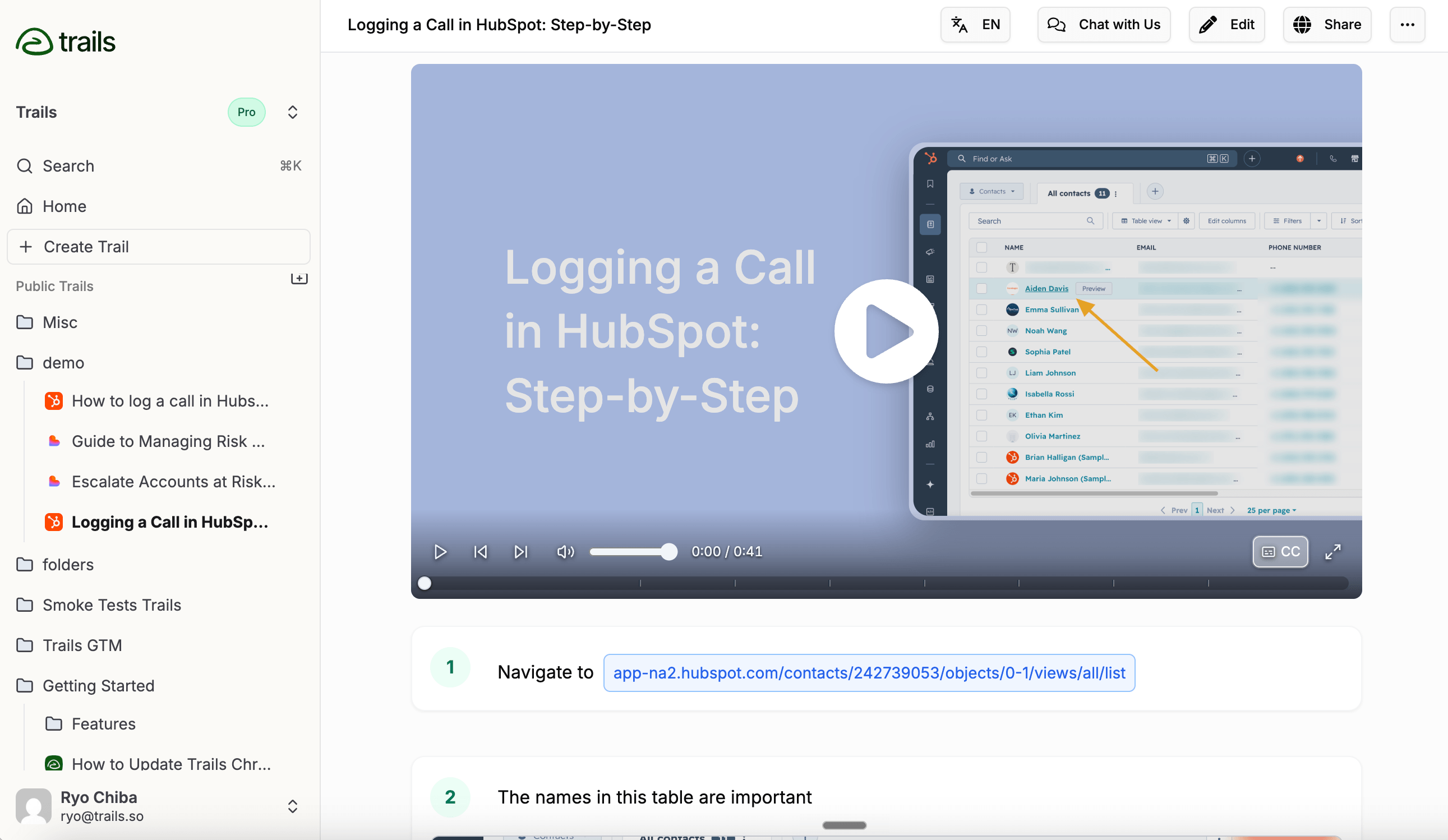
Best for: guide + video documentation
Trails fits when one captured workflow needs to become both a written guide and a narrated training video. You record the process, Trails turns it into step-by-step instructions with screenshots, and the same guide becomes a branded AI-narrated video. That covers onboarding, customer education, SOPs, and support docs, where different people prefer different formats.
The difference from Trupeer is the center of gravity. Trupeer is video-first. Trails is documentation-first, with the video generated from the guide. That matters when the workflow changes: instead of treating every update as a video edit, you fix the steps and screenshots and regenerate the video.
Trails handles browser and desktop capture, video-to-guide conversion, redaction, branded videos, embeds, multiple export formats, and AI translation on higher tiers. Pricing lists Creator at $29/mo and Team at $49/mo with 5 users included, plus $10/mo per additional user; Business is contact-us pricing for unlimited users and translations. A free plan covers public guides.
The honest limit: Trails isn't a studio video editor. If you need avatars, timeline editing, or heavy marketing polish, Trupeer, Clueso, or Guidde give you more control. Trails wins when the video is part of a maintainable documentation system, not the whole job.
Choose Trails if: you need repeatable workflow documentation that doubles as training content. It is strongest for customer success, operations, support, and enablement teams that want guides and videos from one workflow.
Skip Trails if: you mostly make product launch videos, avatar-led demos, or marketing clips. Use Trupeer or Clueso when polish matters more than maintaining a guide library.
Guidde
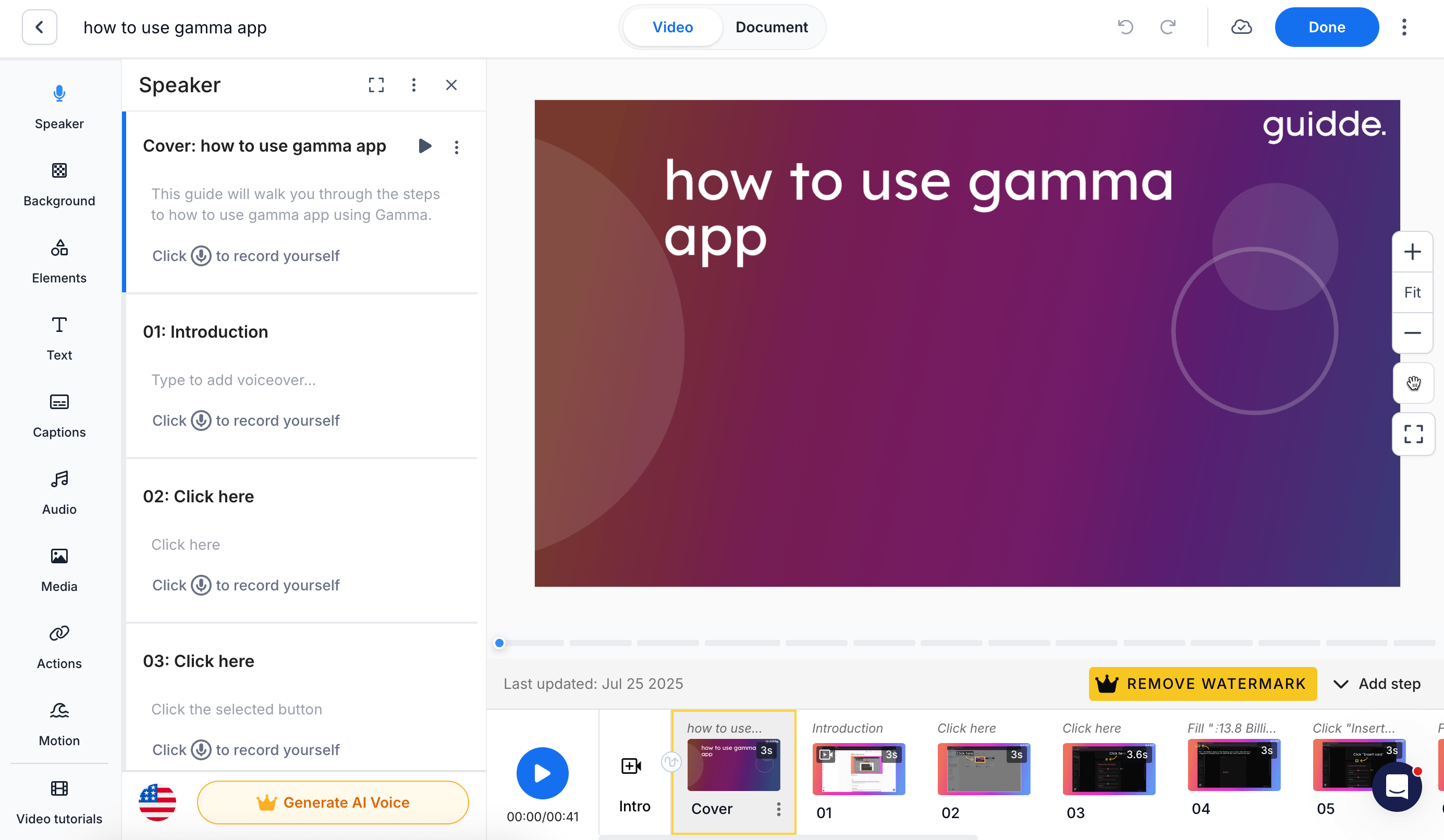
Best for: AI video documentation with enterprise delivery options
Guidde is one of the closest Trupeer alternatives if you like AI-narrated video documentation but want a more mature delivery layer. It builds video guides from screen capture, with AI voiceover, branding, analytics, and a growing Broadcast product for in-app guidance.
Guidde stands out when documentation has to reach people inside business software. Broadcast, sold separately, works like a lightweight digital adoption layer with viewer-based packaging and customer-facing portals. That suits larger teams trying to push training into the flow of work.
Pricing is per creator for the Create product: a free plan, Pro at $29 per creator/month ($19 annually), and Business at $59 ($39 annually). Enterprise is custom, and Broadcast pricing is less transparent and sold annually.
The tradeoff is complexity and cost. Guidde produces richer media and more enterprise delivery features than a simple guide tool, but teams that just need fast documentation may not want the Broadcast layer, creator-based pricing, or a heavier editor.
Choose Guidde if: you need AI video documentation, branded training, analytics, and a path into in-app delivery. It is a credible choice for customer education, enablement, and enterprise training teams.
Skip Guidde if: you want the simplest way to maintain a high-volume SOP library. Trails or Scribe feel lighter when the output is mostly step-by-step documentation.
Clueso
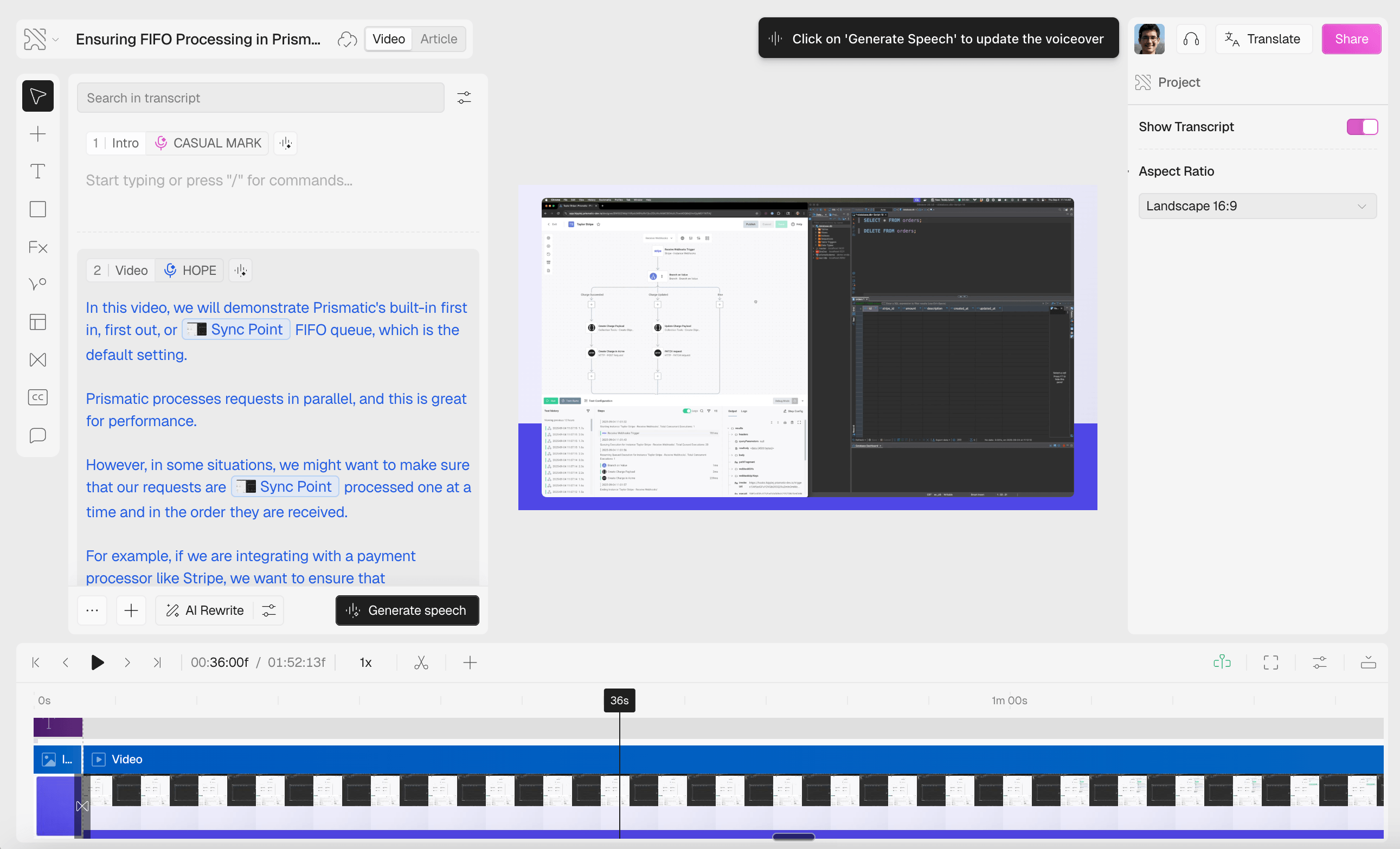
Best for: polished product videos and help-center articles
Clueso is a strong alternative for teams that want higher-production education content. Like Trupeer, it turns rough recordings into polished videos and written docs, adding AI scripts, filler-word removal, automatic zooms, branded templates, and article export.
Its sweet spot is software explanation. Customer education, product marketing, and enablement teams can turn one recording into a video, article, captions, and localized versions. It can also import existing recordings, convert slides or PDFs to video, and split long recordings into clips on enterprise plans.
Pricing is team-based but export-limited. A 7-day trial leads into Starter at $120/mo billed yearly (2 users, 6 hours of video and 360 article exports a year) and Growth at $200/mo billed yearly (4 users, 12 hours of video and 720 article exports). Enterprise is custom.
That works when a small team produces high-value assets. It chafes when many people need to crank out internal SOPs. Watch the export limits.
Choose Clueso if: you need polished product videos, customer education assets, and help-center articles from the same recording. It fits when content quality and brand consistency matter.
Skip Clueso if: your main job is documenting lots of internal workflows quickly. Export limits and a production-style editor are more than everyday SOP work needs.
Camtasia
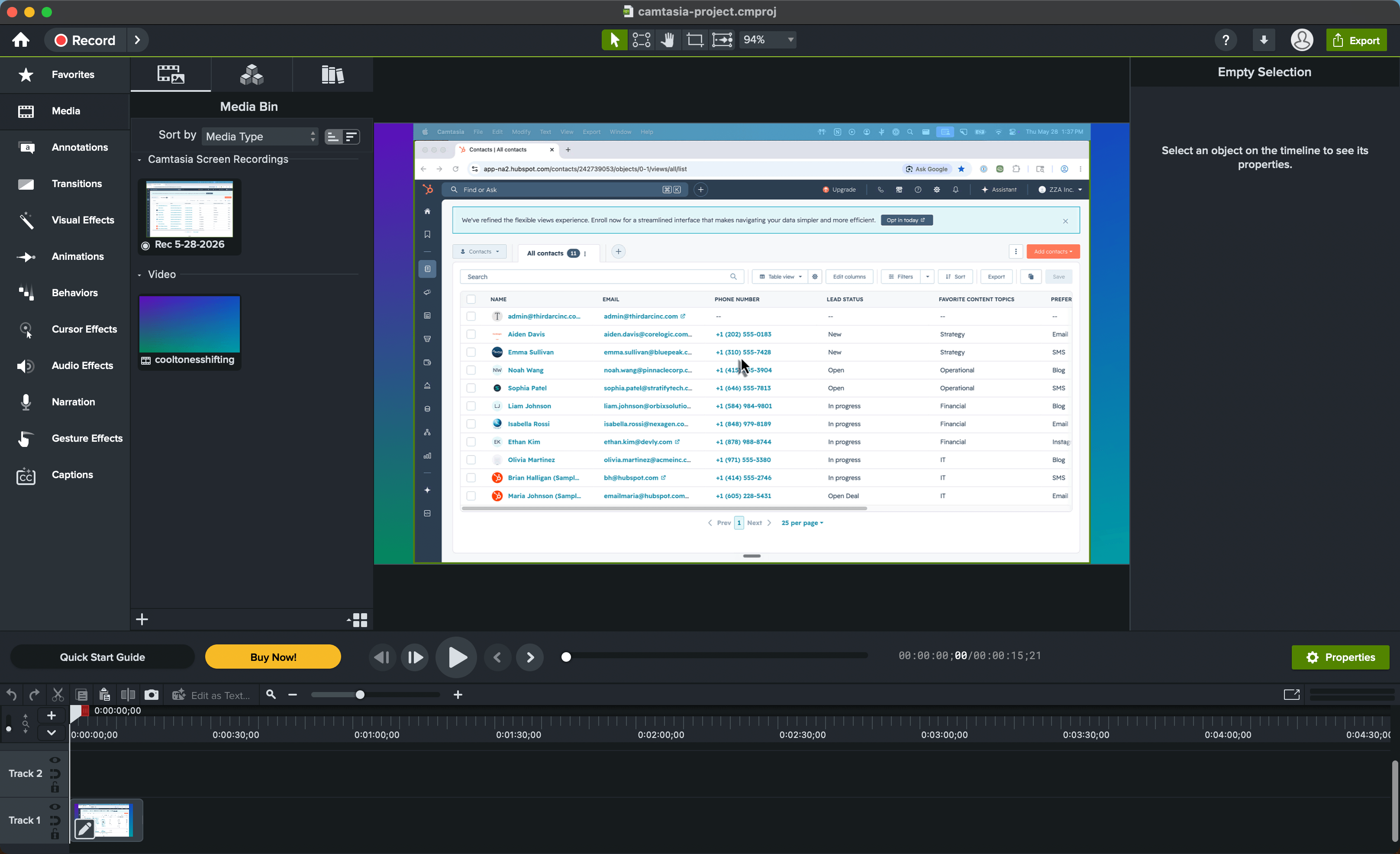
Best for: desktop-grade training video production
Camtasia fits when the output needs more production control than Trupeer, Loom, or a fast guide tool can offer. It is a full screen-recording and editing suite: multitrack timeline editing, cursor effects, captions, audio cleanup, quizzes, and SCORM export, with review workflows through Screencast.
That sets it apart from Trupeer, which turns a rough recording into an AI-polished video and guide with little manual editing. Camtasia gives you control after the recording, which matters for training videos where cursor path, zooms, captions, and the LMS package all need care.
Pricing works differently too. TechSmith lists Starter at $39/year, but that tier exports with a watermark. Watermark-free work starts at Essentials ($179.88/year), Create adds AI video at $249/year, and Pro reaches $599/year for avatars, dubbing, and unlimited Screencast sharing. Individual plans are non-transferable, so teams needing reassignment should look at Teams & Business.
The tradeoff is overhead. Camtasia is gentler than Premiere Pro, but it is still a production tool. Reviews on G2, Capterra, and Reddit praise its ease and editing power; the recurring complaints are cost, resource use, and lag on larger projects.
Choose Camtasia if: you create polished training videos, courses, or LMS-ready assets and need timeline-level control. It is built for instructional designers and technical trainers who care about cursor polish, captions, quizzes, and SCORM.
Skip Camtasia if: you mainly need fast, maintainable documentation. Trails, Scribe, Tango, or Guidde feel lighter when the goal is to capture a workflow, keep it current, and share it without turning every update into a video-editing project.
Screen Studio
Best for: polished Mac screen recordings
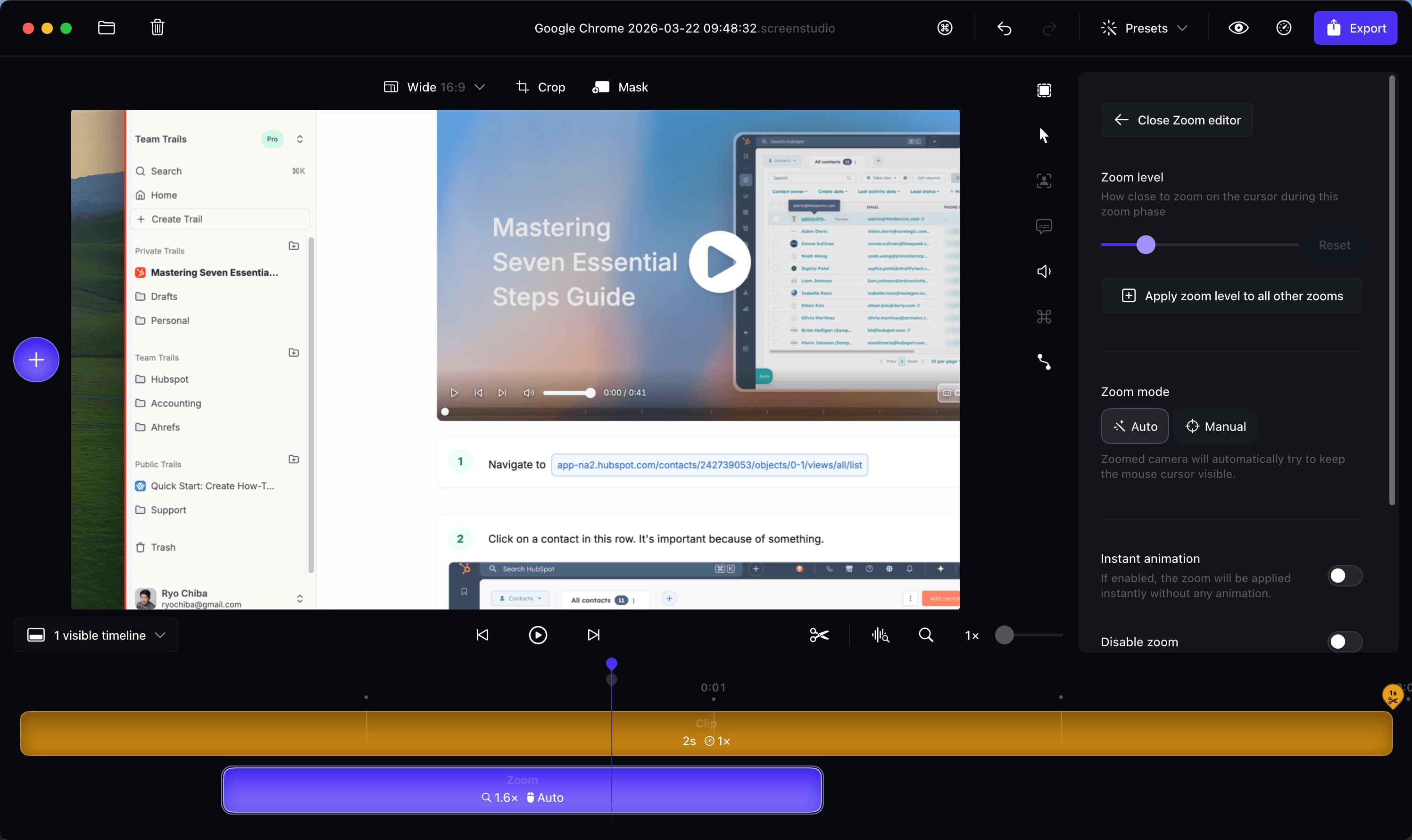
Screen Studio is the right alternative when the job is a polished screen video, not a guide library. It is a native macOS recorder and light editor with automatic zoom, smooth cursor movement, brand-style backgrounds, captions, shareable links, and export up to 4K 60fps.
That puts it closer to Camtasia and Loom than to Scribe or Tango. Against Trupeer, it gives Mac creators more control over how the recording looks: zoom timing, cursor size, background, and camera layout. It doesn't build structured SOPs or AI-narrated guides, and its own roadmap still lists AI voiceover and team subscriptions as in progress.
Pricing is simple: $29/month monthly or $9/month billed yearly, with every feature included. You can use the app without a plan, but exporting files requires one. Shareable links cap at 30 minutes, so longer projects need file export.
Sentiment is strong where the reviews cluster. Product Hunt shows a 4.9 from 175 reviews, praising recording quality, auto-zoom, and smooth cursor movement. The cautions are predictable: macOS only, pricing sensitivity, large files on long recordings, and no deeper annotation, voiceover, or team workflows.
Choose Screen Studio if: you are on a Mac and need demos, tutorials, or walkthroughs to look polished fast. It fits when the recording itself is the asset and you care about cursor movement, zooms, and export quality.
Skip Screen Studio if: you need the recording to become a maintainable guide, SOP, or narrated training video. Trails, Guidde, Clueso, or Trupeer fit that better, and Loom is simpler for quick async messages.
Scribe
Best for: quick screenshot guides
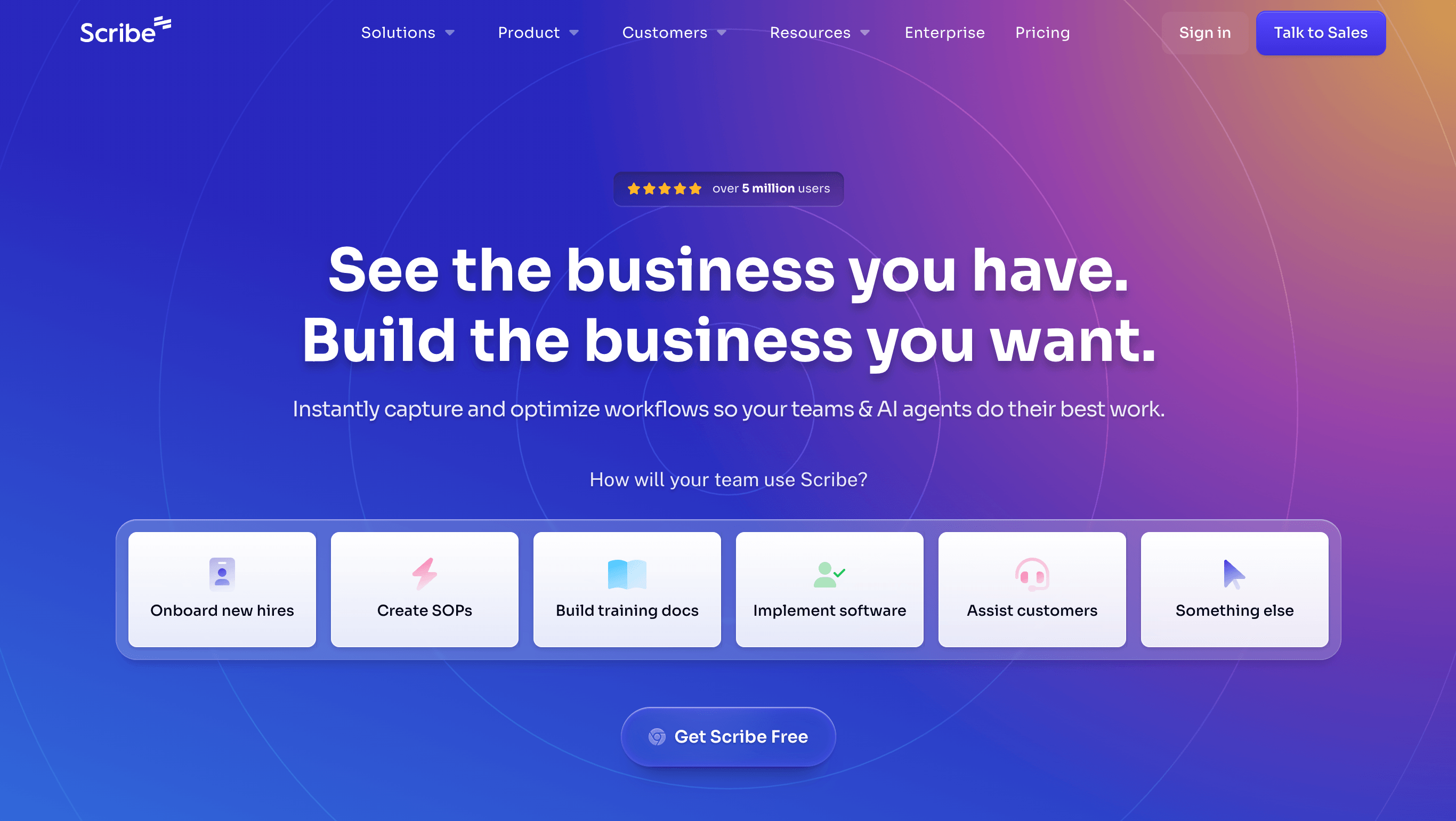
Scribe is the obvious choice if you came to Trupeer for written documentation but don't need polished video. You start capture, click through a process, and Scribe builds a step-by-step guide with screenshots. It is fast, widely adopted, and familiar to teams that want clean process docs without a full training system.
Its documentation feature set is deep: browser and desktop capture, screenshot editing, redaction, Pages for longer docs, multiple export formats, live embeds, and enterprise governance. It also carries a large public footprint and broad awareness in the category.
There's a free Basic plan. Pro Personal lists at $35/seat/month and Pro Team at $17/seat/month, while the annual view shows Team at $59/month for 5 users plus $12 per extra seat. Enterprise is custom. The page exposes several billing views, so verify the seat math before publishing.
The limitation for Trupeer buyers is video. Scribe can render guides in a movie-style format, but that isn't a narrated, branded training video as a first-class output. If video matters, Scribe is one piece of the stack, not the whole answer.
Choose Scribe if: you want the fastest path to clean screenshot-based guides. It is ideal for teams replacing manual screenshots, Google Docs, and repeated live walkthroughs.
Skip Scribe if: documentation also needs to become narrated training video. Pick Trails for guide plus video, Guidde for richer video docs, or Trupeer/Clueso for more product-video polish.
Iorad
Best for: interactive software tutorials
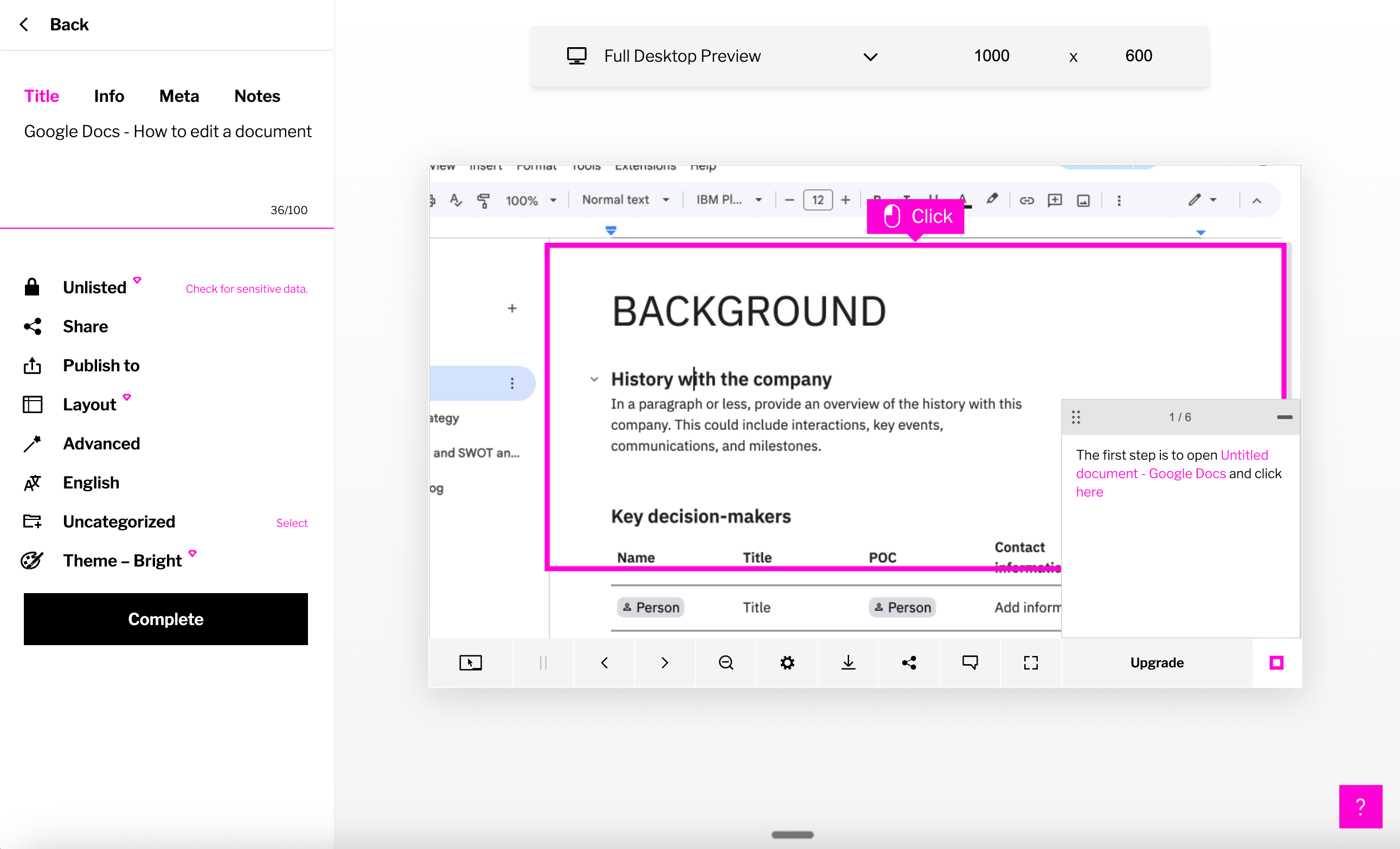
Iorad fits when a tutorial needs to be something a learner clicks through, not just reads or watches. A creator records a workflow, Iorad breaks it into steps, and learners get modes like Try It, Watch It, and Quiz, depending on the plan.
That separates it from Trupeer, which is stronger for an AI-polished product video. Iorad wins when L&D, IT, or customer education teams need repeatable training that supports practice, LMS workflows, and knowledge-base embedding.
Pricing lists a free plan for public tutorials, Individual at $200/mo, Team at $500/mo with one seat plus $50/mo per extra creator, and quote-based Enterprise. Team adds branding, SSO, and advanced analytics; Enterprise adds in-app guidance, anti-track controls, and translation into 100+ languages.
The tradeoff is cost and format. Iorad is expensive for small teams that only need quick SOPs, and its output feels more like a learner simulation than a polished video. Reviewers on G2 and Capterra are largely positive, with cautions around pricing, occasional capture friction, and an interface that takes some adjustment.
Choose Iorad if: you need interactive tutorials for employee training, customer education, or LMS content. It is strong when learners need to practice the task and integrations matter more than video polish.
Skip Iorad if: you mainly want polished AI videos, avatar-led demos, or a cheaper screenshot tool. Trupeer, Clueso, or Guidde fit the video job better, and Scribe or Trails feel lighter for everyday documentation.
Tango
Best for: in-app workflow guidance
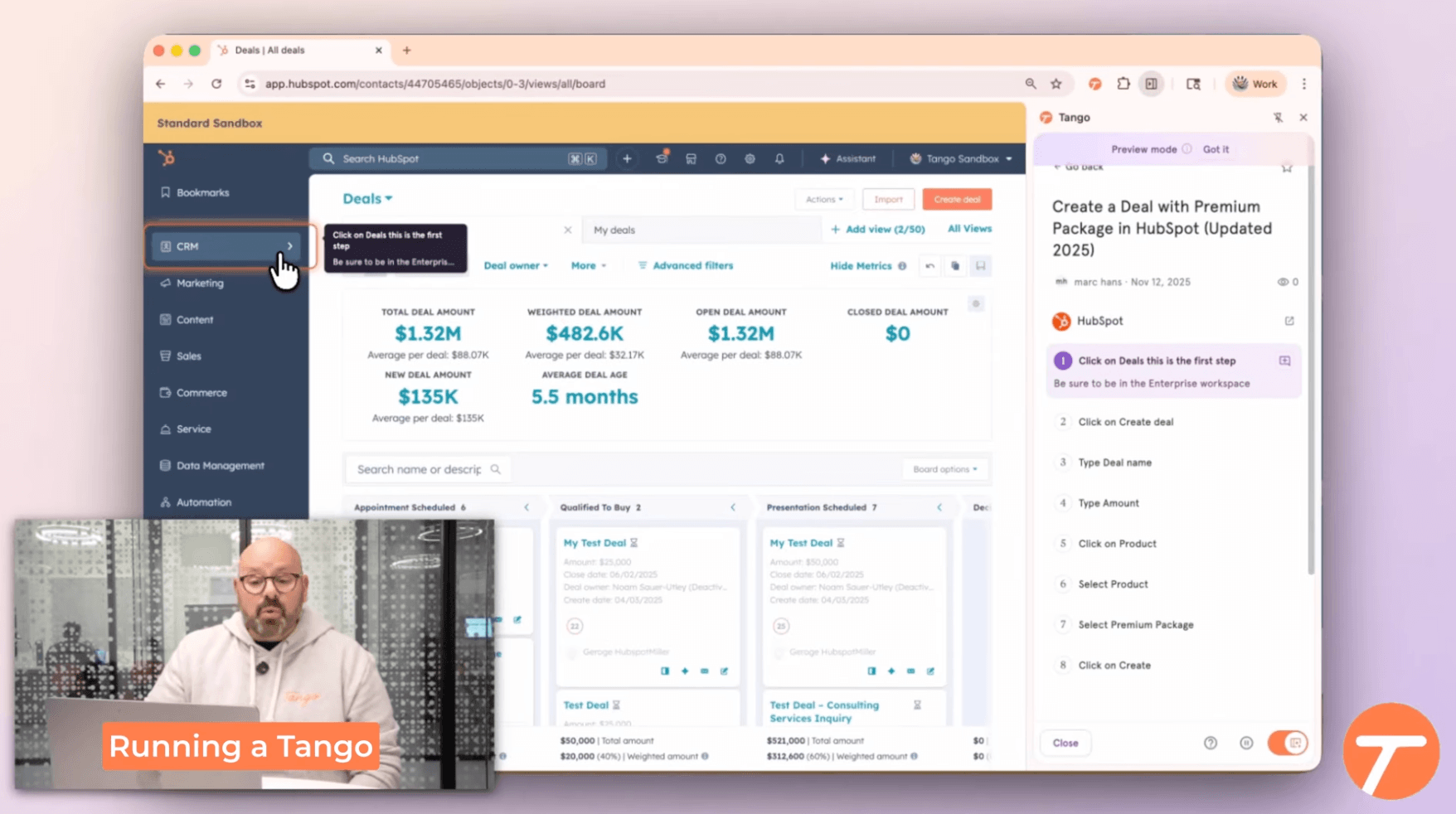
Tango fits when the problem isn't making another guide, but helping employees follow the right process inside the software they already use. It starts with automatic capture, then extends into Guide Me walkthroughs, Nuggets, video embeds, and browser automation on enterprise plans.
That sets it apart from Trupeer, which makes a polished video and guide from a recording. Tango puts process knowledge at the point of execution. When you're rolling out a CRM, ERP, or internal operations workflow, in-app guidance matters more than video polish.
The free plan is genuinely useful: browser capture, link and embed sharing, 5 shared workflows, and up to 10 users. Pro Team runs $15/user/month billed annually (3+ users) or $20 monthly; Pro Personal is $22/user/month annually or $26 monthly. Enterprise is custom and adds Guide Me, automations, SSO, SCIM, and audit logs.
The tradeoff is format. Tango can embed video from a workflow, but it isn't a video-production tool. It is strongest for in-app adoption and lighter documentation, not polished training videos or marketing demos.
Choose Tango if: your goal is helping employees execute workflows correctly inside business apps. It fits operations, RevOps, IT, HR, and enablement teams managing process change.
Skip Tango if: you need customer-ready AI videos, avatars, or documentation that doubles as polished training. Trails, Guidde, Trupeer, or Clueso fit that better.
Loom
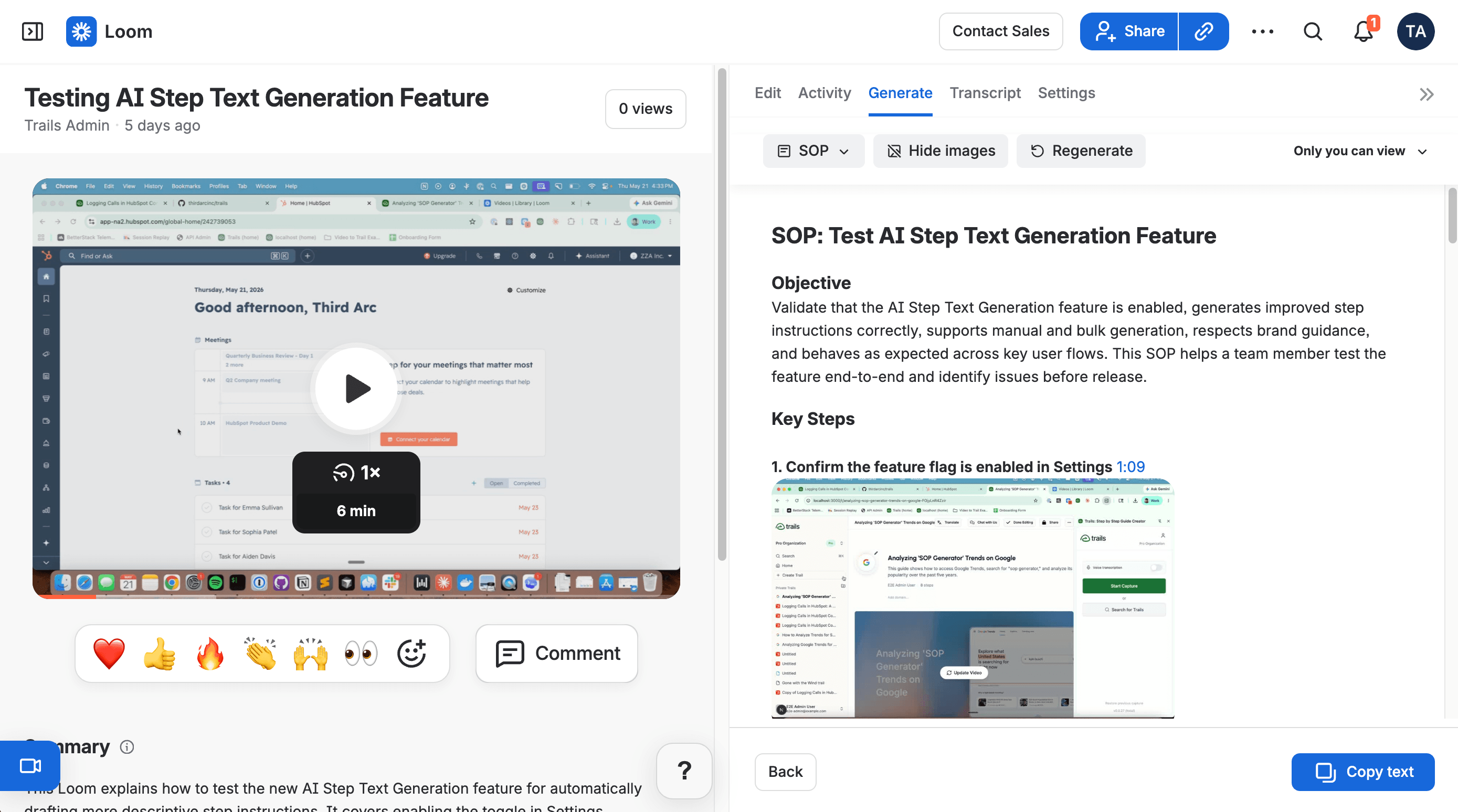
Best for: async video explanation
Loom is the best alternative if you don't actually need an AI documentation platform. It is fast and familiar: record your screen, camera, or both, then share a link. For quick customer replies, bug reports, or internal updates, Loom is usually the lowest-friction answer.
Atlassian has pushed Loom deeper into team workflows. Business + AI adds automatic titles, summaries, transcript-based editing, filler-word removal, and video-to-text that can draft docs, messages, and SOPs. That makes it more useful for documentation than it once was.
Pricing is per user. Starter is $0 with 25 recordings capped at 5 minutes each. Business is $18/user/month with unlimited videos and basic editing, and Business + AI is $24/user/month with AI enhancement and video-to-text. Enterprise is custom.
The tradeoff is that Loom stays video-first. A Loom is easy to make but hard to maintain as a durable document. When step 7 changes, you usually re-record. A written guide with screenshots is easier to scan, search, update, and embed.
Choose Loom if: you mostly need quick async communication and lightweight screen recordings. It is the simplest way to replace a meeting, a long email, or a vague bug report.
Skip Loom if: your team needs reusable process documentation, structured guides, or training content that stays current after the workflow changes. Pick Trails, Scribe, Tango, or Guidde instead.
Trainual
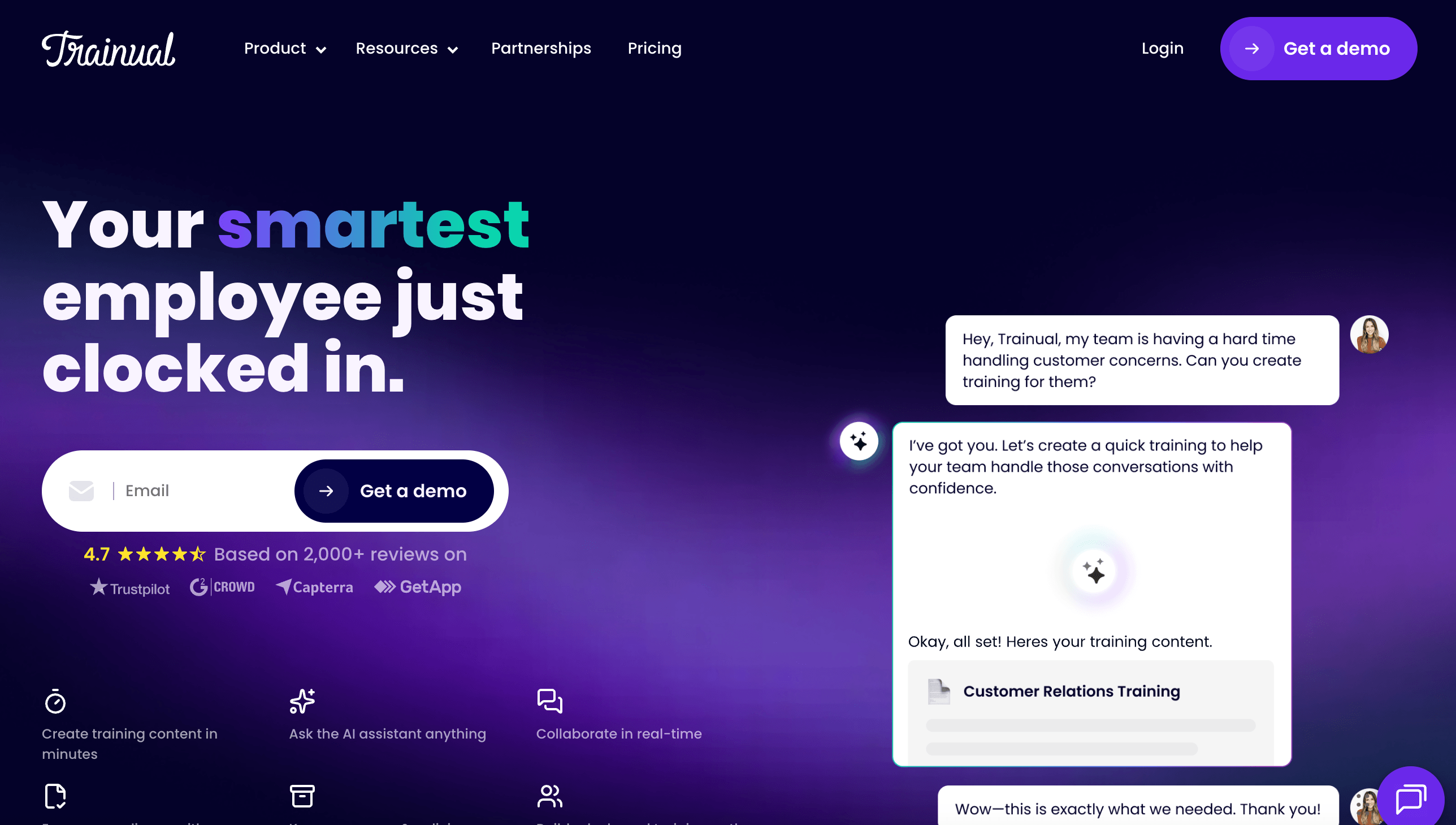
Best for: SOP and training management
Trainual isn't a Trupeer clone. It belongs in the decision set when the real need is training management, not content generation. It combines process docs, onboarding, roles, quizzes, assignments, progress tracking, and HRIS integrations into one accountability layer.
That makes it closer to an SMB training platform than an AI video tool. If the question is "Can we prove every new hire finished onboarding?" Trainual beats Trupeer. If it's "Can we turn this recording into a polished walkthrough?" it doesn't.
Trainual no longer publishes self-serve prices. Its help center describes annual agreements and legacy plans for accounts created before July 28, 2025. Treat third-party pricing guides as directional, and expect a demo-led sale rather than a checkout page.
The limitation for Trupeer buyers is creation speed. Trainual hosts and manages training, but it doesn't replace a capture-first tool for generating walkthroughs. To document a browser workflow in five minutes, start in Trails, Scribe, Tango, Guidde, or Trupeer, then bring the finished asset into Trainual.
Choose Trainual if: you need assigned onboarding, quizzes, role-based training paths, and HR-connected accountability. It is strongest when documentation must become managed employee training.
Skip Trainual if: your main problem is quickly creating the source guide or video. Trainual manages training well, but it is not the fastest way to capture software workflows.
The bottom line
Trupeer's mismatch isn't quality. The product is tuned for AI-polished video, while many people shopping for alternatives actually need maintainable documentation, cheaper async recording, in-app guidance, or training accountability.
If you valued the polished product videos, choose Clueso or Guidde. For deeper desktop editing, choose Camtasia. For a polished Mac recording with auto-zoom, choose Screen Studio. For the quick recording workflow without AI polish, choose Loom. For fast written guides, choose Scribe. For interactive tutorials and LMS delivery, choose Iorad. For guidance inside business software, choose Tango. For assigned learning paths and proof that training happened, choose Trainual.
If you need documentation that works as training content, choose Trails. One workflow becomes a written guide and a narrated video, and the guide stays easier to edit than a traditional video project. That is the better fit for teams that care less about one perfect demo and more about keeping process knowledge current.