
Glossary
Training Assessment
 ChatGPT
 Perplexity
 Gemini
 Claude
What is a training assessment?
A training assessment checks whether learners understand, can apply, or are ready to perform what a training program taught. It might be a quiz, practical task, scenario, observation, demonstration, certification, or manager review.1
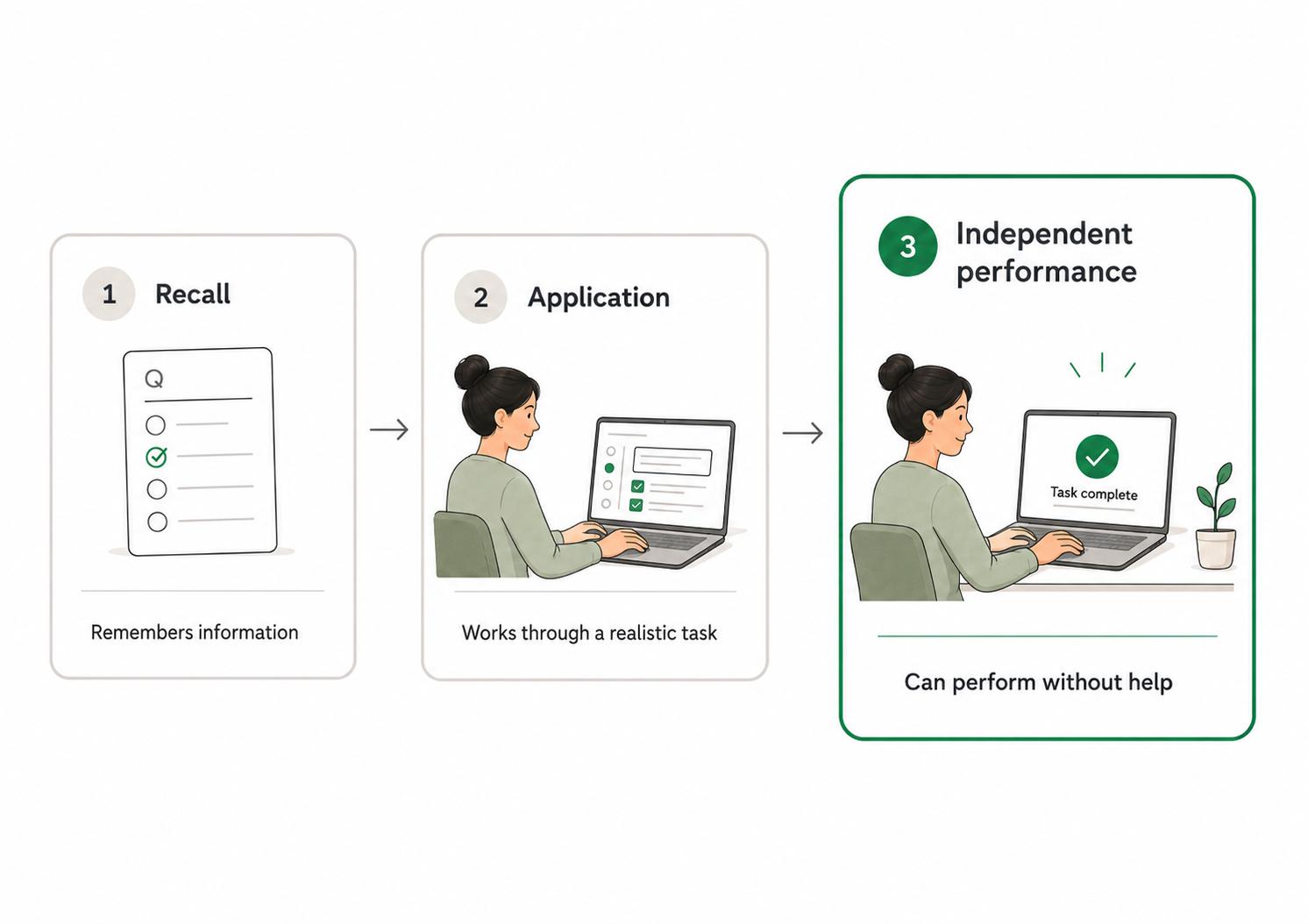
The best assessments test readiness for real work. They do not just ask whether someone remembers the lesson; they show whether someone can apply it when the trainer is gone.2
Why training assessments matter
Training without assessment creates a blind spot. People may attend a workshop, complete a module, or read a manual, but the team still may not know whether they can perform the task correctly.
Assessments make training more honest. They show learners where they need practice, give managers a coaching signal, and help training owners see whether the content is doing its job.
They also reduce avoidable risk. It is better to find confusion during a practice scenario than during a customer conversation, safety task, compliance process, equipment setup, or operational handoff.
What training assessments measure
A useful assessment measures the thing the training was meant to improve. Many assessments drift toward what is easiest to test, which is why simple recall checks get overused.
Training assessments may measure:
- Recall: Does the learner remember key terms, rules, or facts?
- Understanding: Can the learner explain why the rule or process matters?
- Application: Can the learner use the knowledge in a realistic situation?
- Workflow performance: Can the learner complete the task in the right sequence?
- Judgment: Can the learner choose the right path when there are tradeoffs or exceptions?
- Readiness: Can the learner perform independently, or do they need coaching?
Recall has a place, but it should not be the default for every training program. If the job requires tool use, decision-making, or customer interaction, the assessment should include those realities.
Types of training assessments
Different formats answer different questions. A quiz can check basic understanding. A scenario can test judgment. A practical task can show whether someone can perform a workflow. A manager observation can confirm whether the behavior shows up during real work.
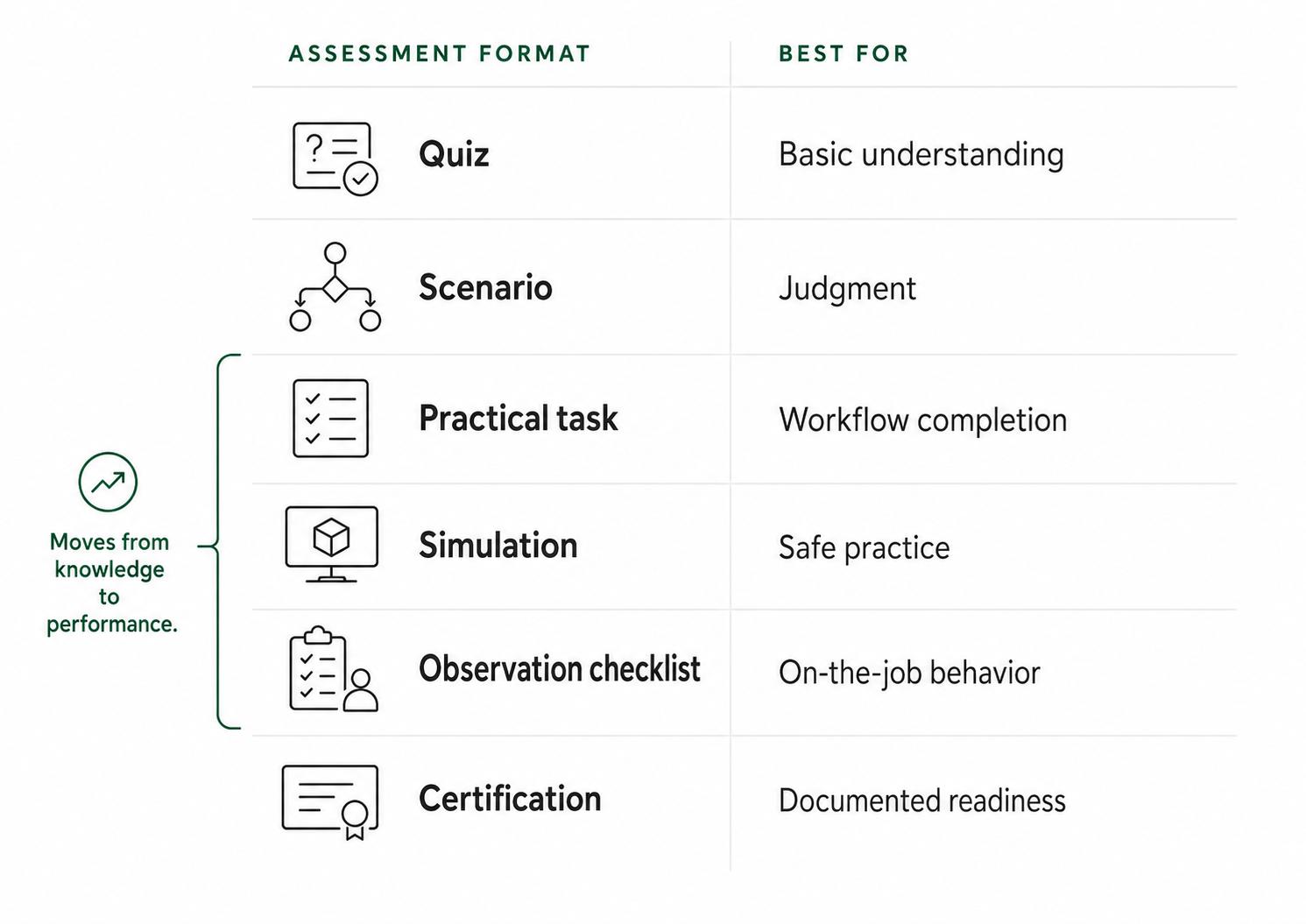
Choose the format based on the risk and complexity of the job:
- Use a quiz for low-risk knowledge checks or prerequisites.
- Use a scenario when the learner must make decisions with context.
- Use a practical task when the learner must complete a workflow or use a system.
- Use a simulation when practice should happen before live work.
- Use an observation checklist when managers need to verify behavior on the job.
- Use a certification when readiness must be documented against a standard.
The format should feel like the work. If the real job involves messy inputs, edge cases, handoffs, or tools, the assessment should not be a clean vocabulary test.3
How to design a useful training assessment
Start with the behavior the training is supposed to produce. If the learner needs to process a refund exception, ask them to handle a realistic refund exception. If they need to diagnose a support issue, give them a scenario with incomplete information, not a list of definitions.
A practical design workflow is:
- Define the task, skill, or decision being assessed.
- Decide what good performance looks like.
- Choose the assessment format.
- Create realistic prompts, data, examples, or cases.
- Define scoring criteria before learners begin.
- Give feedback that points to the next practice or reference.
- Use results to improve the training material.
The scoring criteria matter. Without them, assessment becomes inconsistent: one manager may pass work that another manager would coach. Clear criteria make the assessment fairer and make the training easier to improve.4
A training assessment template
Use this template to design a practical assessment:
## Training Assessment Template

**Glossary term:** Training Assessment
**Source:** Trails Glossary — trails.so/glossary/training-assessment

---

### 01. Design a practical training assessment

"Training assessment: [skill, process, or workflow]
Audience: [learner group]
Training goal: [what learners should be able to do]
Assessment format: [quiz, scenario, practical task, simulation, observation]

Task prompt:
[Describe the realistic task or scenario learners must complete.]

Required evidence:
- [Step, decision, answer, output, or behavior 1]
- [Step, decision, answer, output, or behavior 2]
- [Step, decision, answer, output, or behavior 3]

Scoring criteria:
- Pass: [minimum acceptable performance]
- Needs coaching: [specific gaps that require follow-up]
- Not ready: [risks or missing skills that block independent work]

Feedback notes:
[What the learner should review or practice next]"
Keep the assessment close to the job. If the learner will use a tool, reference a guide, or make a judgment during real work, include that in the assessment.
Common mistakes
The first mistake is testing trivia. A learner may know the name of a policy and still be unable to apply it in a real situation.
The second mistake is making the assessment harder than the training. If the training only shows ideal examples but the assessment uses complex edge cases, the result may reveal a training design problem, not a learner problem.
The third mistake is treating assessment results as an endpoint. Results should improve the program. If many learners miss the same step, the team may need clearer documentation, better practice, or a simpler process.
Training assessment vs. training evaluation
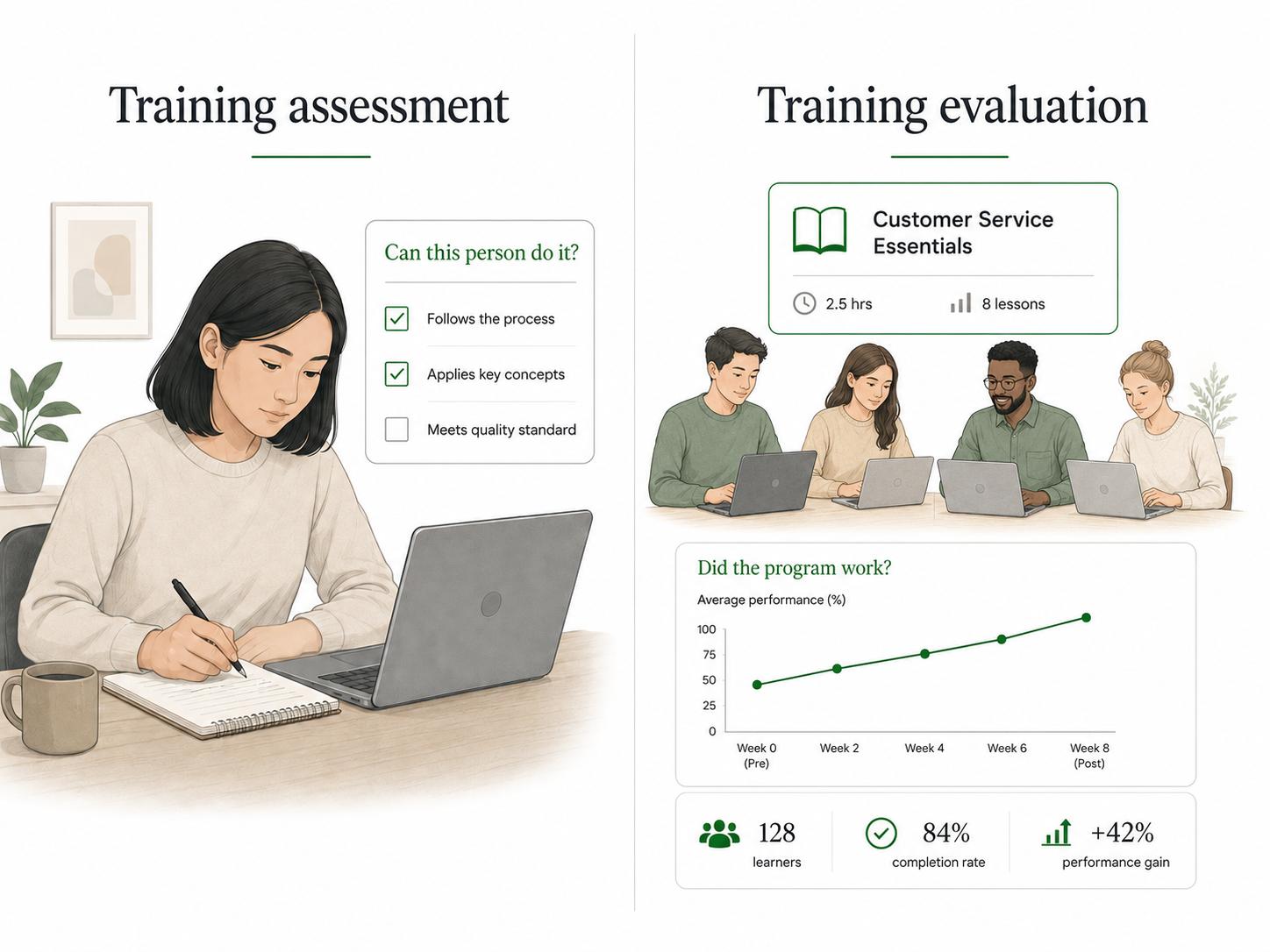
A training assessment measures learner readiness or performance. Training evaluation looks at the effectiveness of the overall training program.
Assessment asks, "Can this person do the thing?" Evaluation asks, "Did this program work well enough to keep, improve, or scale?" Both matter, but they operate at different levels.
Documentation takeaway
Training assessments are more consistent when learners and managers share a clear process standard. A guide, checklist, example, or SOP gives the learner something to practice against and gives the assessor a more objective reference.
If the assessment reveals confusion, inspect the documentation before blaming the learner. The standard may not be as clear as the team thinks.
How Trails helps
Trails helps teams create the workflow documentation that makes assessments clearer. A team member can capture a workflow as they perform it, turn that capture into a polished step-by-step guide, and create an AI-narrated video version for training or sharing.
That gives learners a clear reference before assessment and gives managers a more consistent way to judge whether the process was followed.
Sources
- 1
Centers for Disease Control and Prevention. Quality Training Standards. CDC. www.cdc.gov/training-development/php/qts/index.html. Accessed July 1, 2026.
- 2
Centers for Disease Control and Prevention. Evaluate Training: Measuring Effectiveness. CDC. www.cdc.gov/training-development/php/about/evaluate-training-measuring-effectiveness.html. Accessed July 1, 2026.
- 3
Kirkpatrick Partners. The Kirkpatrick Model. Kirkpatrick Partners. www.kirkpatrickpartners.com/the-kirkpatrick-model/. Accessed July 1, 2026.
- 4
Rubrics: Tools for Making Learning Goals and Evaluation Criteria Explicit. Rubrics: Tools for Making Learning Goals and Evaluation Criteria Explicit. CBE Life Sciences Education. pmc.ncbi.nlm.nih.gov/articles/PMC1618692/. Accessed July 1, 2026.