
Glossary
Video SOP
 ChatGPT
 Perplexity
 Gemini
 Claude
What is a video SOP?
A video SOP is a standard operating procedure that uses video to show how a repeatable task should be performed. It may be a screen recording, camera recording, narrated walkthrough, or embedded training clip, but it still needs the structure of an SOP: scope, steps, owner, exceptions, and a clear definition of done.1
The useful part is not simply adding video to documentation. It is choosing video for the moments where seeing the work prevents errors that text alone tends to leave open. A billing specialist can read "choose the correct adjustment reason," but a short walkthrough can show exactly where that field appears, which cases require a manager note, and what the final record should look like.
When a video SOP is the right format
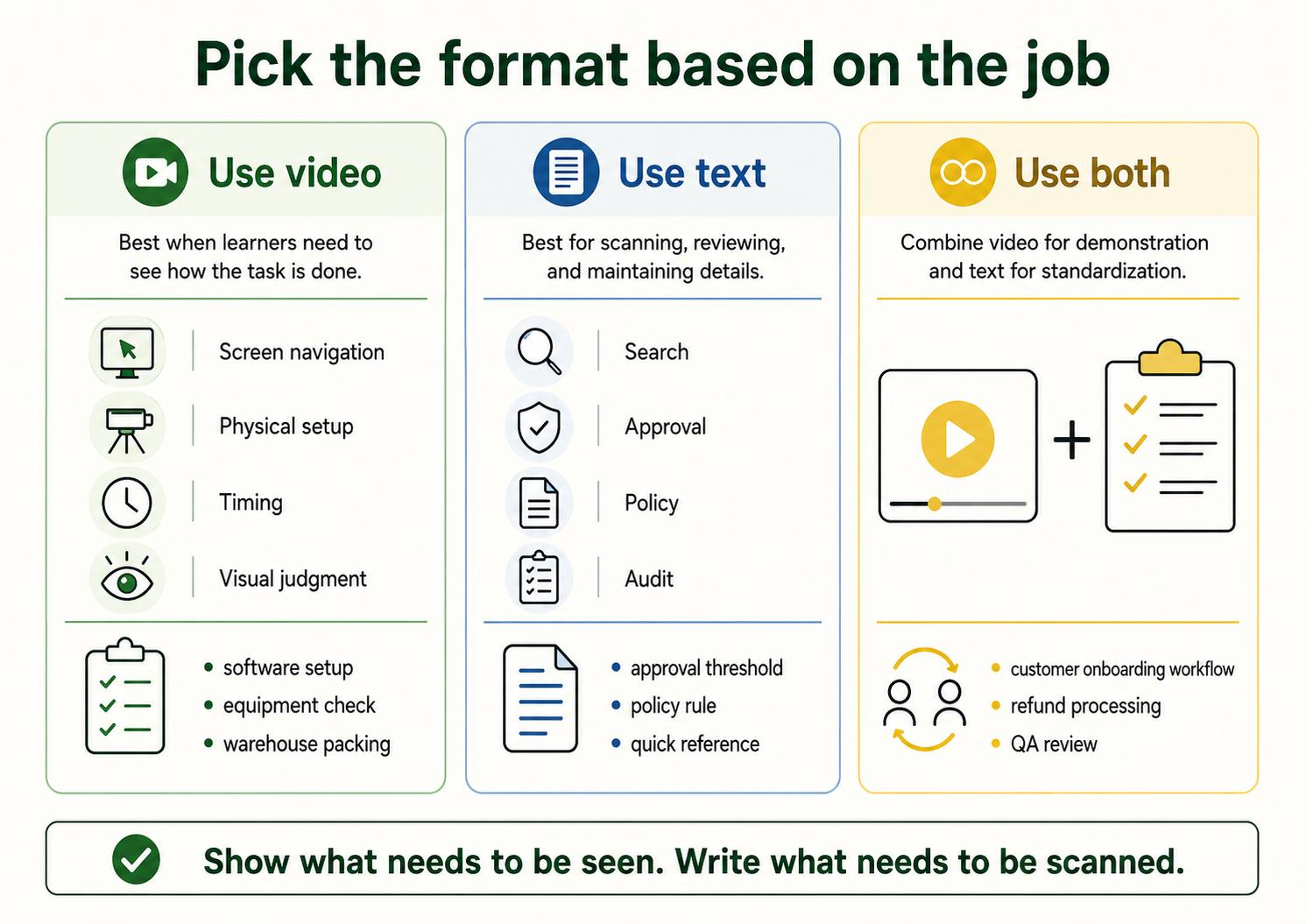
A video SOP works best when the task has visual judgment, screen navigation, timing, physical setup, or repeated mistakes that happen because people misread the written steps.2 Common examples include software setup, customer onboarding workflows, equipment checks, warehouse packing, refund processing, QA review, and support troubleshooting.
It is less useful when the procedure is mostly policy, decision logic, or a short reference. If someone only needs to check an approval threshold, a two-minute video is friction. A good video SOP earns the extra format by showing something that is hard to express clearly in words.
The practical decision rule: use video when the learner needs to see what good execution looks like. Use text when the user needs to search, scan, approve, or audit the procedure. Use both when the task matters enough to train and standardize.3
What a video SOP should include
A video SOP should not be a loose recording dropped into a knowledge base. It should be a controlled procedure with a video component.
Strong video SOPs usually include:
- Purpose: what the procedure accomplishes and why it exists.
- Scope: where the procedure applies and where it does not.
- Audience: who should follow it.
- Prerequisites: access, tools, materials, accounts, or setup needed first.
- Video walkthrough: the process shown in the right sequence.
- Written steps: the same workflow in skimmable form.
- Exception handling: what to do when the normal path breaks.
- Quality check: how someone confirms the task was done correctly.
- Owner and review trigger: who maintains the SOP and what kind of change requires an update.
The written steps are the part many teams skip. That creates a polished training asset but a weak operating standard. Video is good for learning the motion of the work; text is better for finding one step quickly, comparing versions, and updating a single instruction when a tool changes.
Video SOP vs video tutorial
A video SOP and a video tutorial can look similar, but they serve different jobs. A video tutorial teaches someone how to do something. A video SOP defines the accepted way a team does that work.
That distinction matters in operations. A tutorial can show one useful method. An SOP needs to clarify which method is approved, who owns it, what exceptions are allowed, and what outcome counts as correct. If a video does not answer those questions, it may still be helpful training content, but it should not be treated as the source of truth for the process.
How to create a useful video SOP
"Customer onboarding" is usually too broad; "create a new customer workspace after kickoff" is much easier to record, test, and maintain. The smaller scope also makes the video easier to replace when one system screen changes.
Record the work as it should be performed, not as a casual demo. Narrate the judgment calls: why a field is selected, when to pause, what to double-check, and where mistakes usually happen. Those comments are often more valuable than describing every click.
After recording, turn the walkthrough into written steps. This is where the SOP becomes operational. Add the prerequisites, exceptions, quality check, owner, and review trigger. Then have someone other than the recorder follow the SOP. If they cannot complete the task without extra explanation, the video and written steps are not ready yet.4
AI-ready video SOP prompt
Use this prompt to turn a walkthrough, transcript, or rough recording notes into a first draft:
## Video SOP Draft Prompt

**Glossary term:** Video SOP
**Source:** Trails Glossary — trails.so/glossary/video-sop

---

### 01. Draft a video SOP from a walkthrough

"Create a video SOP for [process] used by [team].

Audience: [role or experience level]
Trigger: [when this procedure starts]
Successful outcome: [what done correctly looks like]
Tools or systems: [apps, equipment, forms, or materials]
Video source: [recording link, transcript, or walkthrough notes]
Known exceptions: [edge cases or stop points]
Owner: [role responsible for accuracy]

Return:
1. Purpose
2. Scope
3. Prerequisites
4. Suggested video chapters
5. Written step-by-step procedure
6. Decision points and exceptions
7. Quality check
8. Review trigger"
Do not publish the output unchanged. Use it to speed up the first draft, then test the SOP against the real task and have the process owner approve it.
Common mistakes
The most common mistake is assuming that a recording is documentation. A recording captures what happened once. An SOP defines what should happen repeatedly.
Another mistake is making the video too long. If one video covers five branching workflows, people will stop using it as a reference. Split the work into smaller SOPs or add short chapters that match the moments users actually need.
The quiet maintenance problem is worse: teams update the written process but leave the old video embedded. A video SOP needs a clear review trigger, especially when software screens, policy rules, equipment, or customer handoff steps change.
How Trails helps
Trails helps teams create video SOPs from the actual workflow instead of starting from a blank page. A teammate captures the process as they perform it, and Trails turns that workflow into a polished step-by-step guide. Trails can also create an AI-narrated video version for training or sharing.
That gives teams both sides of the format: a visual walkthrough for learning and a written guide for scanning, maintaining, and repeating the process.
FAQ
Is a video SOP the same as a screen recording?
No. A screen recording can be part of a video SOP, but the SOP also needs scope, written steps, ownership, exception handling, and a quality check.
Can video replace a written SOP?
Usually no. Video is useful for demonstration, but written steps are easier to search, skim, update, and approve. Important procedures normally need both.
How long should a video SOP be?
As short as the procedure allows. If the video covers multiple workflows or many exceptions, split it into smaller SOPs or add clear chapters.
Sources
- 1
International Organization for Standardization. Guidance on Documented Information. ISO. www.iso.org/iso/documented_information.pdf. Accessed June 24, 2026.
- 2
Nielsen Norman Group. Video Usability. Nielsen Norman Group. www.nngroup.com/articles/video-usability/. Accessed June 24, 2026.
- 3
Centers for Disease Control and Prevention. Quality Training Standards. CDC. www.cdc.gov/training-development/php/qts/index.html. Accessed June 24, 2026.
- 4
Occupational Safety and Health Administration. Training Requirements in OSHA Standards. OSHA. www.osha.gov/sites/default/files/publications/OSHA2254.pdf. Accessed June 24, 2026.