
Glossary
Video Tutorial
 ChatGPT
 Perplexity
 Gemini
 Claude
What is a video tutorial?
A video tutorial is an instructional video that shows someone how to complete a task, use a tool, or understand a process. Instead of only explaining what to do, it demonstrates the action so the viewer can follow along and compare their own work to the example.
Video tutorials are common in employee training, customer education, onboarding, software support, and internal process documentation. They work best when the task has a visual or sequential element: click this menu, inspect this screen, assemble this part, fill out this form, or handle this exception in this order.
When to use a video tutorial
Use a video tutorial when seeing the task will prevent confusion. A written checklist may be enough for a simple policy or reminder. A video is stronger when timing, sequence, screen movement, visual judgment, or a finished example matters.
- Showing new customers how to configure a product feature.
- Training employees on a software workflow with several screens.
- Demonstrating a physical setup, inspection, or handoff.
- Answering a support question that is easier to show than describe.
- Teaching a new hire the full flow before they do it alone.
- Explaining an exception path that people often get wrong.
Do not use video as a hiding place for unclear process design. If the workflow is messy, a tutorial may make the mess easier to watch without making it easier to perform. Clean up the process first, then record the tutorial.
What makes a good video tutorial
A useful video tutorial has a point of view. It does not just record a screen while someone talks. It tells the learner what matters, what to ignore, and how to know they are on track.1
| Element | Why it matters |
|---|---|
| Clear outcome | The viewer knows what they will be able to do by the end |
| Focused scope | One tutorial covers one task or workflow, not every related feature |
| Visible steps | The viewer can see each action, screen, field, or object clearly |
| Plain narration | The explanation names the decision behind the action, not just the clicks |
| Error handling | Common mistakes and exceptions are called out before they cause confusion |
| Easy reference | Timestamps, transcript, or written steps help people return to the right moment |
The reference layer matters. Video is easy to watch, but hard to skim. A five-minute tutorial may be useful for first-time learning and irritating for someone who only needs step four. Strong teams pair video tutorials with written steps, timestamps, transcripts, or short checklists.2
Video tutorial vs training video
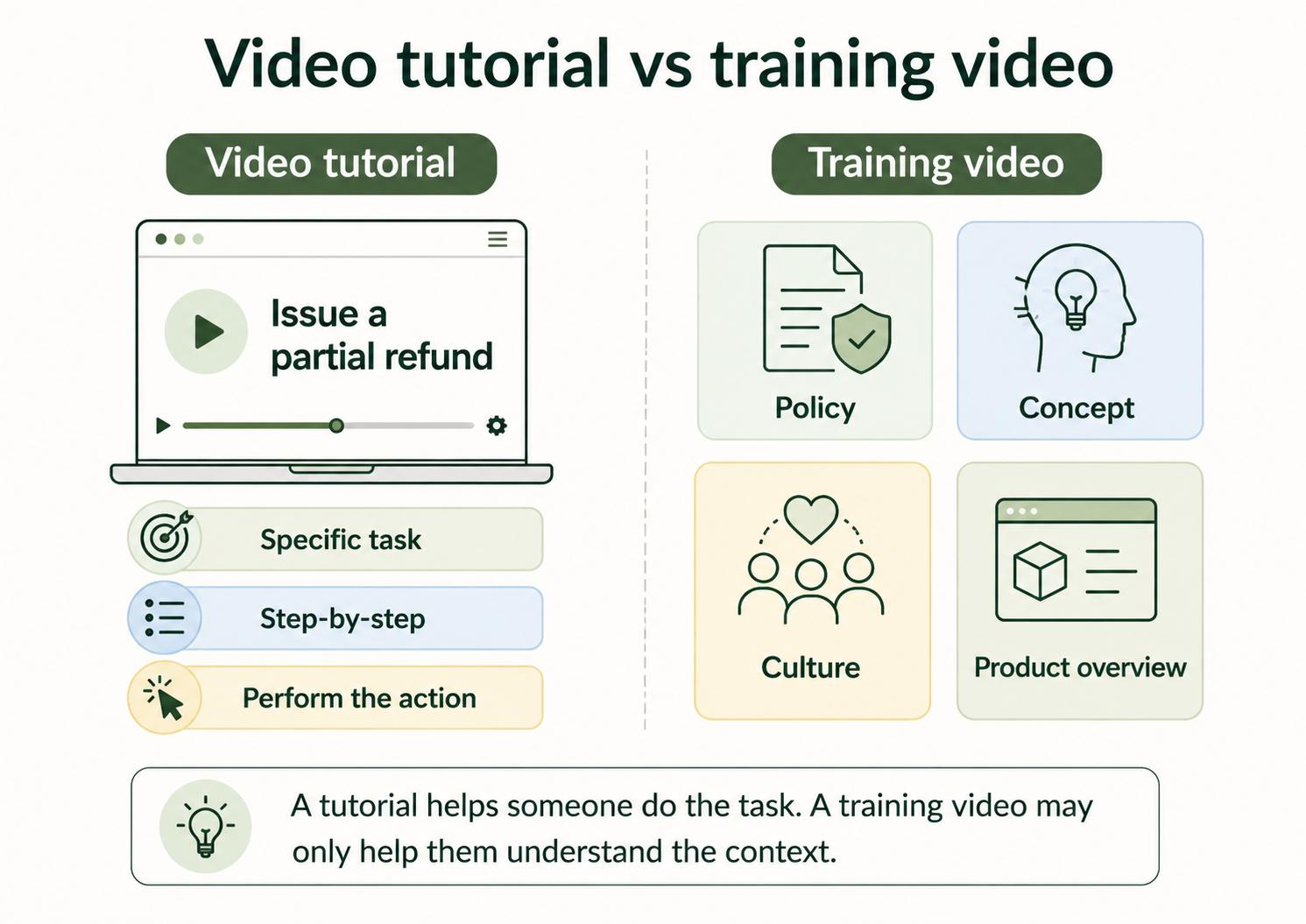
A video tutorial is a specific type of training video. It teaches someone how to do a defined task. A broader training video might explain a policy, introduce a product, discuss company values, or teach a concept without walking through task execution.
For example, "How to create a refund in the billing system" is a video tutorial. "How our refund policy works" is a training video. Both can be useful, but they should not be judged by the same standard. The tutorial should help the viewer perform the task. The policy video should help the viewer understand the decision context.
Confusing the two creates bloated tutorials. If a task tutorial starts with ten minutes of background, the person trying to complete the task will skip around or give up.
How to create a video tutorial
Start by choosing one task. "How to use the billing system" is too broad. "How to issue a partial refund in the billing system" is specific enough to teach and maintain.
- Define the learner and the task they need to complete.
- Write the starting point and the finished outcome.
- Capture the process exactly as the learner should perform it.
- Narrate the reason behind each important action.
- Edit out waiting, repeated clicks, and unrelated navigation.
- Add captions, transcript, timestamps, or written steps for reference.
- Store the tutorial where the learner will actually look for it.
- Assign an owner to update it when the process or interface changes.
The maintenance step is not optional. A polished tutorial that shows an outdated interface can create more confusion than no tutorial at all. Captions and transcripts are also part of the usable artifact, not an afterthought, because they make the same tutorial accessible and easier to reference.3
AI-ready video tutorial brief
Use this prompt before recording or generating a tutorial script:
## Video Tutorial Brief

**Glossary term:** Video Tutorial
**Source:** Trails Glossary — trails.so/glossary/video-tutorial

---

### 01. Plan a focused video tutorial

"Create a short video tutorial plan for [task] used by [audience].

The viewer needs to learn: [outcome]
Context: [where this task happens]
Starting point: [what the viewer has before the task begins]
Ending point: [what success looks like]
Required tools/screens: [tools, pages, forms, equipment]
Common mistakes: [mistakes or exceptions]
Tone: clear, direct, and practical

Return:
1. A 30-second intro script.
2. A numbered shot list or screen sequence.
3. Narration notes for each step.
4. Callouts for mistakes or decision points.
5. A short written summary to publish below the video."
This gives the creator a focused plan instead of a loose recording. It also makes it easier to turn the tutorial into a written guide later.
Documentation takeaway
Video tutorials should not live alone. They work best as part of a documentation system that also includes written steps, searchable summaries, transcripts, and links to related SOPs or work instructions.
That matters because people use tutorials at different moments. A new hire may watch the full video. An experienced teammate may only need the written step. A support rep may want the timestamp that explains the error message. One captured workflow can serve all of those needs if it is structured deliberately.
How Trails helps
Trails fits video tutorials when the tutorial is really a repeatable process. A team member can capture the workflow as they perform it, and Trails turns that capture into a polished step-by-step guide.
Trails can also create an AI-narrated video version for training or sharing. That combination lets a team keep the video and written guide connected instead of maintaining separate assets that drift apart.
FAQ
Is a video tutorial the same as a training video?
A video tutorial is a type of training video focused on showing how to do a specific task. Training videos can be broader and may cover policies, concepts, culture, or explanations that are not step-by-step tutorials.
How long should a video tutorial be?
It should be as short as the task allows. If the tutorial covers multiple workflows, split it into separate videos so viewers can find the exact task they need.
Should every process have a video tutorial?
No. Use video when demonstration improves understanding. For simple reference material, a written checklist or short SOP may be faster to use and easier to maintain.
- Training video
- Screen recording
- Video to text
- Video SOP
- How-to guide
- Step-by-step guide
- Work instruction
- Digital work instruction
Sources
- 1
CBE-Life Sciences Education. Effective Educational Videos. PMC. pmc.ncbi.nlm.nih.gov/articles/PMC5132380/. Accessed June 24, 2026.
- 2
Richard E. Mayer. Multimedia Learning. Cambridge University Press. www.jsu.edu/online/faculty/MULTIMEDIA%20LEARNING%20by%20Richard%20E.%20Mayer.pdf. Accessed June 24, 2026.
- 3
W3C Web Accessibility Initiative. Making Audio and Video Media Accessible. W3C. www.w3.org/WAI/media/av/. Accessed June 24, 2026.