
Glossary
Training Video
 ChatGPT
 Perplexity
 Gemini
 Claude
What is a training video?
A training video is an instructional video that teaches someone how to perform a task, understand a process, use a tool, or build a specific skill. It might use screen recording, camera footage, narration, slides, captions, or a mix of formats.1
A useful training video does more than package information as video. It shows the learner what to notice, what order to follow, and what good work looks like when the task is done.
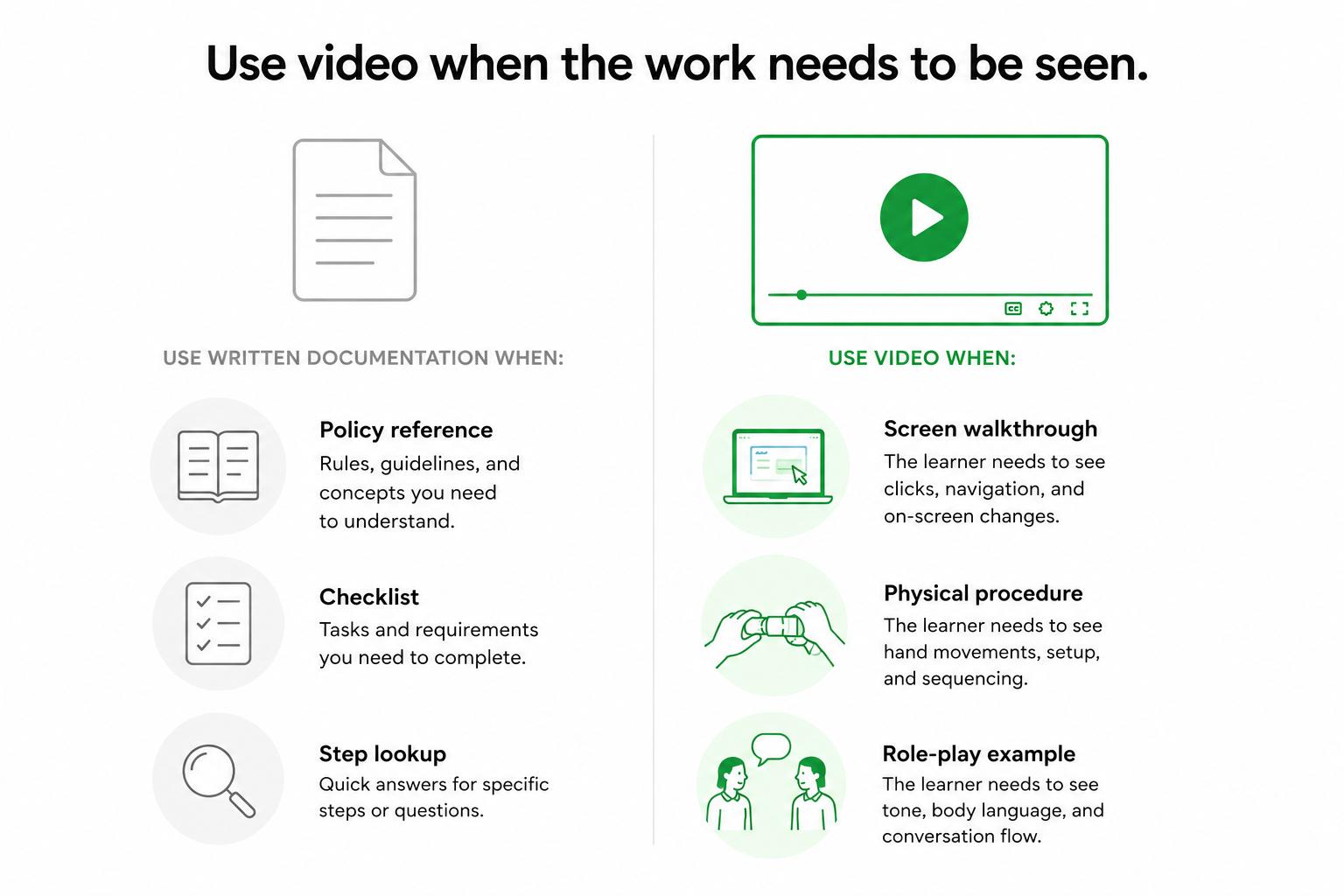
When training videos work best
Training videos work best when the learner needs to see the work happen. A checklist can explain what to click, but a video can show screen layout, pacing, handoff, tone, and judgment.2
They are especially useful for:
- Software walkthroughs and internal tool training.
- New hire onboarding tasks.
- Customer support workflows that cross several systems.
- Physical procedures where movement or positioning matters.
- Role-play examples, such as sales calls or escalation handling.
The tradeoff is maintenance. Video is harder to skim, harder to update, and easier to overproduce. If a task changes often, pair a short video with a written guide that someone can revise quickly.3
Training video vs video tutorial vs video SOP
These formats overlap, but they do different jobs.
A training video teaches a skill, task, behavior, or decision pattern. A video tutorial usually shows how to complete one narrow task. A video SOP demonstrates the approved way to follow a repeatable process. A screen recording is simply one production method for any of those formats.
For example, a customer success team might create a training video on running a kickoff call. A product team might create a video tutorial for configuring an integration. An operations team might create a video SOP for processing a refund.
The format should match the outcome. A training video can include context and examples. A video SOP needs to stay aligned with the written procedure. A quick tutorial should stay narrow enough that someone can finish the task without sitting through a course.
What makes a training video effective
The best training videos teach one job, one workflow, or one decision pattern at a time. When a video tries to capture an entire department's knowledge in 45 minutes, people watch passively and forget the details.
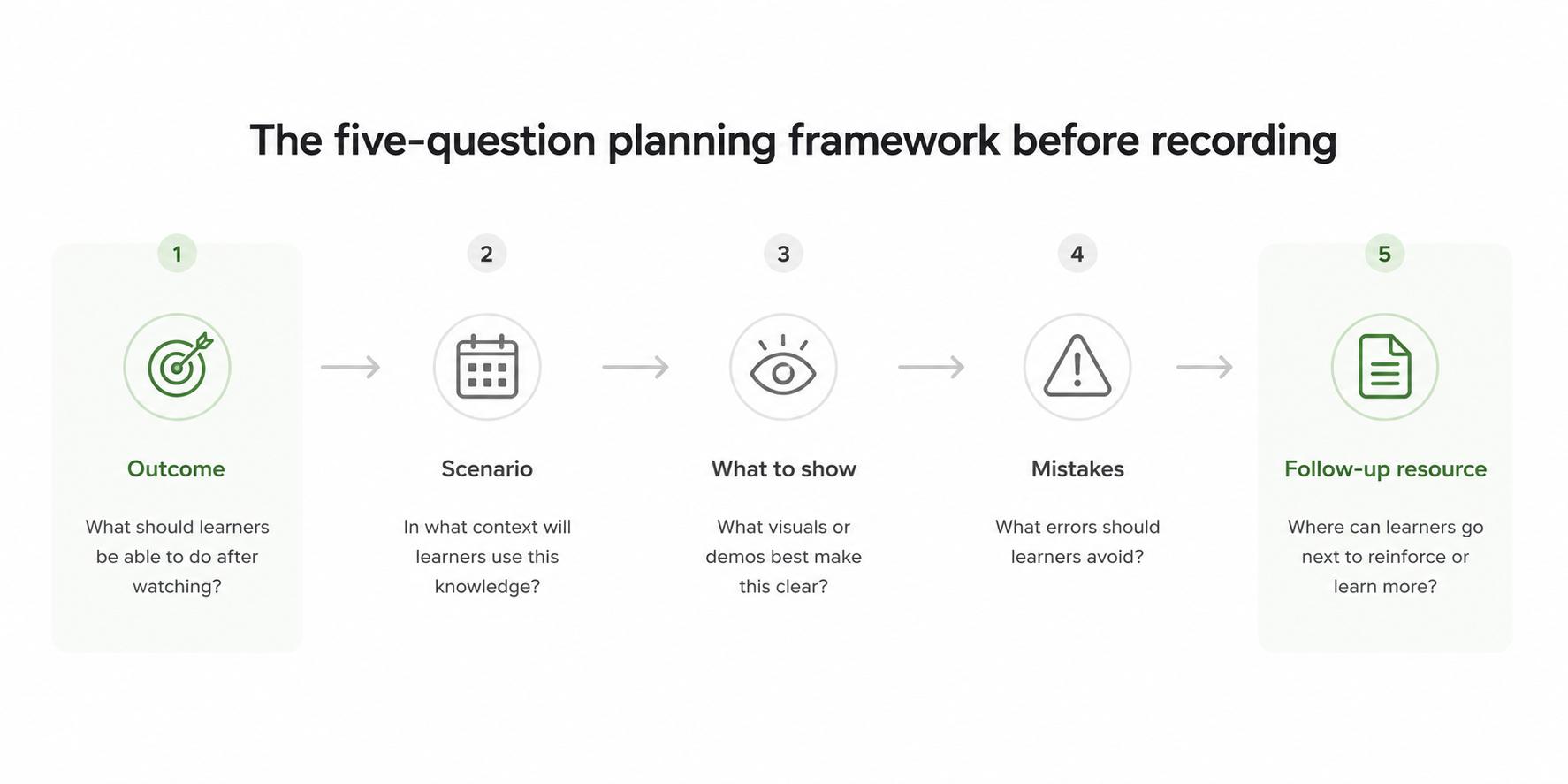
Before recording, pressure-test the video against five questions:
- What should the learner be able to do afterward? Keep the outcome specific enough to evaluate.
- When does the task come up? Give the scenario so the viewer can place the lesson in real work.
- What needs to be shown, not described? Use video for sequence, judgment, pacing, interface layout, and movement.
- Where do people usually make mistakes? Explain the decision points, not only the visible steps.
- What should the learner use later? Pair the video with a checklist, SOP, transcript, or job aid.
That companion resource matters. Video is strong for demonstration, but written material is stronger for search, review, and quick reference. Training works better when the video and written guide support each other.4
Training video planning template
Use this before recording:
## Training Video Planning Template

**Glossary term:** Training Video
**Source:** Trails Glossary — trails.so/glossary/training-video

---

### 01. Plan a focused training video

"Training video topic: [task, workflow, or skill]
Audience: [role or team]
Learning goal: After watching, the viewer can [specific outcome]
Scenario: [when this task happens]
Steps to show: [ordered list]
Key decisions: [what the learner must choose or notice]
Common mistakes: [what to avoid]
Companion resource: [SOP, user guide, checklist, job aid]
Success check: [how the learner knows they did it correctly]
Update owner: [who keeps the video current]"
If the team cannot write the learning goal in one sentence, the topic is probably too broad. Split it into smaller videos.
Common mistakes
One common mistake is recording before defining the learning goal. The result is a long expert walkthrough that includes everything the speaker happened to say, but not the structure a learner needs.
Another mistake is leaving out decision points. Beginners can copy visible steps and still fail when an exception appears. A strong training video explains what to notice and how to choose.
The third mistake is treating the video as permanent. Tools, policies, interfaces, and workflows change. Every training video needs an owner and a review trigger so outdated guidance does not keep circulating.
Documentation takeaway
Training videos are strongest when they live inside a documentation system, not as isolated files. Pair the video with a written guide, transcript, checklist, or SOP so learners can watch first and reference later.
That matters most for operational training. A video can show how work happens. Written documentation keeps the standard searchable, maintainable, and easier to update.
How Trails helps
Trails helps teams create training videos from real workflows. A teammate can capture the process as they perform it, turn the workflow into a polished step-by-step guide, and create an AI-narrated video version for training or sharing.
That keeps the training asset closer to the documented workflow. When the process changes, the team has a clearer path to refresh both the written guide and the video.
FAQ
Is a training video the same as a tutorial?
Not always. A tutorial usually shows how to complete a specific task. A training video may teach a broader skill, behavior, workflow, or decision pattern.
How long should a training video be?
As short as the learning goal allows. If one video covers several outcomes, split it into smaller videos so learners can find and revisit the right section.
Should training videos include written documentation?
Yes. A written guide, transcript, checklist, or SOP makes the training easier to search, review, update, and use at the moment of work.
- Video tutorial
- Video SOP
- Video to text
- Screen recording
- Training documentation
- Training manual
- Microlearning
- Learning management system
Sources
- 1
Centers for Disease Control and Prevention. Quality Training Standards. CDC. www.cdc.gov/training-development/php/qts/index.html. Accessed June 25, 2026.
- 2
Richard E. Mayer. Multimedia Learning. Cambridge University Press. www.jsu.edu/online/faculty/MULTIMEDIA%20LEARNING%20by%20Richard%20E.%20Mayer.pdf. Accessed June 25, 2026.
- 3
Nielsen Norman Group. Instructional Videos: Guidelines for Improving Usability. Nielsen Norman Group. www.nngroup.com/articles/instructional-video-guidelines/. Accessed June 25, 2026.
- 4
Section 508. Captions and Transcripts. U.S. General Services Administration. www.section508.gov/create/captions-transcripts/. Accessed June 25, 2026.