
Glossary
Visual Management
 ChatGPT
 Perplexity
 Gemini
 Claude
What is visual management?
Visual management is the practice of making work status, standards, problems, and next actions visible at a glance. Instead of forcing people to search through reports, messages, or tribal knowledge, it uses boards, labels, color, signs, checklists, dashboards, floor markings, and other cues to show what is normal, what is off track, and what should happen next.1
The idea is common in Lean management and frontline operations, but it applies anywhere teams need shared situational awareness. A good visual system makes the work easier to see and the exception harder to ignore.
Why visual management matters
Most process problems do not start as dramatic failures. They start as small signals: a queue growing, a station missing supplies, a checklist skipped, a customer ticket aging, an order waiting for approval, or a handoff with no owner. When those signals stay hidden, teams find out late.
Visual management brings those signals into the open. It helps employees answer practical questions quickly:
- Are we on pace?
- What is blocked?
- What changed?
- What standard should I follow?
- Who owns the next action?
- What needs attention now?
The best visual systems reduce status chasing. The worst ones create decoration. A wall full of charts is not visual management if no one uses it to manage the work. The visual has to change behavior, expose abnormalities, or guide decisions.
How visual management works
Visual management works by turning important process information into a visible cue near the work. In a warehouse, that might be floor tape separating inbound staging from inspected inventory. In a support team, it might be a queue view that highlights tickets outside the response target. In a software team, it might be a Kanban board that shows stalled work and ownership.
A useful visual signal has three traits:
- It is easy to understand without special explanation.
- It is close enough to the work to influence action.
- It makes the abnormal condition obvious.
That third trait is the heart of visual management. The point is not to make work look organized. The point is to help people see when reality no longer matches the standard.2
Examples of visual management
The format matters less than the operational question it answers. A printed checklist can be stronger than a polished dashboard if it helps the worker make the right decision at the exact moment of work.
| Visual management example | What it helps the team see |
|---|---|
| Kanban board | Work status, ownership, bottlenecks, and next steps |
| Color-coded labels | Priority, status, category, risk, or required handling |
| Floor markings | Where items, people, equipment, or hazards belong |
| Daily management board | Goals, actual performance, blockers, and improvement actions |
| Shadow board | Missing tools or misplaced equipment |
| Checklist at point of use | Required steps, inspection criteria, or completion standard |
| Exception dashboard | Work that is late, blocked, failed, or outside the expected range |
A visual cue should answer one question well. If a board tries to show every metric, every initiative, every blocker, and every plan, people stop seeing it.
Visual management vs reporting
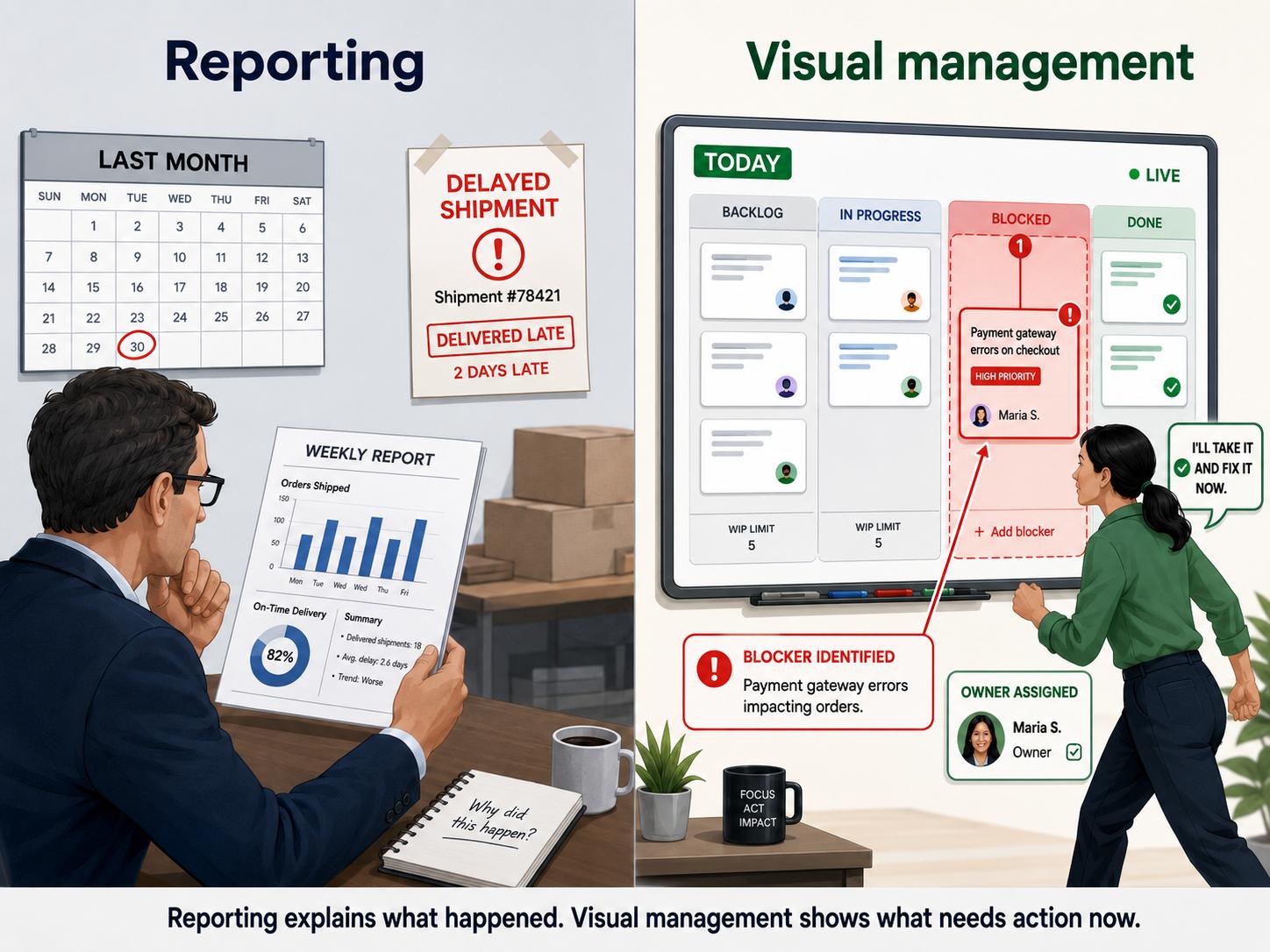
Reporting explains what happened. Visual management helps people manage what is happening now.
A weekly report may show that orders shipped late last month. A visual management board should show that today's packing queue is already behind, which carrier lane is blocked, and who is responsible for clearing it. One is retrospective; the other is operational.3
Teams need both, but they do different jobs. If a process depends only on reports, problems often become visible after the cost has already been paid. Visual management pulls the signal forward.
Common mistakes
The most common mistake is designing visuals for leaders instead of workers. If a visual exists mainly to impress visitors or make a manager's review easier, it may not help the people doing the work.
Other mistakes include:
- Showing too many metrics, so no one knows what matters.
- Using colors or icons without a shared meaning.
- Updating boards manually but inconsistently.
- Hiding the visual in a place where the work does not happen.
- Tracking problems without assigning an owner or next action.
- Leaving outdated visuals in place after the process changes.
Visual management should make work clearer, not heavier. If maintaining the visual takes more energy than the decisions it improves, simplify it.
How to create a visual management system
Start with the decision, not the display. Ask what the team needs to notice sooner: a late handoff, a safety risk, missing inventory, a quality defect, a work backlog, or a skipped process step.
Then define the standard. Visual management only works when people know what normal looks like. If there is no agreed target, threshold, location, owner, or sequence, the visual cannot show an abnormality.
A practical setup flow looks like this:
- Choose one process or work area.
- Name the status, standard, or problem the team needs to see.
- Decide what visible cue will make that information obvious.
- Place the cue where the work happens or where the decision is made.
- Define who updates it and how often.
- Create a response rule for abnormal conditions.
- Review whether the visual actually changes behavior.
The response rule is what separates visual management from visual display. If red means "behind," someone needs to know what to do when red appears.
AI-ready visual management prompt
Use this prompt to design a simple visual system for a process:
## Visual Management Design Prompt

**Glossary term:** Visual Management
**Source:** Trails Glossary — trails.so/glossary/visual-management

---

### 01. Design a simple visual system

"Design a visual management approach for [team/process/work area].

Goal: [what the team needs to notice faster]
Current problem: [late work, defects, missing ownership, unsafe condition, unclear priority]
Where the work happens: [physical area, software queue, shared board, dashboard]
Users: [frontline team, supervisor, support agents, operations lead]
Normal standard: [target, threshold, location, status, timing, sequence]
Abnormal condition: [what should stand out]
Response owner: [role]

Recommend:
1. The simplest visual cue to use.
2. Where it should live.
3. What each color, label, or status means.
4. How often it should be updated.
5. What action the team should take when the visual shows a problem."
Keep the first version small. A visual that the team trusts and updates consistently is more valuable than a comprehensive board that becomes stale.
Documentation takeaway
Visual management and process documentation work best together. Visual cues help teams see what is happening in the moment. Documentation explains the standard behind the cue.
If a board shows that a handoff is blocked, the documented process should explain how to resolve that block. If a color label means urgent, the SOP should define what urgent means and who owns the next step. Without that shared standard, the visual becomes a suggestion instead of an operating system.
How Trails helps
Trails can help teams capture the workflow behind a visual signal and turn it into a polished step-by-step guide. That makes the visual easier to teach, audit, and update as the process changes.
For example, if a visual board shows a blocked support escalation, Trails can help document the exact escalation workflow that should happen next.
FAQ
Is visual management only for manufacturing?
No. It is common in manufacturing and Lean operations, but the same idea applies to support queues, onboarding workflows, sales handoffs, software delivery, facilities work, and any team that needs to see work status clearly.
What is the goal of visual management?
The goal is to make the current condition visible enough that people can act sooner. Good visual management shows status, standards, ownership, and abnormalities without requiring extra explanation.
What is the difference between visual management and a dashboard?
A dashboard can be part of visual management, but only if it helps people manage active work. A dashboard that is reviewed after the fact is reporting; a dashboard that guides daily decisions can be visual management.
- Kanban
- Pull system
- Standard work
- Leader standard work
- Lean management
- Lean manufacturing
- Visual work instruction
- Work instruction
Sources
- 1
Lean Enterprise Institute. Visual Management. Lean Enterprise Institute. www.lean.org/lexicon-terms/visual-management/. Accessed June 24, 2026.
- 2
Lean Enterprise Institute. Visual Management and Lean Behavior. Lean Enterprise Institute. www.lean.org/the-lean-post/articles/reinforcing-lean-behavior-through-visual-management/. Accessed June 24, 2026.
- 3
PMI Disciplined Agile. Using Visual Controls to See the Flow of Work. Project Management Institute. www.pmi.org/disciplined-agile/da-flex-toc/visual-controls. Accessed June 24, 2026.