
Glossary
To-Be Process
 ChatGPT
 Perplexity
 Gemini
 Claude
What is a to-be process?
A to-be process is the future-state version of a workflow. It shows how work should happen after a team changes steps, roles, tools, approvals, automation, or documentation.
The phrase usually appears in business process management, operations improvement, systems implementation, and change management. BPM guidance commonly treats future-state or to-be process design as a step that follows current-state analysis and defines new workflows, roles, and technologies.1 A to-be process is a practical design for how the new workflow will actually run.
Why a to-be process matters
Most teams start with a messy current process: too many handoffs, unclear ownership, duplicate entry, manual approvals, outdated instructions, or decisions that depend on whoever happens to be available. A to-be process gives the team a target state before it starts changing systems or retraining people.
That target matters because process improvement can fragment quickly. One person wants fewer approvals. Another wants better risk control. Another wants automation. Another wants a cleaner customer experience. Without a shared to-be process, each group may optimize its own piece while the full workflow stays confusing. BPMN exists partly to give business and technical stakeholders a common notation for discussing process behavior.2
A good to-be process forces agreement on the future operating model. It answers: what will happen, who will do it, where it will happen, what will be automated, what still needs judgment, and how exceptions will be handled.
As-is process vs. to-be process
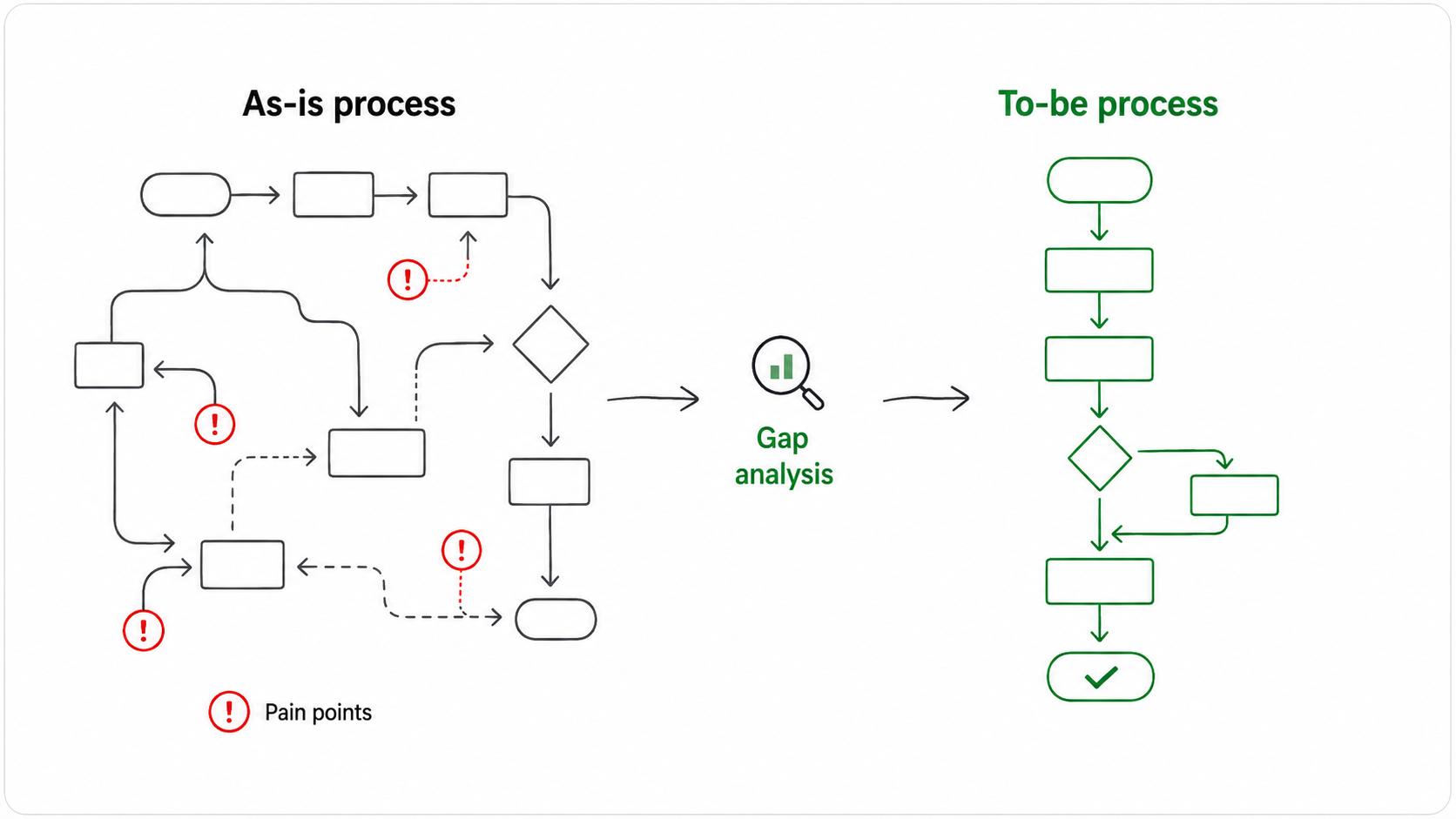
The as-is process captures current reality. The to-be process defines the improved future state. Teams need both because a future design that ignores current constraints can fail during implementation.
| View | What it captures | Typical use |
|---|---|---|
| As-is process | How the workflow works today, including workarounds and pain points | Diagnose problems and understand constraints |
| To-be process | How the workflow should work after changes | Align stakeholders and guide implementation |
| Gap analysis | What must change between current and future state | Plan systems, training, documentation, and rollout |
Skipping the as-is view is tempting when everyone already feels the pain. The risk is that the team designs around the obvious problems and misses hidden dependencies that keep the current process running.
What a to-be process should include
A to-be process should be detailed enough to guide implementation without becoming unreadable. The strongest versions make these decisions explicit:
- Trigger: what starts the process, such as a customer request, system alert, new hire, order, renewal, or internal approval.
- Roles: who owns each step, who approves, who is consulted, and who only needs visibility.
- Workflow steps: the future sequence of work, including handoffs and decision points.
- Systems: where each action happens and what data moves between tools.
- Rules: the criteria that determine approvals, exceptions, escalations, or routing.
- Outputs: the finished artifact, decision, update, customer response, or internal record.
- Success measures: how the team will know whether the future process improved the problem.
The non-obvious part is exceptions. Many to-be processes look clean because they leave edge cases off the page. That makes the diagram attractive and the rollout painful. Name the most common exceptions early, even if the team decides to handle rare cases outside the standard flow.
Example of a to-be process
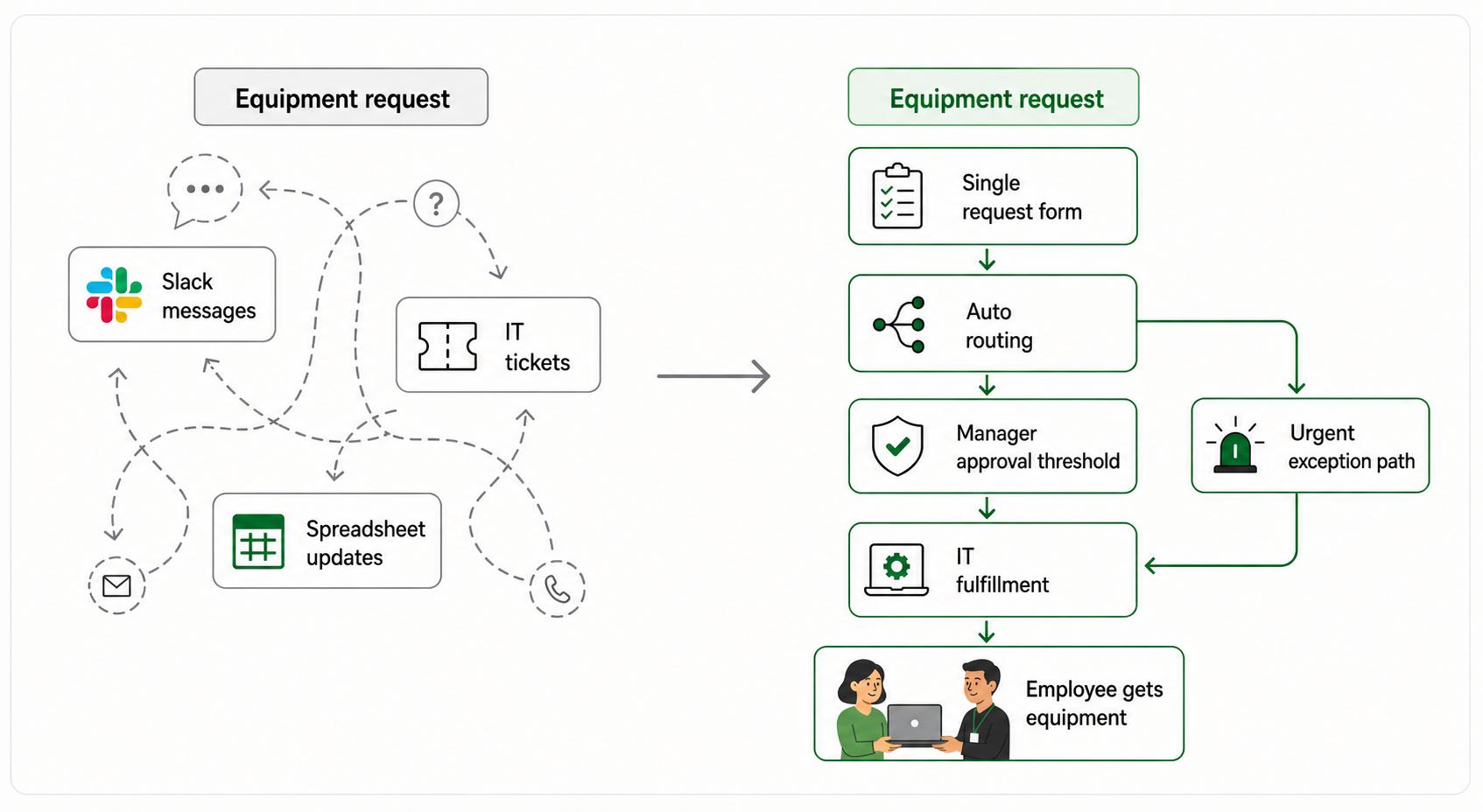
Imagine a company redesigning its employee equipment request process. The as-is process is a mix of Slack messages, manager approvals, IT tickets, and spreadsheet updates. Requests get lost, new hires wait too long, and nobody knows which team owns the bottleneck.
The to-be process might define a single request form, automatic routing based on location and role, manager approval only above a certain cost, IT ownership for fulfillment, finance visibility for budget tracking, and a documented exception path for urgent requests.
That shared operating picture matters before anyone configures tools or starts training. IT, HR, finance, managers, and employees can see what the future process requires and where the handoffs will land.
How to design a to-be process
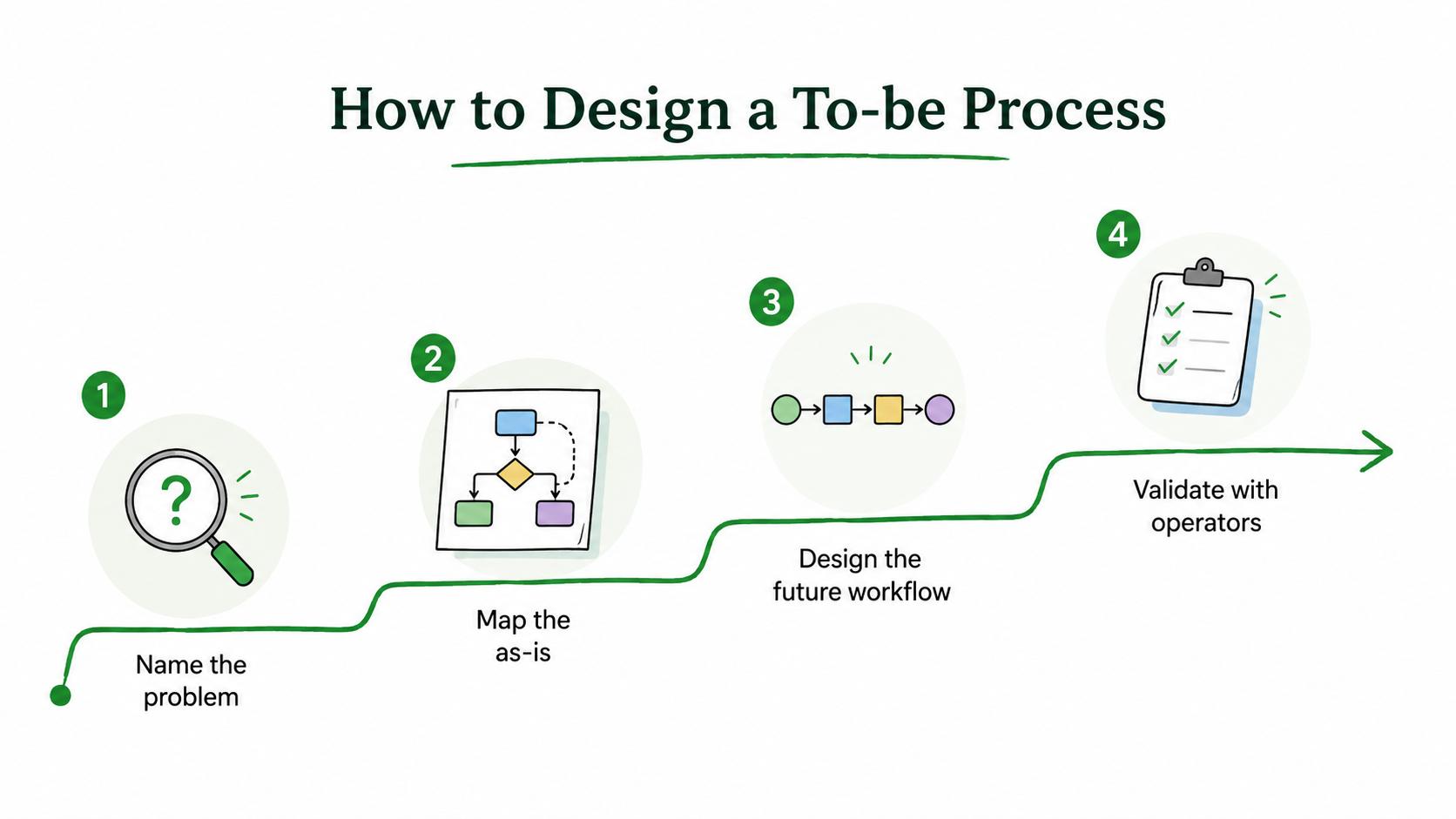
Start by naming the process problem in plain language. "Fix onboarding" is too broad. "Reduce equipment delays for new hires before day one" is specific enough to design around.
Then map the as-is process just deeply enough to understand the causes of the problem. Look for unclear ownership, duplicated data entry, waiting time, unnecessary approvals, tool gaps, decision ambiguity, and places where people rely on private knowledge.
After that, design the future workflow. Make each change earn its place. Research on business process redesign has cataloged redesign heuristics around task elimination, task composition, customer contact, specialist-generalist work, and other concrete process-design choices.3 If you add an approval, explain the risk it controls. If you remove an approval, explain why the risk is low enough. If you automate a step, define what happens when automation fails.
Finally, validate the design with the people who will run it. Literature reviews of business process reengineering repeatedly point to human, technology, and organization factors as important success conditions, not just the diagram itself.4 Those people will spot missing inputs, unrealistic handoffs, permission issues, and customer-facing edge cases faster than a process workshop can.
To-be process prompt
Use this prompt to draft a future-state process that can become documentation:
## To-Be Process Prompt

**Glossary term:** To-Be Process
**Source:** Trails Glossary — trails.so/glossary/to-be-process

---

### 01. Draft a future-state process

"Create a to-be process for [process name].
Current problem: [specific issue the future state should solve]
Current constraints: [systems, staffing, policies, permissions, compliance needs]
Future-state goal: [what should improve]
Trigger: [what starts the workflow]
Roles involved: [teams or people]
Proposed steps: [future sequence]
Decision points: [approvals, routing, exceptions, escalations]
Systems and records: [tools, forms, fields, handoffs]
Outputs: [what the process produces]
Risks or tradeoffs: [what could break or become harder]
Documentation needed: [SOP, checklist, guide, training video]
Success measures: [how improvement will be evaluated]"
The best output is a future process that is concrete enough to test, not a polished diagram that hides all the hard decisions.
Documentation takeaway
A to-be process becomes useful when it turns into operating instructions. After the design is approved, teams usually need SOPs, step-by-step guides, checklists, templates, training materials, and manager coaching notes.
The process map explains the intended flow. Documentation helps people perform the new flow the same way after the workshop ends.
How Trails helps
Trails helps teams capture a workflow as someone performs it and turn that workflow into a polished step-by-step guide. Teams can also create AI-narrated video versions for training or sharing.
For a to-be process, Trails is most useful once the future workflow is ready to test. The team can run the new process, capture the real steps, and create practical documentation for rollout.
- Process discovery
- Process flow
- Process reengineering
- Business process management software
- Total quality management
Sources
- 1
SAP Signavio. What is Business Process Management?. SAP Signavio. www.signavio.com/wiki/bpm/what-is-business-process-management/. Accessed July 1, 2026.
- 2
Object Management Group. Business Process Model and Notation. OMG. www.omg.org/bpmn/. Accessed July 1, 2026.
- 3
Hajo A. Reijers and Selma Limam Mansar. Best practices in business process redesign. Computers in Industry. hreijers.win.tue.nl/H.A.%20Reijers%20Bestanden/Mansar_2005_Computers-in-Industry.pdf. Accessed July 1, 2026.
- 4
Abdolvand, Albadvi, and Ferdowsi. Business Process Re-Engineering: A Literature Review-Based Analysis of Implementation Measures. Information. www.mdpi.com/2078-2489/13/4/185. Accessed July 1, 2026.