
Glossary
Swimlane Diagram
 ChatGPT
 Perplexity
 Gemini
 Claude
What is a swimlane diagram?
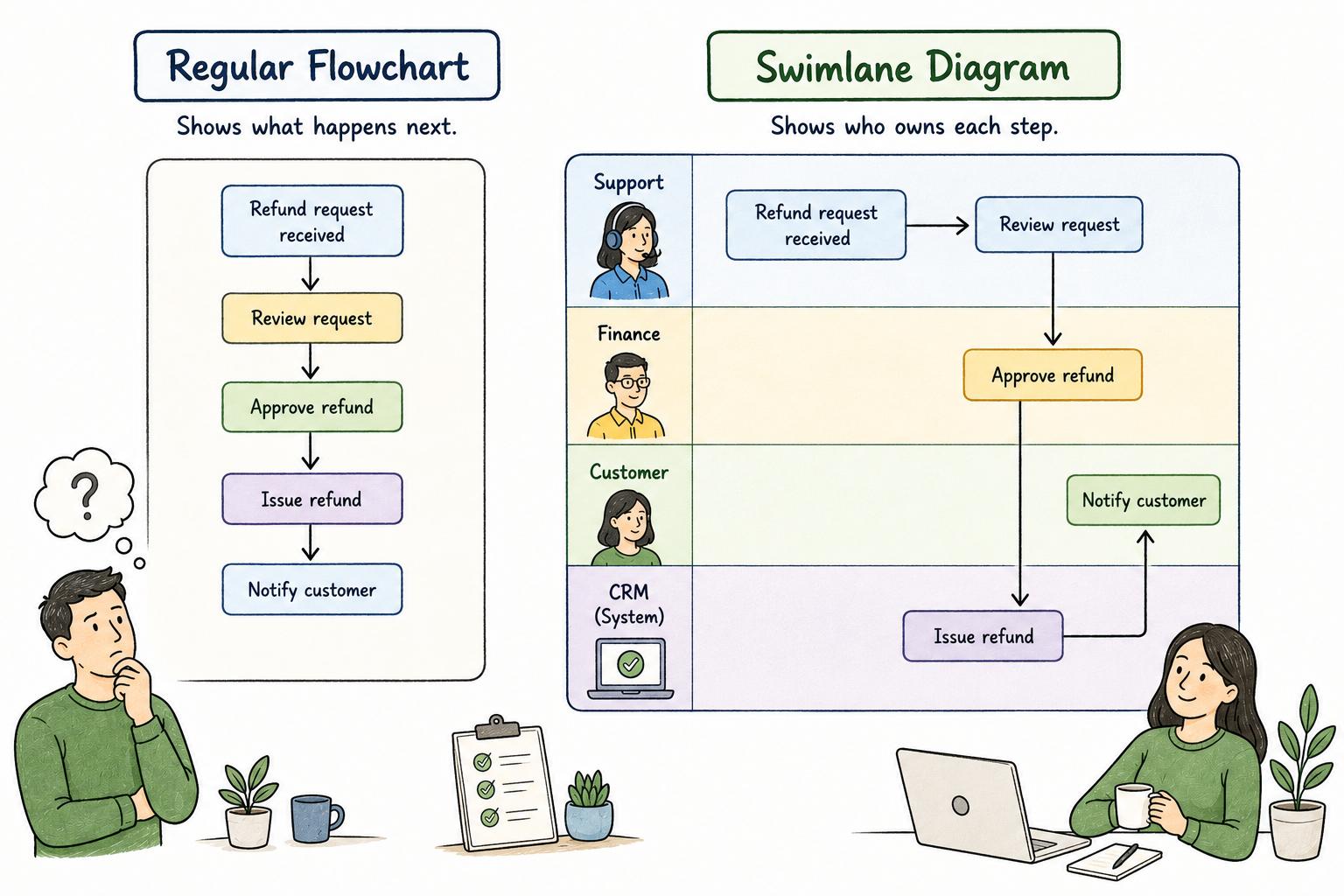
A swimlane diagram is a process map that separates workflow steps into lanes, usually by role, team, department, customer, vendor, or system. It shows what happens in a process and who owns each step.1
That ownership layer is the main feature. A basic flowchart can show that a request gets reviewed, approved, and completed. A swimlane diagram shows whether Support, Finance, a manager, a customer, or a software system owns each part of the work.
When to use a swimlane diagram
Use a swimlane diagram when the hard part of a process is coordination. It is especially useful when work crosses teams, tools, approvals, systems of record, or handoff points.2
Good examples include customer onboarding, employee offboarding, support escalations, invoice approvals, procurement requests, implementation handoffs, QA reviews, and refund workflows. The individual steps may be simple, but the process can still fail when ownership moves from one lane to another.
A swimlane diagram is less useful for a single-person task with a clear sequence. If one person performs every step, a checklist, work instruction, or step-by-step guide will usually be easier to read and maintain.
What a swimlane diagram should show
A strong swimlane diagram clarifies responsibility, sequence, handoffs, decisions, and the end state. It does not need to show every click, message, notification, or status update.
The lanes should represent the owners that matter to the process. The steps should be the major actions in the workflow. The handoffs should make ownership changes visible. Decision points should appear only when the path truly branches.
That selectivity matters. A swimlane that captures every tiny action becomes a wall of boxes. A useful swimlane shows where work starts, where it changes hands, where judgment enters, and how it finishes.3
Swimlane diagram example
Imagine a customer refund process. The customer contacts Support. Support checks eligibility in the CRM. If the refund is below a threshold, Support approves it directly. If it is above that threshold, Support sends the request to Finance. Finance approves or rejects it. Support updates the customer. The CRM records the final outcome.
As a plain list, the process sounds straightforward. As a swimlane diagram, the risk points are easier to see. Support owns the customer relationship. Finance owns larger approval decisions. The CRM is the system of record. If refunds are getting stuck, the team can inspect the Support-to-Finance handoff instead of debating the whole process.
That is the practical value of the format: it shows where accountability is unclear, where a rule is missing, and where a handoff needs better documentation.
How to create a useful swimlane diagram
Start with the real workflow, not the ideal one. Ask the people who do the work to walk through a recent example and map what actually happened. Clean up the process after the current state is visible.
Define the start and end points first. Then identify the lanes. Add the major steps in order, connect handoffs between lanes, and mark decision points where the process branches. When a step belongs to more than one owner, don't smooth it over too quickly. Shared ownership may be the issue the diagram needs to expose.
The review conversation matters more than the drawing tool. A swimlane made by one person in isolation often reflects the process everyone wishes existed. A swimlane reviewed with the actual owners reveals missing approvals, invisible rework, awkward handoffs, and exceptions no one put in the official procedure.
AI-ready prompt for a swimlane diagram brief
## Swimlane Diagram Brief Prompt

**Glossary term:** Swimlane Diagram
**Source:** Trails Glossary — trails.so/glossary/swimlane-diagram

---

### 01. Create a swimlane diagram brief

"Create a swimlane diagram brief for [process].
Start point: [trigger]
End point: [completed outcome]
Lanes: [role/team/system 1], [role/team/system 2], [role/team/system 3]

Include:
- The major steps in order
- Which lane owns each step
- Handoffs between lanes
- Decision points and branch conditions
- Known exceptions or rework loops
- Places where ownership is unclear
- Steps that need separate work instructions or SOPs

Keep the diagram high-level enough to show ownership and flow, not every click."
Common mistakes
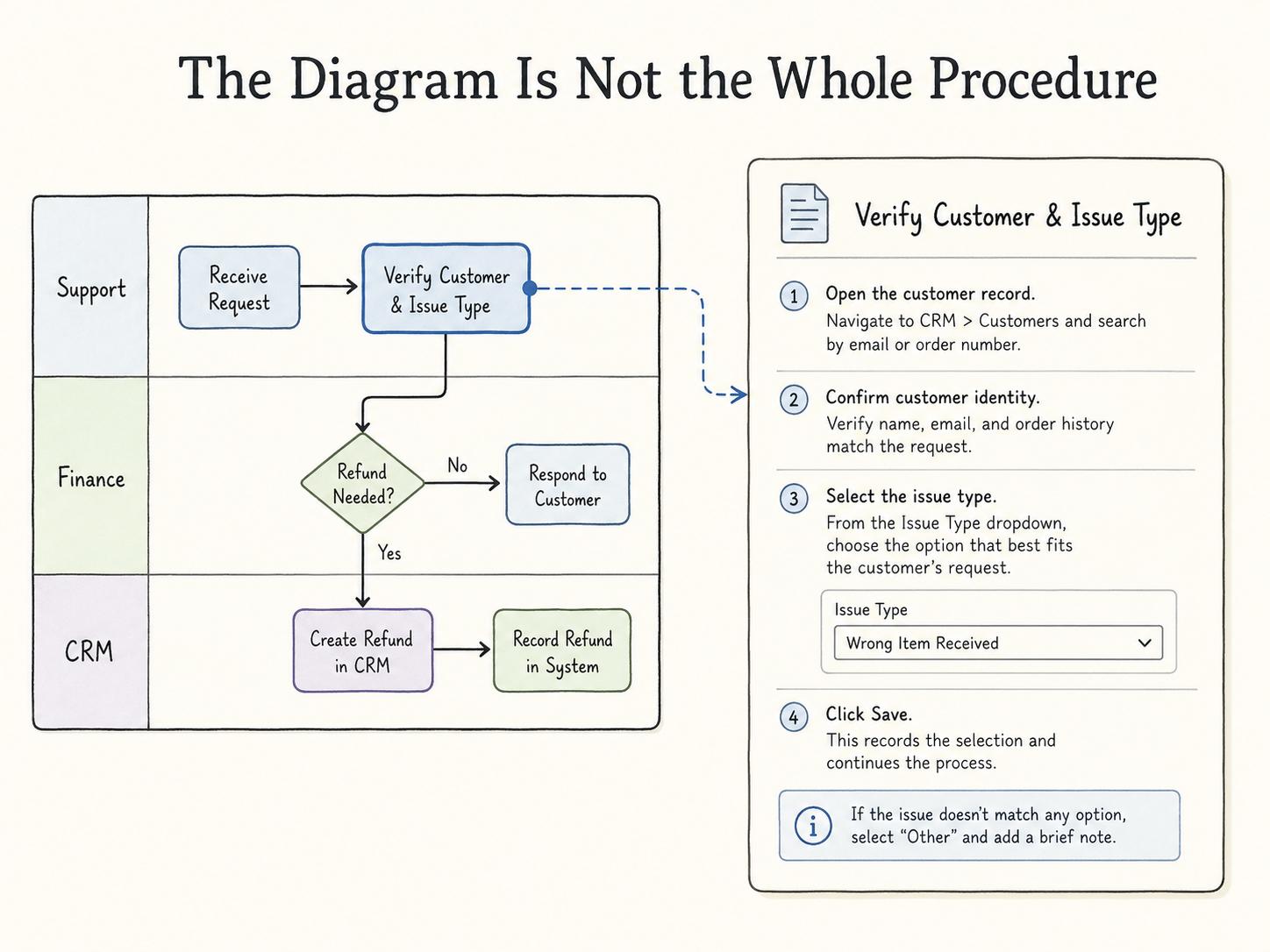
The first mistake is treating the swimlane as the entire procedure. A swimlane can show that Finance approves a refund, but it usually won't explain which system to open, which fields to complete, or what to do if approval is rejected.
The second mistake is hiding messy ownership. If three roles share responsibility for a step, the diagram should make that tension visible. A tidy chart that hides the real problem is not useful.
The third mistake is over-diagramming. If every notification, message, click, and status update appears in the swimlane, readers stop using it. Put workflow logic in the diagram and detailed execution steps in linked documentation.
Documentation takeaway
A swimlane diagram is strongest when paired with step-by-step documentation. The diagram shows the shape of the process and the handoffs between owners. The guide explains how to perform the work inside each lane.
That pairing is useful for process improvement and onboarding. The diagram reveals duplicate approvals, broken handoffs, and unclear accountability. The supporting documentation turns the agreed process into something new hires, backup owners, and cross-functional partners can follow.
How Trails helps
Trails helps teams capture a workflow as someone performs it, then turn that captured work into a polished step-by-step guide. For a process that starts as a swimlane diagram, Trails can document the detailed steps behind a lane and create an AI-narrated video version for training or sharing.
That gives teams two useful views: the swimlane for ownership and flow, and the guide for execution.
- Process flow diagram
- Process map
- Process owner
- Standard operating procedure
- Work instruction
- Cross-functional flowchart
- BPMN
Sources
- 1
IBM. BPMN Symbols. IBM. www.ibm.com/docs/en/blueworks-live?topic=processes-bpmn-symbols. Accessed July 2, 2026.
- 2
Nielsen Norman Group. Service Blueprints: Definition. Nielsen Norman Group. www.nngroup.com/articles/service-blueprints-definition/. Accessed July 2, 2026.
- 3
Miro. What Is a Swimlane Diagram?. Miro. miro.com/diagramming/what-is-a-swimlane-diagram/. Accessed July 2, 2026.