
Tango Alternatives: Which Process Documentation Tool Should Your Team Use?





Tango is good at turning real browser work into step-by-step documentation, then helping people follow that process inside the software they already use. If your team is rolling out internal tools and wants guidance to appear in the flow of work, use Tango.
However, there are a variety of other tools that are worth looking at if in-app guidance isn’t the focus. In this guide, we'll walk through the top Tango alternatives and when each one is the right choice for process documentation, training, customer education, and software walkthroughs.
For a broader look at capturing instructions, organizing a knowledge base, and managing training, compare process documentation software before narrowing your shortlist.
The quick answer
- Trails: Best for guide + video documentation.
- Scribe: Best for enterprise workflow intelligence and automation discovery.
- Guidde: Best for video-first documentation with AI narration.
- iorad: Best for interactive software tutorials and LMS-ready training.
- Loom: Best for async video explanation.
- Trainual: Best for SOP and training management.
How we evaluated
To compare these tools, we used the same workflow as the test case: a 12-step customer onboarding process inside a web app, with one decision point, one sensitive-data moment, and one step that needed a later update. We looked at creation speed, editing burden, visual clarity, video quality, branding, sharing, updateability, and pricing at team scale for 5, 10, and 25 users.
We make Trails, so this guide has a point of view. We tried to make that useful by being specific about where Trails is and isn't the right fit. If a team mostly needs in-app guidance, interactive demos, or a full LMS, we'll say so.
How we chose what to test
We focused on tools that help teams capture, explain, and reuse software workflows. That means process documentation tools, guided walkthrough builders, video documentation tools, and training platforms that commonly appear in the same buying conversation as Tango.
Tools made the list when they showed up repeatedly in alternatives articles, user comparisons, G2 or Capterra research, or internal competitive research for workflow documentation. We also prioritized tools that serve the same buyer: SMB and mid-market teams documenting internal processes, customer workflows, software onboarding, or SOPs.
We excluded full digital adoption platforms like WalkMe and Whatfix from the main list because they usually require a heavier enterprise rollout. We also left out general knowledge bases like Document360 because they store documentation well, but they don't solve the capture problem that brings most people to Tango in the first place.
Why do customers look for Tango alternatives?
Tango gets a lot right. G2 lists Tango at 4.7 out of 5 from 498 reviews, and the review summary consistently praises ease of use, fast workflow capture, and automatic documentation. People usually look elsewhere because the product shape, plan gates, or output format stops matching what they need.
Based on G2 reviews, Tango's pricing page, Tango's help docs, and alternatives research, the most common reasons are:
Reason #1: The smaller plans are useful, but serious team use moves you into enterprise plans quickly
Tango's free plan includes 5 shared workflows and up to 10 users in a workspace. That is enough to test the product, but it isn't enough for teams building a real SOP library. One G2 reviewer put the complaint plainly: the "paid version is a bit limited."
This matters most for small teams, consultants, and agencies. They may like Tango's capture flow, but if they need exports, branded workflows, unlimited workflows, desktop capture, or longer-term version history, you’ll quickly be moved to the enterprise plans.
Reason #2: Some teams need more editing control than Tango gives them
G2's pros-and-cons summary names limited options, limited customization, and editing difficulties as recurring user themes. One reviewer specifically wanted more control over annotations, blurring, and rearranging steps before sharing polished client documentation.
That doesn't make Tango weak. It means Tango is optimized for fast capture and in-app guidance, not for teams that want to produce heavily edited customer-facing tutorials, branded videos, or detailed training assets.
Reason #3: Tango works best in standard browser workflows
Tango's own help center says the Chrome extension does not capture Chrome Settings, the Chrome Web Store, or details inside Google Docs and Google Sheets because those areas use canvas-like rendering. Tango suggests the desktop app or manual screenshot upload as workarounds.
That boundary matters if your workflows include desktop apps, mobile apps, complex canvas tools, or documentation that needs to become a polished video. In those cases, the best alternative may be a video-first tool, a tutorial builder, or a guide-plus-video workflow rather than another screenshot-first capture tool.
Trails
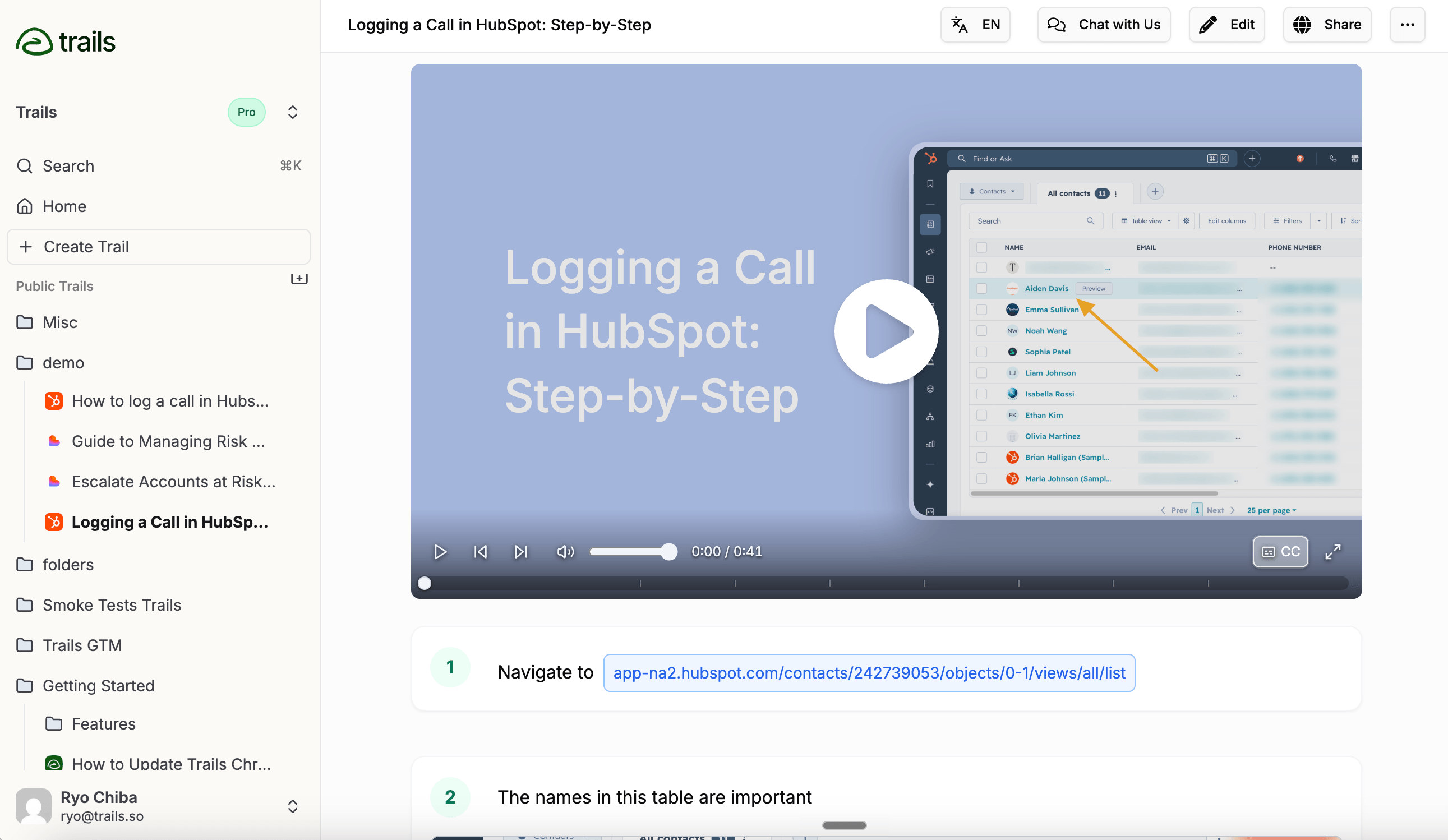
Best for: guide + video documentation
Choose Trails when one workflow needs to become both a written guide and a narrated training video. That is the core difference from Tango, Scribe, and most screenshot-first tools: you capture once, edit the written guide, and regenerate the video from the same source. If those are the two tools on your shortlist, read Trails vs Tango.
That matters when documentation needs to train people, not just remind them where to click. A support team can publish a customer help article and a video from the same workflow. An ops lead can document an internal handoff and give new hires a visual walkthrough. A customer success team can update the guide after a product change without re-recording the whole video.
Trails also supports video-to-guide conversion, browser and desktop capture, voice transcription, blur, PDF/HTML/Markdown export, MP4 export, and embeds. The pricing page lists Creator at $29/month, Team at $49/month with 5 users included and $10/month for each additional user, and Business as a custom company-wide plan with unlimited users.
Trails is not the right choice if your main job is in-app guidance. It does not have Tango's Guide Me, Nuggets, or browser automation layer. It is better when the output needs to live as a guide, video, help-center embed, or training asset.
Choose Trails if: you need documentation to double as training content. It's also the strongest fit when frequent product changes make re-recording videos too slow.
Skip Trails if: you want prompts to appear inside the live software while someone works. Tango, Scribe Guide Me, iorad Live Mode, or a full DAP will fit that job better.
Scribe
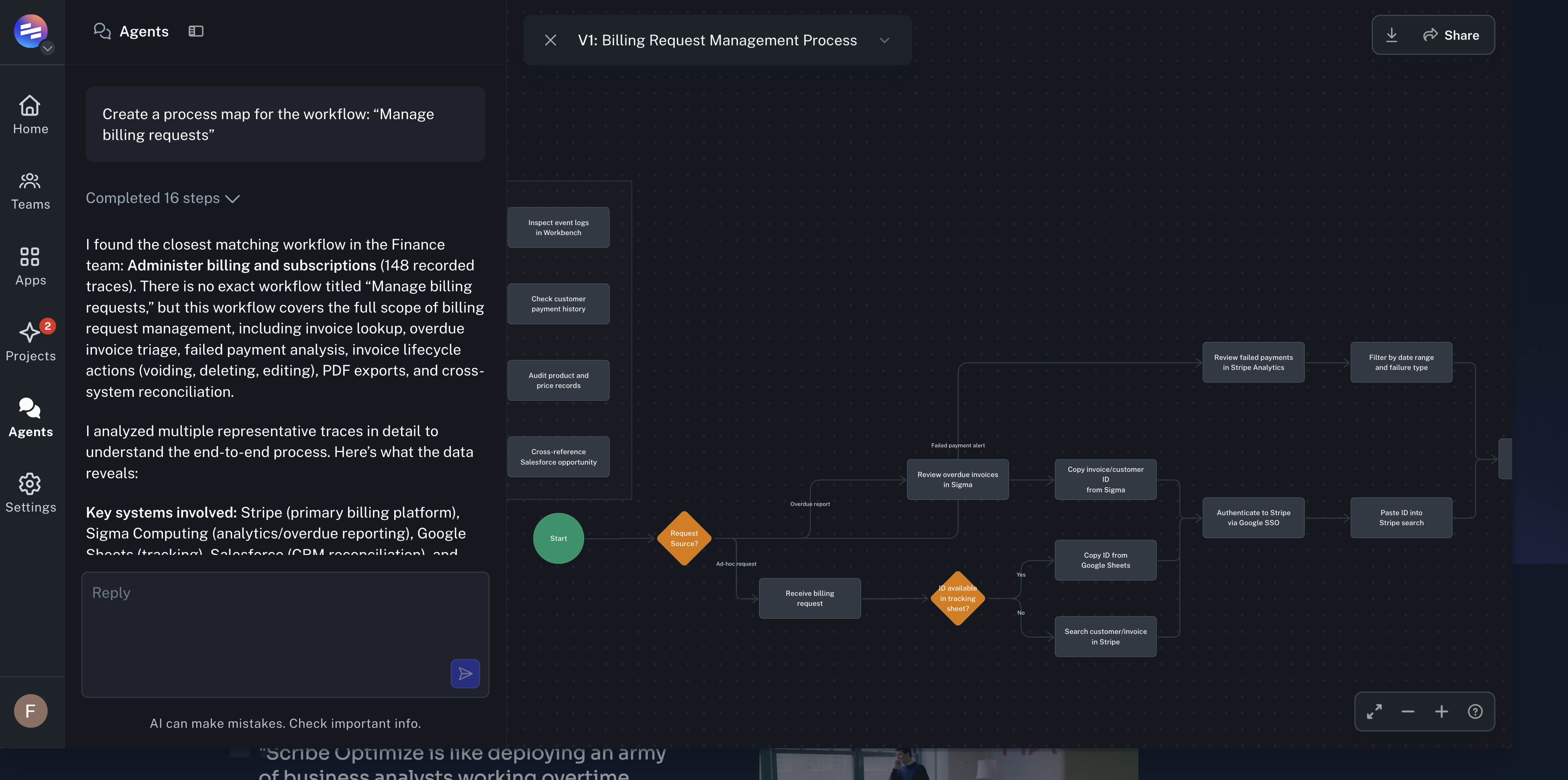
Best for: enterprise workflow intelligence and automation discovery
Scribe is no longer just a Tango-style guide creator. With Scribe Optimize, the company is positioning itself around a bigger enterprise problem: helping operations, IT, transformation, and AI leaders see how work actually happens, then decide which workflows are worth automating.
That changes the buying conversation. Tango is still strongest when a team wants in-app guidance while someone works through a software process. Scribe Optimize is aimed higher in the organization. It captures workflow activity across approved apps and turns that activity into process maps, bottleneck analysis, automation recommendations, and ROI business cases.
The pitch is useful for enterprises that are under pressure to prove where AI or automation will pay off. Instead of asking teams to run workshops, shadow employees, or guess which processes are broken, Scribe Optimize tries to show the work from observed behavior. Leaders can ask which workflows take the most time, where handoffs break down, which automations have the strongest business case, and where AI agents could remove repetitive work.
Scribe still has its original capture product. Teams can create step-by-step guides, combine them into Pages, embed them in tools like Confluence, Notion, SharePoint, ServiceNow, Salesforce Knowledge, Smartsheet, and Microsoft Teams, and use Guide Me or Sidekick for lightweight in-context help. But in this comparison, Scribe is most interesting as a workflow intelligence platform, not just a screenshot documentation tool.
That also makes Scribe less of a clean swap for Tango. It can help teams document processes, but its newer strategic center of gravity is enterprise automation discovery. If your team wants to understand which workflows should be automated before investing in AI, Scribe belongs on the shortlist. The Scribe vs Tango comparison breaks down that split in more detail.
Choose Scribe if: your enterprise needs to map real workflows, find bottlenecks, rank automation opportunities, and build a business case for AI or process automation.
Skip Scribe if: you mainly need lightweight process documentation, guide-plus-video training content, or in-app guidance for a small team without an enterprise workflow transformation motion.
Guidde
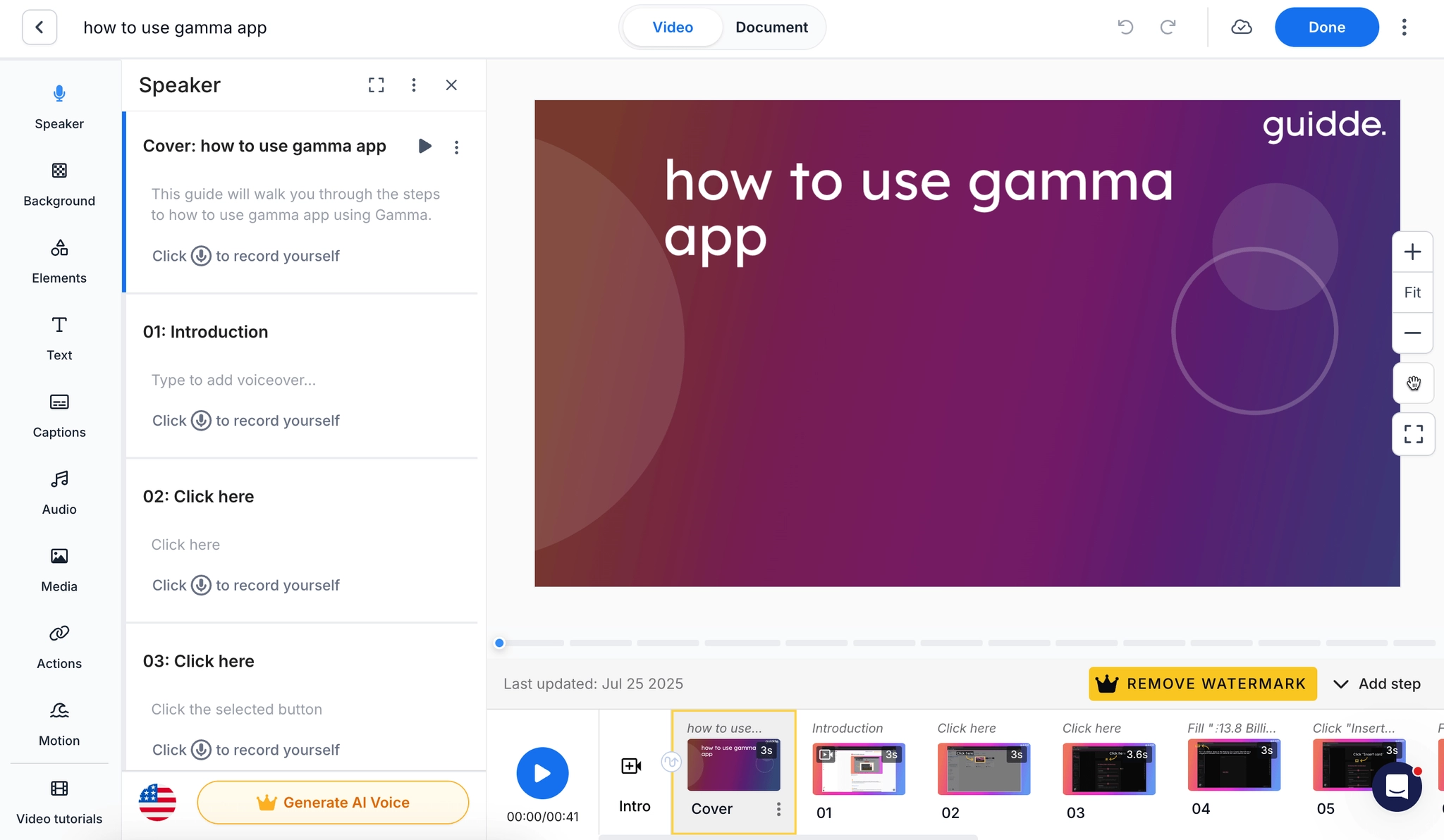
Best for: video-first documentation with AI narration
Guidde is a strong Tango alternative when the deliverable needs to feel more like a narrated video than a screenshot guide. It records a workflow, generates structured steps, adds callouts, supports AI voiceover, and lets teams export or embed content across help centers, training systems, and customer education workflows.
The product is stronger than Tango for teams that care about video polish, voice libraries, translation, branding, and customer-facing presentation. It also has Broadcast, a separate in-app delivery layer that surfaces guidance inside software. That makes Guidde one of the few tools here that can compete with Tango on both creation and contextual delivery, though Broadcast is more enterprise-shaped than the standard create product. See Tango vs Guidde for the direct creation-versus-delivery tradeoff.
Guidde's current pricing page lists Free at $0, Pro at $29 or $19 per creator per month depending on billing view, and Business at $59 or $39 per creator per month. Business adds desktop capture, unlimited text-to-voice generation, analytics, advanced privacy controls, and up to 5 creators billed per creator. Enterprise adds translation, PII redaction, SSO, and content review.
The tradeoff is complexity. Guidde gives teams more video control, which also means a heavier editing surface than simple screenshot documentation tools. If you only need quick internal SOPs, Scribe or Tango may feel faster.
Choose Guidde if: your documentation needs AI narration, branded video, customer-facing polish, and richer media than Tango's core screenshot workflow.
Skip Guidde if: your team wants lightweight internal docs, low editing overhead, or clear pricing for in-app delivery without a sales conversation.
iorad
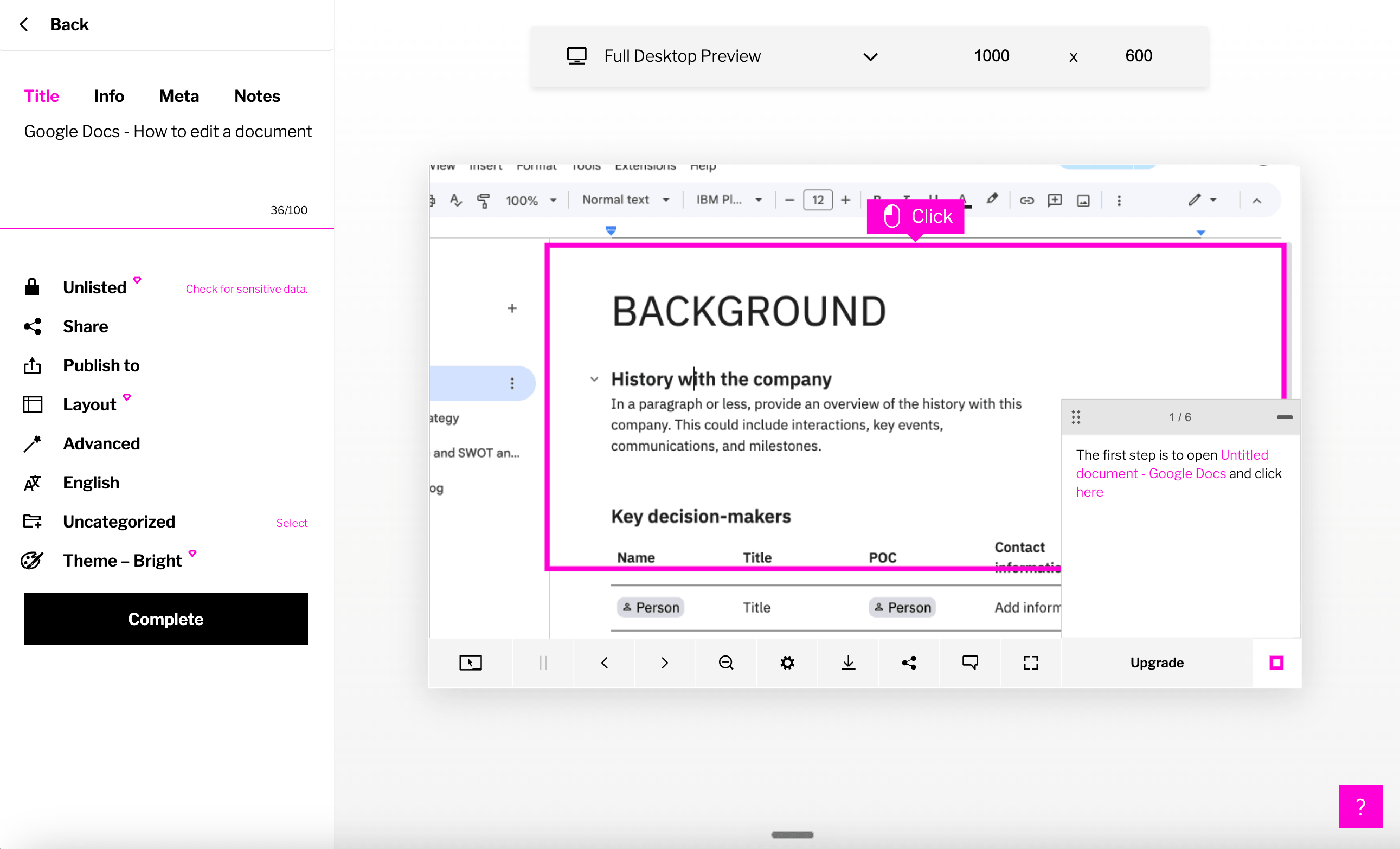
Best for: interactive software tutorials and LMS-ready training
iorad is the best fit here for teams that care about learner interactivity. One capture can become several learning modes: Try It, View It, Watch It, Print It, and in some cases Do It through live guidance. That makes it more training-oriented than Tango, Scribe, or basic walkthrough tools.
The product also has a strong integration story for L&D and customer education teams. It supports browser and desktop capture, tutorial libraries, data masking, analytics, SSO on Team, advanced exports on Enterprise, and integrations across LMS, help desk, knowledge base, and collaboration tools. If your team needs SCORM, HTML packages, or 100+ language translation, iorad belongs on the shortlist.
The main issue is price. iorad's current pricing page lists Individual at $200/month for 1 creator, Team at $500/month with 1 seat included and $50/month per extra seat, and Enterprise as quote-based. It also notes that all paid plans include unlimited tutorials and learners.
That makes iorad a serious training platform, not a casual Tango replacement. It can be worth it for L&D teams, instructional designers, and customer education programs. For SMB teams that just need to document recurring internal workflows, it will usually be too expensive.
Choose iorad if: your audience needs interactive practice, LMS-ready content, translation, or formal training delivery.
Skip iorad if: price sensitivity matters, or if you mostly need quick guides and videos for everyday internal processes.
Loom
Best for: async video explanation
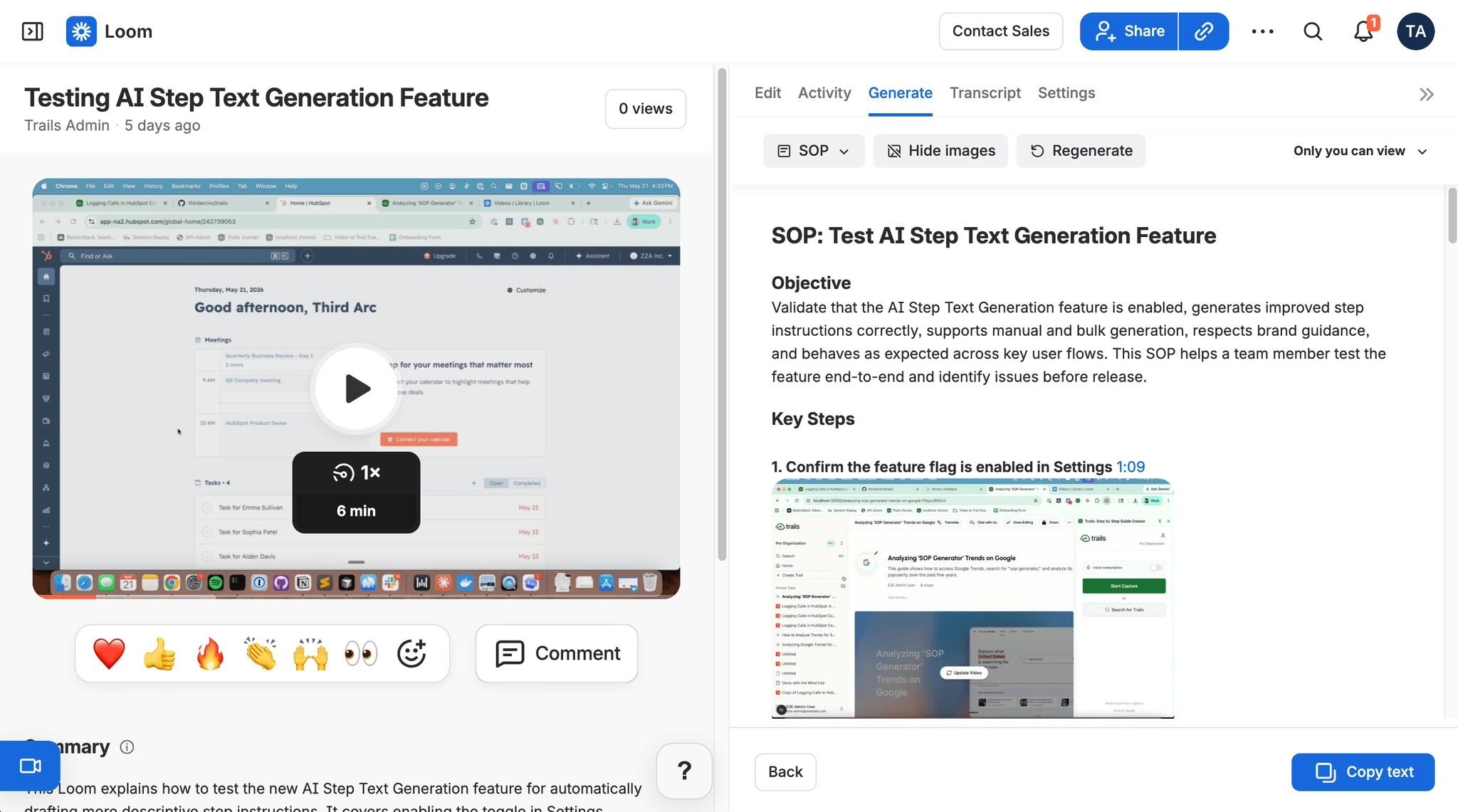
Loom is not a one-to-one Tango replacement, but it is often in the same conversation. Teams use Loom when the real need is not a guide, but a fast explanation with voice, screen context, and personality. That makes it useful for bug reports, handoffs, customer replies, product updates, and quick training clips. The Tango vs Loom guide is the cleaner read if you are choosing between in-app guidance and async video.
Loom has become more relevant to documentation because of its AI workflows. On Business + AI, Loom can generate summaries, chapters, meeting notes, tasks, and video-to-text artifacts such as SOPs or docs. It can also connect more deeply with Jira and Confluence through Atlassian.
The pricing page lists Starter at $0 with 25 recordings and a 5-minute video recording limit. Business is $18/user/month, and Business + AI is $24/user/month. Enterprise adds SSO, SCIM, advanced content privacy, retention controls, Salesforce integration, admin insights, and an uptime SLA.
The tradeoff is durability. Video is great for context, but weak as a long-term process artifact. It is harder to skim, harder to update surgically, and less structured than a step-by-step guide. Loom's AI can create a draft from a video, but the native object is still the recording.
Choose Loom if: your team needs quick async explanations more than formal process documentation. It is especially good when tone, context, and face or voice matter.
Skip Loom if: the content needs to become a maintainable SOP library, customer help article, or training guide that stays current after each product change.
Trainual
Best for: SOP and training management
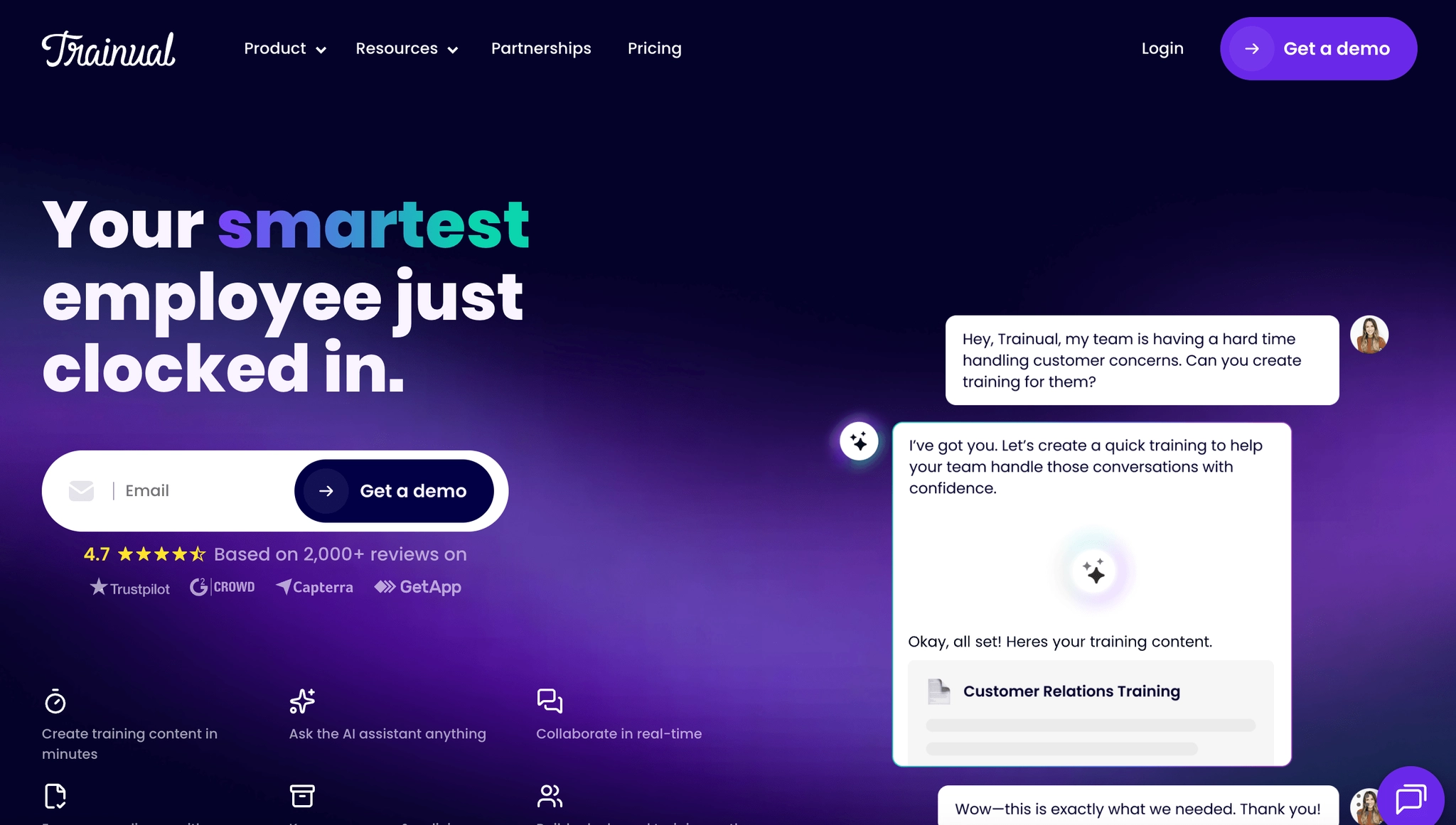
Trainual is the best Tango alternative when the problem has moved beyond capture. It is built for businesses that need a company playbook, role-based onboarding, policy acknowledgment, quizzes, training paths, HR integrations, and accountability around who has completed what.
That makes Trainual more complete than Tango for structured employee training. It supports templates, AI-assisted content creation, quizzes, e-signatures on higher plans, role assignments, org charts, HRIS integrations, reporting, and mobile access. It is closer to an SMB training management system than a workflow recorder.
The tradeoff is authoring speed. Trainual can host and manage process knowledge, but it is not primarily a real-time workflow capture tool. If you need to document a software process from scratch, a capture-first tool like Tango, Scribe, or Trails will get you to the first draft faster.
Trainual's current public pricing page is quote-driven, so pricing should be verified directly with sales before publishing. Internal competitive research and third-party pricing data from 2025 pointed to Core, Pro, and Premium plans beginning around $249/month for 10 seats, plus a one-time implementation fee, but those public numbers may no longer be current.
Choose Trainual if: your real need is onboarding, compliance, training completion, and company-wide SOP management.
Skip Trainual if: the bottleneck is creating guides quickly from live software workflows. It manages training well, but it does not remove as much capture work as Tango-style tools.
The bottom line
Tango's biggest mismatch is that it tries to cover both quick documentation and in-app process adoption. That is useful when your team needs guidance inside live software, but it can feel like the wrong shape if you mainly need training content, video output, customer-facing demos, or a formal SOP system.
If you valued Tango because it helped people follow processes inside software, Tango may still be the better fit, with iorad worth considering for formal interactive tutorials. If you need to identify which enterprise workflows should be automated, choose Scribe Optimize. If you valued video explanation, choose Loom for casual async communication or Guidde for more polished AI video documentation. If you need training accountability, choose Trainual.
If one workflow needs to become a written guide and a narrated training video, choose Trails. That is the cleanest fork in the road: Tango helps people follow processes inside software, while Trails helps teams turn processes into reusable training content they can publish, update, embed, and share.
Frequently asked questions
What is the best alternative to Tango?
The best Tango alternative depends on what you are replacing. Choose Scribe for enterprise workflow intelligence and automation discovery, Trails for guide-plus-video documentation, Guidde for video-first training content, and Trainual for structured onboarding and SOP management.
Is there a free version of Tango?
Yes. Tango's pricing page lists a Free plan with 5 shared workflows, browser capture, link and embed sharing, and up to 10 users per workspace. Teams that need unlimited workflows, exports, branding, desktop capture, voice transcription, or video embeds should compare the Pro and Enterprise plans.
Is there a better app than Tango?
There can be, depending on the job. Tango is strong for workflow capture and in-app guidance, but Trails is a better fit when documentation also needs to become video training, Scribe is stronger when enterprises need to find automation opportunities, and Supademo is better for interactive product demos.
What is Scribe and Tango?
Scribe and Tango both started in the workflow documentation category, but they now point in different directions. Tango leans toward software enablement and in-app guidance, while Scribe is pushing into enterprise workflow intelligence with Scribe Optimize, which helps teams map processes, find bottlenecks, and identify automation opportunities.