
Glossary
Version History
 ChatGPT
 Perplexity
 Gemini
 Claude
What is version history?
Version history is the record of how a document, file, guide, product, or process has changed over time. In a documentation context, it usually shows when a change happened, who made it, what changed, and sometimes why the change was made.1
The point of version history is not to preserve every tiny edit for its own sake. It is to give future readers enough context to trust the current version and understand important changes. When a support workflow, onboarding guide, or SOP changes, version history answers the question people eventually ask: "What changed, and should I do anything differently now?"
Why version history matters
Most operational documentation is not static. A user guide gets a new screenshot. A refund SOP adds an approval step. A training checklist changes after a customer handoff problem. If the latest document silently replaces the old one, the team may know what to do today but lose the reason behind the change.
That lost context creates real friction. Managers cannot tell whether a process change was approved. New hires learn from an old PDF saved on someone's desktop. Teams repeat a mistake because the correction was made in the document but never explained.2
A useful version history gives three kinds of confidence:
- Currency: readers can tell whether they are using the latest version.
- Accountability: owners can see who changed or approved important updates.
- Context: future editors know why the change happened, not just what text moved.
The tradeoff is noise. If every typo fix gets treated like a major release, people stop paying attention. Version history should be detailed enough to explain meaningful changes and quiet enough to stay useful.
What a useful version history includes
A lightweight version history can be enough for most internal documentation. The best format depends on how formal the process is, but the fields should answer the questions a future reader will actually have.
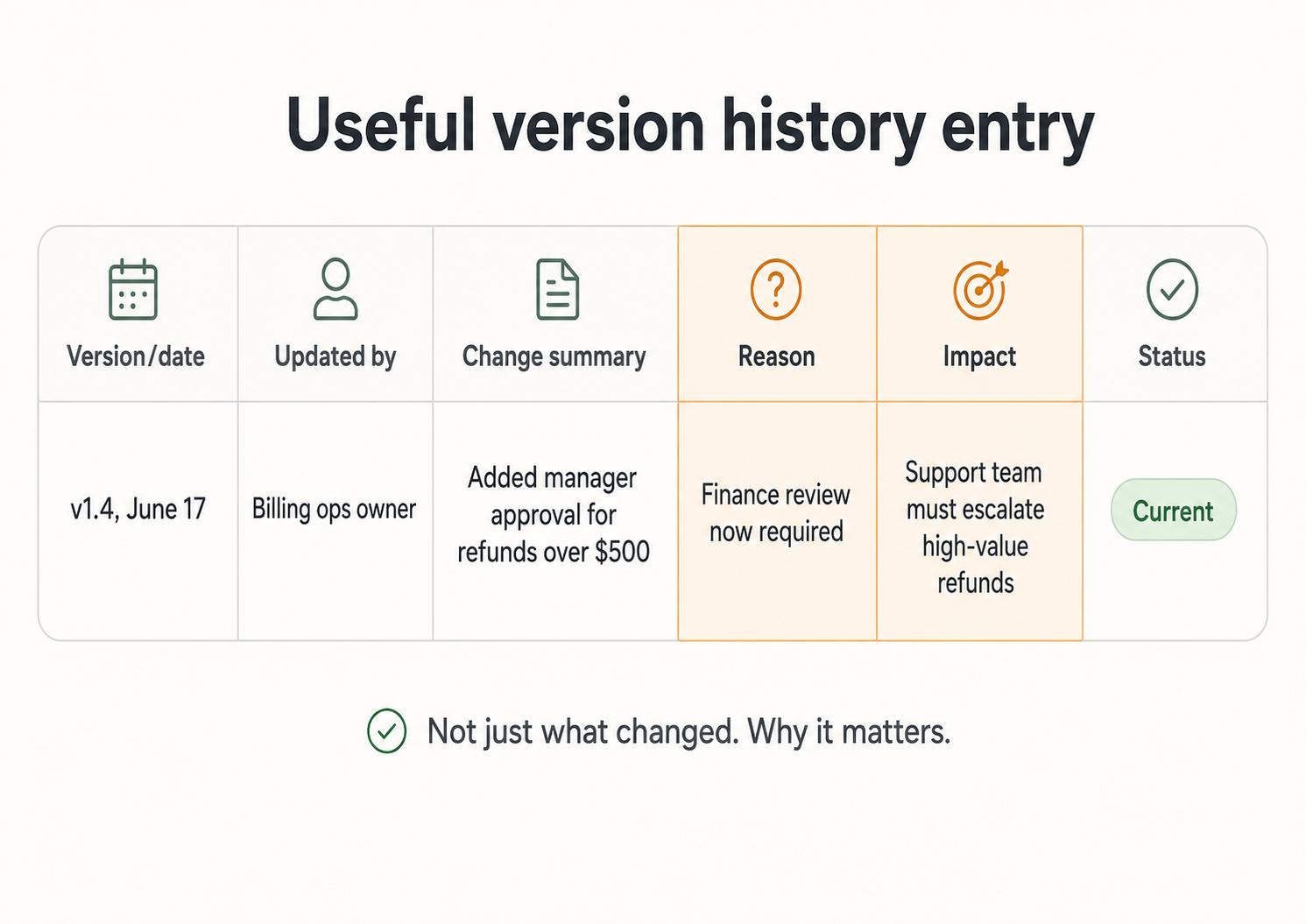
For SOPs, guides, and process documentation, include:3
- Version or date: the identifier people can refer to later.
- Change summary: a short explanation of what changed.
- Owner or editor: the person or role responsible for the update.
- Reason for change: the policy, tool, customer issue, audit finding, or process improvement that caused it.
- Impact: who needs to know or what behavior should change.
- Status: draft, approved, deprecated, or current.
The reason field is often the most valuable and the most neglected. "Updated billing step" tells someone what changed. "Added manager approval because refunds over $500 now require finance review" tells them how to behave.
Version history vs version control
Version history and version control are related, but they are not the same thing. Version history is the visible record of changes. Version control is the system or workflow used to manage those changes.
A document platform's revision panel, a wiki edit log, or a CMS page history can provide version history. Version control is more structured: it may include commits, branches, merges, approvals, rollbacks, and comparisons between versions.
For many operations teams, the practical question is whether people can see what changed and recover the right version if needed. If yes, basic version history may be enough. If many people are editing complex documentation or code-like files at the same time, stronger version control becomes more important.
How to use version history in process documentation
Treat version history as a communication tool, not just an archive. When a change affects how work is done, the history should make the change visible to the people who depend on the process.
A helpful rule: log changes that affect execution, training, compliance, customer experience, tool behavior, ownership, or escalation. Skip formal notes for minor grammar edits unless the document is regulated, audited, or customer-facing enough that every change matters.
Here is a compact template:
## Version History Entry Template

**Glossary term:** Version History
**Source:** Trails Glossary — trails.so/glossary/version-history

---

### 01. Record a meaningful documentation change

"Version/date: [v1.4 or 2026-06-17]
Updated by: [owner or role]
Status: [draft, approved, deprecated, current]
Change summary: [what changed]
Reason: [why the change was needed]
Impact: [who should know or what behavior changes]
Follow-up: [training, announcement, replacement of old doc, none]"
The follow-up line prevents a common failure: the documentation changed, but the operating behavior did not. If the change affects a team's daily work, version history should point to the next action.
Common mistakes
One mistake is using vague labels like "final," "new," or "updated." Those names only make sense for a few days. Dates, version numbers, and clear statuses age better.
Another mistake is recording what changed but not why. Future maintainers need the reason because the same situation will come back: a tool changes again, a customer edge case repeats, or someone wants to remove a step that was added for a good reason.
The quietest mistake is keeping version history separate from the document people actually use. If the history lives in a spreadsheet nobody opens, it will not help the next person who questions the current process.
Documentation takeaway
Version history is especially useful for SOPs, training materials, user guides, and internal knowledge bases because those assets shape how people work. The more a document is used for repeatable execution, the more important it is to show what changed and why.
You do not need a heavy approval workflow for every page. You do need enough history that someone can trust the current guidance, understand meaningful changes, and avoid reviving an outdated version.
FAQ
Is version history only for software?
No. Software teams use version history heavily, but the concept applies to documents, SOPs, user guides, training materials, policies, and any asset that changes over time.
What is the difference between version history and an audit trail?
Version history focuses on changes to a file, page, or document. An audit trail is usually broader and may track user actions, approvals, access, and system events for accountability or compliance.
Should every edit appear in version history?
Not always. For everyday internal documentation, focus on changes that affect how people work. For regulated or audited documents, the standard may be stricter.4
- Version control
- Document control
- Audit trail
- Content governance
- Quality control
- Process audit
- Process documentation software
- Change log
Sources
- 1
U.S. Food and Drug Administration. Data Integrity and Compliance With Drug CGMP. FDA. www.fda.gov/media/119267/download. Accessed June 24, 2026.
- 2
National Institute of Standards and Technology. Security and Privacy Controls for Information Systems and Organizations. NIST, 2020. nvlpubs.nist.gov/nistpubs/SpecialPublications/NIST.SP.800-53r5.pdf. Accessed June 24, 2026.
- 3
International Organization for Standardization. Guidance on Documented Information. ISO. www.iso.org/iso/documented_information.pdf. Accessed June 24, 2026.
- 4
Electronic Code of Federal Regulations. 21 CFR 11.10 - Controls for closed systems. eCFR. www.ecfr.gov/current/title-21/chapter-I/subchapter-A/part-11/subpart-B/section-11.10. Accessed June 24, 2026.