
Glossary
Version Control
 ChatGPT
 Perplexity
 Gemini
 Claude
What is version control?
Version control is a method for managing changes to files, documents, code, or other shared work over time. It helps teams track what changed, compare versions, recover earlier work, and coordinate edits without losing the approved source of truth.1
The term is most common in software development, where systems like Git manage code changes. But the same idea matters anywhere important work changes: SOPs, user guides, training materials, policies, technical documentation, and internal knowledge bases.
If people can overwrite each other, revive old instructions, or disagree about which version is current, they need some form of version control.
How version control works
At its simplest, version control captures a sequence of changes. Each meaningful update records the content that changed, the person or role responsible, and the time the change happened. Stronger systems also support comparison, review, approval, rollback, and parallel work.2
In software, that may mean commits, branches, pull requests, and merges. In documentation, it may look like edit history, named versions, approval workflows, controlled document libraries, or page-level permissions. The mechanics differ, but the operating goal is the same: make change visible before it creates confusion.
A useful version control process answers four questions:
- What is the current approved version?
- What changed since the last version?
- Who made or approved the change?
- Can we recover an earlier version if this one is wrong?
The last question is where version control becomes more than a tidy archive. It gives the team a recovery path when a bad edit, outdated screenshot, or mistaken process change slips through.
Version control vs version history
Version history and version control are closely related, but they are not interchangeable.
Version history is the record of past changes. Version control is the system or workflow used to manage those changes. A wiki page's edit log may provide version history. A more formal version control process may define who can edit, how changes are reviewed, how versions are approved, and how old versions are restored or retired.
For a small internal page, version history may be enough. For a customer-facing guide, regulated procedure, or shared operational playbook, the team may need version control because the cost of a bad change is higher.3
A practical way to think about it: version history tells you what happened. Version control helps the team decide what should become official.
When teams need version control
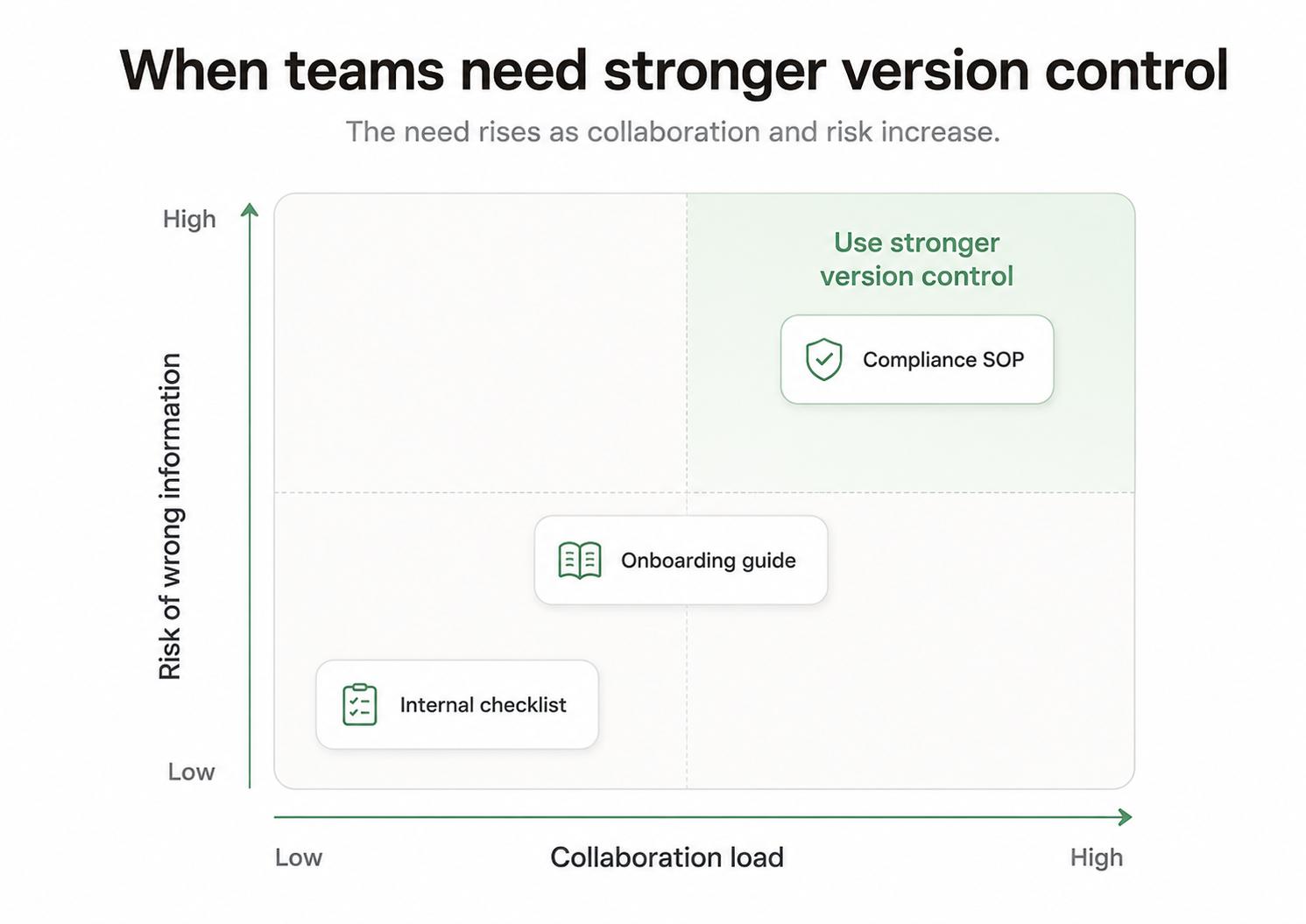
Not every page deserves a heavy workflow. A lightweight checklist used by two people may only need an owner and visible edit history. Version control becomes more important as the risk and collaboration load increase.
Use stronger version control when:4
- Several people update the same file or page.
- The content affects customers, safety, billing, compliance, quality, or production work.
- Drafts should be reviewed before they become official.
- Teams need to compare versions or restore an earlier one.
- Old versions must be clearly archived so people do not keep using them.
The common mistake is treating version control as bureaucracy. Bad version control slows everyone down with approvals that do not reduce risk. Good version control prevents a worse slowdown later, when teams argue over which instructions are real or spend hours rebuilding work that was accidentally replaced.
How to apply version control to documentation
Documentation version control should match the importance of the document. A support macro, onboarding guide, and compliance SOP should not all use the same process.
Start with a simple control policy for important documents:
## Documentation Version Control Policy

**Glossary term:** Version Control
**Source:** Trails Glossary — trails.so/glossary/version-control

---

### 01. Define a lightweight control policy

"Document: [name]
Owner: [person or role]
Current version: [date or version number]
Change rule: [who can edit directly vs propose changes]
Review rule: [who approves major updates]
Rollback rule: [where previous versions can be found]
Archive rule: [how outdated versions are labeled or removed]
Communication rule: [who must be notified when this changes]"
The communication rule is easy to miss. A document can be perfectly versioned and still fail if the affected team never learns that the process changed.
Common mistakes
One mistake is giving everyone edit access because it feels collaborative. Collaboration is useful, but unmanaged editing can make important instructions unstable. For high-impact documents, separate contribution from approval.
Another mistake is keeping old versions visible without a clear label. If an archived SOP looks as official as the current one, someone will eventually use it.
A third mistake is applying software-style complexity to simple documentation. Branches, reviews, and formal releases are valuable when the work needs them. For many teams, an owner, change notes, clear status, and rollback path are enough.
Documentation takeaway
Version control is ultimately a trust system. It helps people know which version is current, how it got there, and what to do when it needs to change again.
For process documentation, the right level of control should match the risk of the work. A lightweight internal guide needs enough structure to prevent confusion. A critical SOP needs stronger ownership, review, and retirement rules.
How Trails helps
Trails helps teams refresh process documentation when the real workflow changes. A teammate can capture the updated workflow as they perform it, turn that workflow into a polished step-by-step guide, and create an AI-narrated video version for training or sharing.
That does not replace version control, but it reduces the friction of keeping the current version accurate. When updating the approved process is easy, teams are less tempted to leave old instructions in place.
FAQ
Is version control only for code?
No. Code is the classic use case, but version control also applies to documents, SOPs, guides, policies, design files, and other shared assets that change over time.
What is the difference between version control and document control?
Version control manages changes between versions. Document control is broader and may include ownership, access, approvals, retention, distribution, and review cycles.
Do small teams need version control?
Yes, but often in a lightweight form. A small team may only need clear ownership, edit history, and a way to restore older versions. The process should grow as the risk grows.
- Version history
- Document control
- Change management
- Change management SOP
- Software documentation
- Documentation software
- Knowledge management
- Rollback
Sources
- 1
Git. Getting Started - About Version Control. Git. git-scm.com/book/en/v2/Getting-Started-About-Version-Control. Accessed June 25, 2026.
- 2
National Institute of Standards and Technology. Security and Privacy Controls for Information Systems and Organizations. NIST, 2020. nvlpubs.nist.gov/nistpubs/SpecialPublications/NIST.SP.800-53r5.pdf. Accessed June 25, 2026.
- 3
Electronic Code of Federal Regulations. 21 CFR 11.10 - Controls for closed systems. eCFR. www.ecfr.gov/current/title-21/chapter-I/subchapter-A/part-11/subpart-B/section-11.10. Accessed June 25, 2026.
- 4
International Organization for Standardization. Guidance on Documented Information. ISO. www.iso.org/iso/documented_information.pdf. Accessed June 25, 2026.